
Imagine this: It's 7:30 a.m., and instead of frantically switching between paper lists, phone notes, and cluttered appointment calendars, you simply open your tablet. Within seconds, you see the complete daily schedule of your workshop – every order, every mechanic, every resource perfectly coordinated. Sounds like a dream? With the right digitalization, this dream will become reality by 2026. Optimizing your automotive workshop's workflows: Designing the right morning briefing with CATAMA software isn't just a technical gimmick, but the key to a more productive, stress-free start to the workday.
The morning briefing is the heart of every successful workshop. It lays the foundation for a smooth daily routine – or not. Many automotive businesses still struggle with outdated processes: handwritten work orders, a lack of overview of employee capacity, and last-minute changes that disrupt the entire daily operation. The solution lies in intelligent workshop software specifically designed for the needs of modern automotive workshops.
Key Takeaways
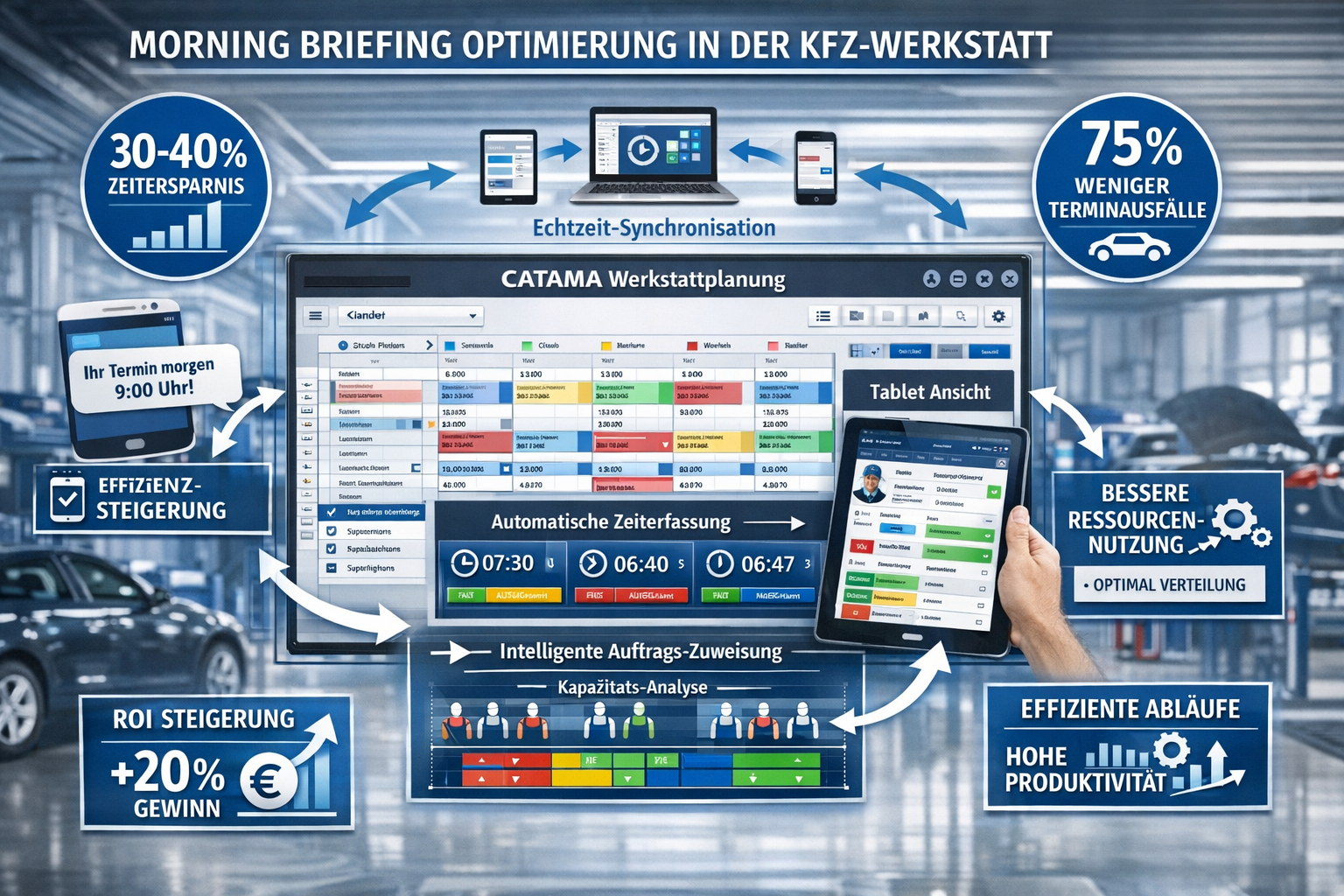
- Time savings of 30-40% : Automatic scheduling and digital time tracking significantly reduce administrative tasks and create more time for value-adding activities[1]
- Cloud-based real-time synchronization : All employees work with the same up-to-date data, which eliminates double bookings and makes the morning briefing more precise[1]
- Intelligent order distribution : Rule-based allocation automatically takes into account mechanic qualifications and capacities for optimal resource utilization[1]
- 75% fewer no-shows : Automatic reminders via SMS or email dramatically improve planning accuracy[1]
- Mobile flexibility : Full tablet access enables real-time updates during briefings and in the workshop[1]
Why the morning briefing determines success or failure
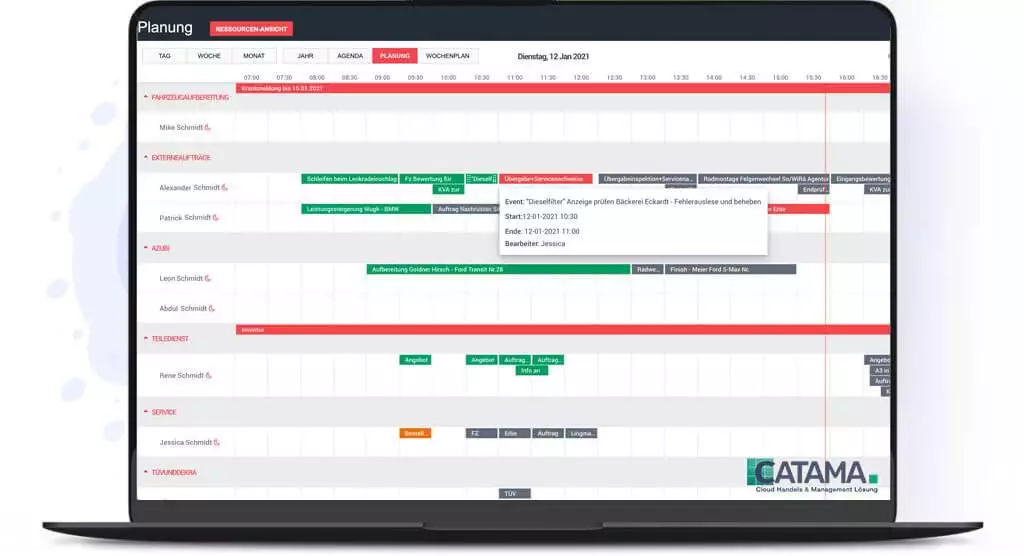
The morning briefing is far more than a short team meeting – it's the strategic compass for the entire workday. In an average automotive workshop with 5-10 mechanics, just 15 minutes of chaos in the morning can lead to several hours of lost productivity later in the day.
The typical challenges in the traditional briefing
Many workshop managers are familiar with this problem: You gather the team, distribute the tasks, and hope everything goes according to plan. But then a customer arrives late, a spare part is missing, or a mechanic is unexpectedly ill. Without digital support, the structured plan quickly turns into improvised chaos.
Typical problems without digital workshop management:
- ❌ No real-time overview of available capacities
- ❌ Manual order distribution wastes valuable time
- ❌ Lack of transparency regarding order status and progress
- ❌ Communication gaps between reception and workshop
- ❌ Paper-based processes lead to information loss
A real-life example: Thomas, a workshop manager in Munich, used to spend 45 minutes every morning sorting orders, assigning mechanics, and keeping track of everything. Since implementing professional automotive workshop ERP software, this time has been reduced to 10 minutes – and the quality of planning has improved significantly.
Optimizing workflows in automotive businesses: The role of digital transformation
Digitizing workshop processes is no longer a luxury, but a necessity in 2026. Workshops still relying on manual processes are not only losing time, but also competitiveness. Automating invoicing and digital order processing are just the tip of the iceberg.
From paper chaos to structured efficiency
The transition from analog to digital processes may initially seem like a major hurdle. However, the advantages become noticeable after just a few weeks. A vehicle invoicing program with an integrated workshop planner creates a consistent database – from the initial customer inquiry to the final invoice.
Advantages of digital transformation:
| Area | Analog process | Digital process with CATAMA |
|---|---|---|
| Scheduling | 30-45 minutes daily | 5-10 min. automatically[1] |
| Order distribution | Manual, prone to errors | Intelligent, rule-based[1] |
| Data availability | Only at the workplace | Anywhere, anytime (Cloud)[1] |
| communication | telephone, note | Real-time synchronization[1] |
| No-show rate | 15-20% | Less than 5% due to memories[1] |
The CATAMA Software Suite offers precisely this comprehensive solution. It connects all business processes in a single platform and makes the morning briefing an efficient, data-driven process [6].
Cloud document management as a game changer
A key advantage of modern workshop management tools is their cloud-based architecture. All data is stored centrally and is available to authorized employees at any time. This means the workshop manager can prepare the briefing while still in the car. Mechanics can check the current status of their jobs on their tablets. And the receptionist can see in real time what capacity is still available.
Cloud -based automotive workshop software eliminates the need for expensive server infrastructure and makes data accessible from anywhere[3].
How to design a proper morning briefing: Best practices for 2026
An effective morning briefing follows a clear structure and uses the right tools. Optimizing workflows in automotive businesses: Designing the right morning briefing with CATAMA software makes this process child's play.
The perfect briefing structure in 5 steps
1. Preparation (5 minutes before the briefing)
Open the workshop planner and get an overview of:
- All scheduled appointments for the day
- Available mechanics and their qualifications
- Special assignments or challenges
- Material availability for upcoming repairs
2. Team meeting (2 minutes)
Use a large monitor or projector to visualize the daily schedule. The color-coded display in CATAMA shows at a glance:
- 🟢 Green: Standard orders, everything ready
- 🟡 Yellow: Orders with open questions
- 🔴 Red: Priority or time-sensitive jobs
3. Task distribution (3 minutes)
CATAMA's intelligent job distribution automatically takes into account[1]:
- Specializations of mechanics
- Current occupancy
- Estimated processing times
- Tool and lifting platform availability
4. Clarification of open issues (3 minutes)
Discuss briefly:
- Special customer requirements
- Missing parts or delays
- Prioritization in case of capacity bottlenecks
5. Day start (1 minute)
A short, motivating word – and off we go!
“Since we started using CATAMA, our morning briefing has shrunk from 30 to 10 minutes – and yet we are better organized than ever before. The automatic planning is simply brilliant.” – Workshop manager from Hamburg
Mobile-First: The briefing in your pocket
Mobile Workshop Management functionality allows mechanics to directly access and manage their workshops on their tablet or smartphone:
- To retrieve order details
- Recording working hours
- Documenting material consumption
- Upload photos of damage
This flexibility means that the morning briefing is no longer static. Changes can be communicated and implemented in real time [1].
CATAMA Software: The all-in-one solution for optimized workflows
workflows : Effectively structuring morning briefings with CATAMA software is more than just a buzzword – it's a reality already experienced by thousands of workshops in Germany. CATAMA offers a comprehensive platform that covers all aspects of workshop management.
Key features for the perfect morning briefing
Automatic appointment scheduling & time tracking
The software automatically schedules appointments, taking all relevant factors into account. This not only saves time but also drastically reduces scheduling errors. Digital time tracking automatically records how long mechanics work on which jobs – perfect for post-calculation and future planning [1].
Cloud-based workshop planning
All data is stored in the cloud and synchronizes automatically. This means that when the receptionist enters a new appointment, the workshop manager sees it immediately in the planner. No more double bookings, no more misunderstandings [1].
Intelligent order distribution
Over time, the system learns which mechanic is best suited for which type of job. The following factors are automatically taken into account during the allocation process [1]:
- Qualifications and specializations
- Current occupancy
- Historical processing times
- Resource availability
Automatic Reminders
Customers automatically receive reminders via SMS or email. This reduces no-shows by up to 75%[1] – a huge advantage for planning reliability during the morning briefing.
Integration into existing systems
CATAMA integrates seamlessly into existing infrastructures. Whether it's the DATEV interface for accounting , Stakis 4.0 for spare parts orders , or Partslink24 for parts trading – the software connects all relevant systems into a harmonious whole [6].
Current developments and features 2026
CATAMA is constantly evolving. The latest updates bring features that make the morning briefing even more efficient[1]:
- Integrated vacation planning : See at a glance who is available and when.
- Extended invoice fields : More flexibility in billing.
- Optimized cancellation management : Better handling of appointment cancellations
- Improved calendar functions : Even more intuitive operation
Planned features for 2026:
- 🤖 AI-powered appointment optimization
- 🔧 Predictive maintenance integration
- 📱 Enhanced mobile app features
Digital order processing: From briefing to invoice
A perfect morning briefing is just the beginning. The true strength of a digital workshop management system is revealed in the entire process – from order acceptance to final invoicing.
The complete workflow in CATAMA
Phase 1: Order Acceptance
The system already records all relevant data when the appointment is made:
- Customer data (automatically retrieved from the database)
- Vehicle data ( from the vehicle registration document using OCR technology )
- Desired services
- Estimated duration and costs
This information is available immediately at the morning briefing.
Phase 2: Morning briefing & assignment
The workshop manager opens the planner and sees all of the day's appointments. With just a few clicks, he assigns jobs – or leaves it to the intelligent automation system. The central vehicle and customer management system ensures that all historical data is available.
Phase 3: Implementation
Mechanics process the orders and document everything directly in the system:
- Hours worked
- Materials used
- Additional defects identified
- Photos and notes
Phase 4: Billing
Automatic invoice creation generates a legally compliant invoice at the touch of a button – including all items, correct VAT and e-invoice compliance .
Time savings in the workshop: Concrete figures
Digitalization brings measurable benefits. Here are some realistic time savings per day in a workshop with 5 mechanics:
- Morning briefing : 20 minutes saved (from 30 to 10 minutes)
- Job search : 45 minutes saved (everything can be found digitally)
- Invoice creation : 60 minutes saved (automatic instead of manual)
- Material documentation : 30 minutes saved (direct recording)
- Customer communication : 25 minutes saved (automatic updates)
Total: 3 hours per day = 15 hours per week = 780 hours per year
At an average hourly rate of €80, this corresponds to a value creation potential of €62,400 per year – solely through more efficient processes[3].
Legally compliant invoices and compliance
An often overlooked aspect of vehicle accounting is legal compliance. Incorrect invoices can not only lead to inquiries but also have tax consequences.
GoBD compliance and data security
CATAMA meets all the requirements of the GoBD (Principles for the proper management and storage of books, records and documents in electronic form). This means:
- ✅ Immutability of evidence
- ✅ Complete documentation of all changes
- ✅ Secure, auditable archiving
- ✅ Traceable processes
The cloud infrastructure ensures automatic backups and maximum data security. Your data is better protected than on any local server.
E-invoicing: Prepared for the future
From 2027, e-invoicing will become mandatory for B2B transactions in Germany. CATAMA is already prepared and supports all common formats such as XRechnung and ZUGFeRD. This gives workshops the confidence to easily meet future requirements as well.
ROI calculation: Is the investment worthwhile?
The question every workshop owner asks themselves is: Does the benefit justify the cost? Let's look at a realistic calculation.
Example calculation for a medium-sized workshop
Initial situation:
- 5 mechanics
- 20 orders per day
- Average order value: €350
Cost of CATAMA software:
- Monthly license: approx. €150-300 (depending on the package)[5]
- One-time setup fee: approx. €500
- Training: approx. €300
Savings in the first year:
- Time savings (780 hours × €80): €62,400
- Reduced no-shows (5% higher occupancy): approx. €18,000
- Fewer errors in invoices: approx. €3,000
- Faster payment receipts: approx. €5,000
Total savings: €88,400
Investment year 1: approx. €4,400
ROI: 2,000% in the first year
This calculation is conservative. Many workshops report even higher savings, particularly through improved customer loyalty and increased order volumes due to a more professional appearance [3].
Practical examples: Success stories from the workshop
Case Study 1: Family-run workshop in Bavaria
The Müller workshop in Regensburg was struggling with chaotic morning briefings and dissatisfied customers. After the introduction of CATAMA:
- Morning briefing : Reduced from 40 to 8 minutes
- Customer satisfaction : From 3.2 to 4.7 stars (Google)
- Revenue : +23% in the first year
- Employee satisfaction : Significantly increased
“CATAMA has transformed our business. We no longer work harder, but smarter – and our customers notice that.” – Johann Müller, Owner
Case Study 2: Growing Chain of Workshops in Northern Germany
AutoService Nord operates 4 locations with a total of 22 mechanics. The challenge: standardized processes across all locations.
Solution with CATAMA:
- Central planning for all locations
- Cross-site resource utilization
- Uniform prices and processes
- Consolidated evaluations
Result:
- 35% efficiency increase
- Possibility to open a 5th location
- Improved negotiating position with suppliers through a central database
Implementation: How to successfully transition
The transition from analog to digital processes doesn't have to be complicated. With the right strategy, implementation can be seamless.
Step-by-step instructions
Weeks 1-2: Preparation
- Free trial of CATAMA software
- Analysis of current processes
- Definition of goals
- Selecting the appropriate package ( Smart , Professional or Enterprise )
Weeks 3-4: Data migration
- Import of customer data
- Transmission of vehicle data
- Setting up article master data
- Configuration of workplaces and resources
Weeks 5-6: Training
- Team training (approx. 4 hours)
- Practical exercises
- Creation of individual workflows
- Test morning briefing with the system
Weeks 7-8: Parallel operation
- Using CATAMA in parallel with legacy processes
- Fine-tuning the settings
- Collection of feedback
- Workflow customization
From week 9: Full operation
- Complete switch to CATAMA
- Regular team reviews
- Continuous optimization
- Use of extended features
Common challenges and solutions
"My employees aren't tech-savvy"
→ CATAMA is intentionally designed to be intuitive. Most users are productive after 2-3 days. CATAMA also offers comprehensive support.
“We already have another system”
→ CATAMA offers interfaces to most common systems. Parallel operation or a gradual migration is possible.
"What happens in case of an internet outage?"
→ The cloud solution is highly available (99.9% uptime). In the event of temporary outages, data can be captured offline and synchronized later.
"Is our data secure?"
→ CATAMA uses German data centers with the highest security standards. All data is encrypted and backed up daily.
The future of workshop planning: Trends in 2026 and beyond
the workflows of a car dealership: Designing the morning briefing correctly with CATAMA software is just the beginning of a comprehensive digital transformation.
AI and Predictive Analytics
The next generation of workshop software will use artificial intelligence to:
- Predicting maintenance needs
- To recommend optimal appointment slots
- Forecasting spare parts requirements
- Prices can be adjusted dynamically
CATAMA is already working on AI-powered features that will be rolled out in 2026 and 2027[1].
Connectivity with vehicles
Modern vehicles already send diagnostic data. In the future, workshop software will be able to communicate directly with vehicles:
- Automatic fault detection
- Appointment scheduling by the vehicle itself
- Preparing for repairs before arrival
- Digital service booklet
Augmented Reality in the Workshop
AR glasses could help mechanics in the future:
- Display repair instructions directly in the field of vision
- Visualizing complex assemblies
- Show expert help via video call
- Document work steps
Comparison: CATAMA vs. traditional processes
To make the advantages even clearer, here is a direct comparison:
Morning briefing
Traditional:
- 30-45 minutes daily
- Paper-based, prone to errors
- No real-time updates
- Difficult prioritization
With CATAMA:
- 5-10 minutes daily[1]
- Digital, precise
- Live synchronization
- Intelligent order distribution
Customer communication
Traditional:
- Manual calls
- High no-show rate
- Time-consuming
- Inconsistent
With CATAMA:
- Automatic Reminders
- 75% fewer no-shows[1]
- Time-saving
- Professional and reliable
Invoicing
Traditional:
- 15-20 minutes per invoice
- Prone to errors
- Manual archiving
- Delayed payments
With CATAMA:
- 2-3 minutes per invoice
- Automatically correct
- Digital Archive
- Faster payment receipts
Additional features for maximum efficiency
In addition to the core feature of the morning briefing, CATAMA offers numerous other functions that make everyday workshop life easier:
Tire management
The integrated tire management system manages tire sets, storage, and changeover dates – including automatic reminders for customers.
Form Builder
With the Form Builder Tool , you can create individual checklists, handover protocols and test reports – perfect for standardized processes.
Inventory management
The complete integration of order processing and goods receipt ensures that materials are available on time.
Cash book
The digital cash book meets all tax requirements and simplifies daily accounting.
Support and further training
An important aspect when choosing workshop software is support. CATAMA offers:
- 📞 Telephone support during business hours
- 💬 Live chat for quick questions
- 📧 Email support with a response within 24 hours
- 📚 Extensive knowledge base with tutorials
- 🎓 Regular webinars on new features
- 🛠️ Ticket system for complex requests
CATAMA support is German-speaking and understands the specific requirements of automotive businesses.
Pricing models and packages
CATAMA offers different packages for different farm sizes:
CATAMA Professional
For medium-sized businesses (4-10 employees)
- All smart features
- Extended planning
- Multiple jobs
- Interfaces to suppliers
CATAMA Enterprise
For large companies and chains (10+ employees)
- All professional features
- Multi-tenancy
- Advanced Analyses
- Individualization
CATAMA Unlimited
Tailor-made solution with:
- Dedicated support
- Individual customization
- Priority updates
- Personal Account Manager
Detailed pricing information can be found on the CATAMA product page .
Conclusion: The future begins with the morning briefing
workflows in automotive businesses: Designing the morning briefing correctly with CATAMA software is more than just a technical improvement – it is
