
Overview of CATAMA Software Features – DATEV Export Accounting Export Module: The Complete Solution for Automotive Businesses
Imagine this: It’s the end of the month, and while other garage owners are still manually entering invoices into their accounting software late into the night, you can sit back and relax. With a single click, your garage software exports all receipts directly to DATEV—automatically, error-free, and in full compliance with legal requirements. It is precisely this time savings that makes the difference between stressful administrative work and profitable garage management. The feature overview of the CATAMA Software – DATEV Export Accounting Export Module demonstrates how modern digitalization is revolutionizing accounting in the automotive industry and providing businesses with measurable competitive advantages.
Key Takeaways
- ✅ Dual export formats: CATAMA offers both DATEV posting batches (CSV) and document sets (ZIP) for maximum flexibility in accounting integration
- ⚡ Save up to 85% of your time: Automated data transfer eliminates manual data entry errors and drastically reduces administrative workload
- 🔄 Seamless integration: Direct connection to DATEV Unternehmen Online without any data gaps or duplicate entries
- 🎯 Centralized account configuration: Setting up the chart of accounts once using product categories ensures consistent journal entries
- 🚀 Future-proof: Fully compatible with DATEV’s cloud transformation starting in 2026, with ongoing updates included
What is the DATEV Export Module in CATAMA?
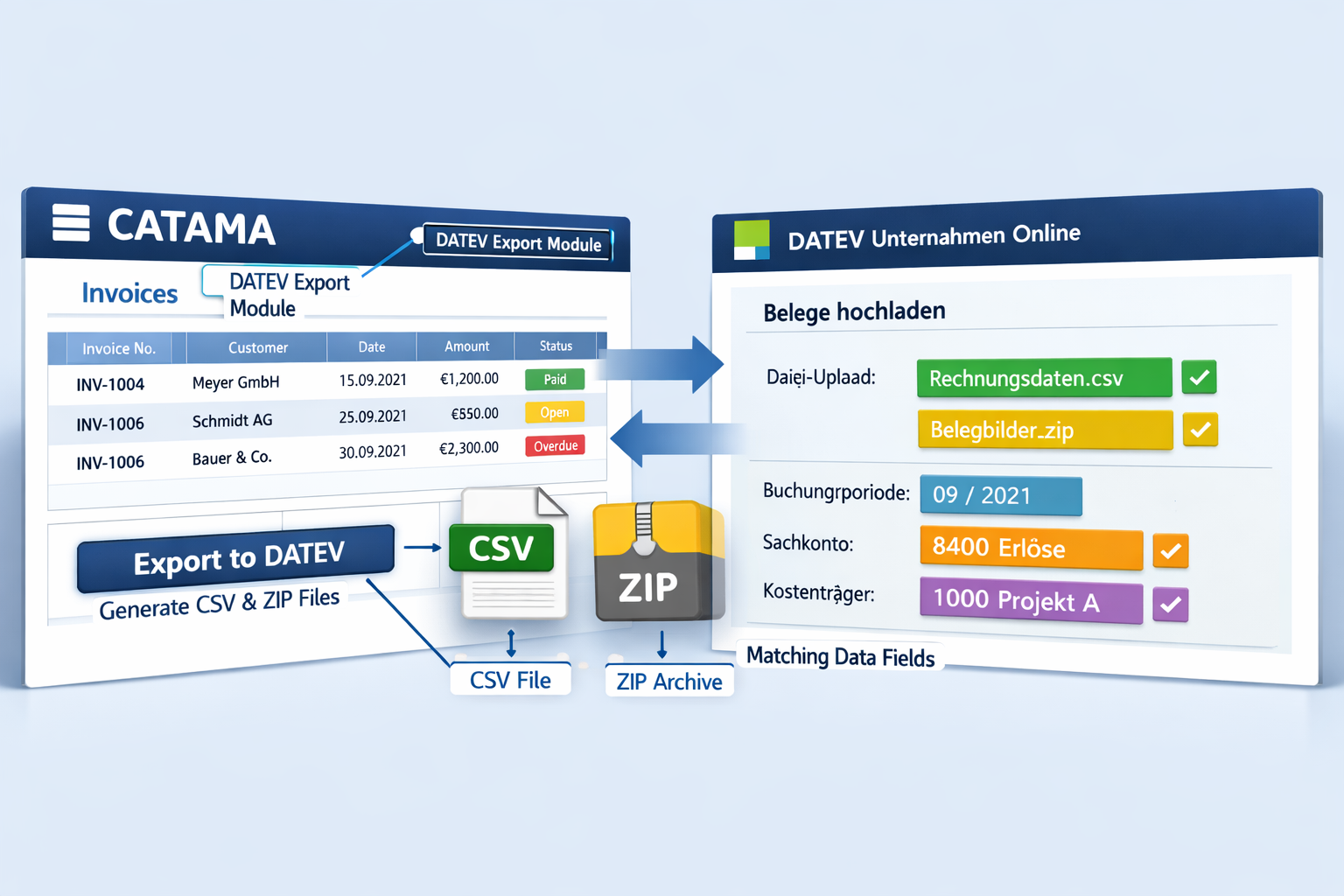
The DATEV Export Module is the heart of the accounting automation features in CATAMA software. It acts as a smart bridge between your auto repair shop management software and the leading accounting system, DATEV. While many auto invoicing programs offer only basic export functions, CATAMA goes significantly further.
An overview of how it works
The module converts your workshop data—invoices, credit memos, down payments, and other documents—into DATEV-compliant formats. It doesn’t just transfer numbers; it generates complete journal entries containing all tax-relevant information.
Key features of the DATEV Export Module:
- 📊 Automatic account assignment based on product groups
- 🔢 Tax breakdown by tax rates and types
- 📅 Accrual-based accounting for accurate monthly financial statements
- 🔐 Audit-proof documentation of all export transactions
- 🎯 Selective export options for maximum control
The CATAMA Professional Suite seamlessly integrates this functionality into the daily workflow, so that accounting is no longer a separate task but rather an automated process.
Why DATEV Integration Is Essential for Auto Repair Shops
DATEV is virtually the industry standard among German tax advisors. Over 40,000 tax advisors use DATEV systems. For auto repair shops, this means that those who provide their data in a DATEV-compliant format not only save time but also reduce their tax advisory costs.
“The DATEV interface has cut our monthly accounting workload from two days to two hours. That’s a real boost in efficiency in practice.” – Typical feedback from CATAMA users
This vehicle management software with accounting features demonstrates how a well-designed integration connects all business areas and creates synergies.
The two DATEV export formats: Posting batch vs. Document set
This overview of the CATAMA software—specifically the DATEV Export accounting export module —would be incomplete without a detailed look at the two available export formats. CATAMA deliberately offers two different approaches to meet a variety of accounting requirements.
DATEV Posting Batch (ExtFormat) – The classic solution for fast posting
The transaction batch export generates a CSV file in DATEV ExtFormat, which can be imported directly into DATEV Unternehmen Online[1]. This format is particularly popular with businesses that primarily want to transfer transaction data without the full document images.
Benefits of batch export:
| Characteristic | Advantage | Practical benefits |
|---|---|---|
| File size | Compact (CSV only) | Fast upload, low storage requirements |
| Processing speed | Very quickly | Ideal for large volumes of documents |
| Account integration | Automatically by product category | A one-time setup is all that's needed |
| Flexibility | Subsequent adjustments are possible | Corrections can be made in the DATEV system |
Configuration is performed centrally via the product group settings in the "Inventory" section. Here, revenue accounts, cost of goods sold accounts, and other accounts relevant to posting are defined. This one-time setup ensures that all future postings are automatically assigned correctly.
Typical use case: A repair shop that generates 150–200 invoices per month uses the batch export feature to transfer all documents at once at the end of the month. The tax advisor receives the data in a structured format and can begin posting the entries immediately.
DATEV Document Set – The Comprehensive Document Solution
The document set export goes one step further by creating a ZIP archive that contains not only the transaction data but also the complete document images (PDF invoices). This aligns with the modern approach to audit-proof, digital document archiving.
Special features of document set export:
- 📄 Full images of documents available as PDFs in the archive
- 🔗 Link between the journal entry and the document
- ✅ GoBD-compliant archiving directly in DATEV
- 🎯 Selective export feature – only new, unexported documents
The selective export feature is particularly useful: the system keeps track of which documents have already been exported and offers the option to transfer only new documents. This prevents duplicates and keeps the accounting records clean.
Real-world example: A car dealership with strict compliance requirements uses document set export to maintain complete documentation for tax audits. Every invoice is digitally archived and directly linked to the accounting entry.
Which format is right for which business?
The decision between a posting batch and a document set depends on several factors:
Select "Posting batch" if:
- ✓ Speed and efficiency are the top priorities
- ✓ Receipt images are archived separately
- ✓ Large volumes of documents are transferred on a regular basis
- ✓ The tax advisor primarily needs accounting data
Select "Document Set" if:
- ✓ Full digital archiving is desired
- ✓ GoBD compliance is a top priority
- ✓ Tax audits are common
- ✓ Centralized document management should be implemented in DATEV
The CATAMA Unlimited Edition offers both formats without restrictions and even allows for simultaneous use depending on the document type.
Step-by-Step: Setting Up and Using DATEV Export in CATAMA
Putting the features of the CATAMA software—the DATEV Export Accounting Export Module— into practice is surprisingly easy. CATAMA relies on intuitive user guidance rather than complicated configuration menus.
Phase 1: Initial account setup (one-time)
Before the first export can take place, the accounts in the chart of accounts must be assigned to product groups. This is done in the "Inventory" → "Product Groups" section .
Accounts to configure:
- Revenue Account – For sales revenue from the respective product group
- Cost of Goods Sold Account – For the purchase value of goods sold
- Expense Account – For Direct Costs
- Offset account – By default, the customer account
💡 Pro tip: Use different revenue accounts for different product groups (e.g., repair services, replacement parts, tire sales). This will allow for detailed analysis later on and simplify cost center accounting.
This comprehensive guide to efficient automotive workshop ERP software explains in detail how a well-designed chart of accounts improves business management.
Phase 2: Perform the export
The actual export process follows a standardized workflow that is identical for both formats:
The export process in 5 steps:
- Navigation: Go to the "Orders" section
- Export button: Click the export function (usually displayed as an icon)
- Document selection: Select document type (invoices, credit memos, etc.) and time period
- Select format: Choose between "DATEV Posting Batch" or "DATEV Document Set"
- Start export: Confirm the export and download the generated file
Time required: About 2–3 minutes for 100 documents—including the download.
Phase 3: Import into DATEV Unternehmen Online
The downloaded file (CSV or ZIP) is now imported into DATEV:
For batch entries (CSV):
- Open DATEV Unternehmen Online
- Go to "Bookings" → "Import"
- Select "DATEV Format" as the import type
- Upload the CSV file
- Review the preview and confirm the import
For document records (ZIP):
- Open DATEV Unternehmen Online
- Go to "Documents" → "Import"
- Select "Document Set" as the import type
- Upload the ZIP file
- The system automatically links documents to journal entries
Common Pitfalls and Their Solutions
Even mature systems can present challenges. Here are the most common problems and their solutions:
Problem 1: Missing account assignment
- Symptom: Error message during import due to unknown accounts
- Solution: Check the product category configuration and add any missing accounts
- Prevention: Create a checklist of all required accounts before the first export
Problem 2: Duplicate entries
- Symptom: Documents appear multiple times in DATEV
- Solution: Use the selective export feature (only documents that haven't been exported)
- Prevention: Keep an export log and mark exported periods
Problem 3: Tax Rate Discrepancies
- Symptom: DATEV displays different tax rates than CATAMA
- Solution: Update the tax rate master data in both systems
- Prevention: Use the automatic updates in CATAMA
The DATEV interface for automotive businesses provides additional guidance on optimal configuration.
Benefits of CATAMA DATEV Integration for Automotive Businesses
The feature overview of the CATAMA Software – DATEV Export Accounting Export Module demonstrates its true strength through the measurable benefits it brings to day-to-day operations. It’s not just about technical features, but about genuine process optimization with a return on investment.
Time savings: From days to hours
The most obvious advantage is the dramatic reduction in the time required. Traditional manual bookkeeping ties up valuable resources:
Time comparison: traditional vs. CATAMA:
| Task | Manual | With CATAMA DATEV Export | Savings |
|---|---|---|---|
| Enter invoices | 3–4 minutes per sheet | Automatically | 100% |
| Check account assignment | 1–2 minutes per sheet | Automatically | 100% |
| Data transmission | 2–3 hours per month | 5 minutes per month | 97% |
| Error correction | 1–2 hours per month | 10 minutes per month | 92% |
| Total (150 receipts/month) | ~12 hours | ~2 hours | ~83% |
At an average hourly rate of €40 for administrative work, this translates to monthly savings of €400 —or €4,800 annually. This calculation does not yet take into account the reduced tax advisory costs resulting from accurate data delivery.
Error Reduction and Compliance
Manual data entry is prone to errors. Studies show that, on average, 1–2% of entries made manually contain errors. With 150 documents per month, that means 2–3 erroneous entries—every month.
Common sources of error that CATAMA eliminates:
- ❌ Transposed digits in amounts
- ❌ Incorrect account assignment
- ❌ Forgotten tax rates
- ❌ Inconsistent period assignment
- ❌ Missing document numbers
Automated data transfer ensures 100% data integrity between CATAMA and DATEV. Everything on the invoice is transferred exactly as is to the accounting system.
Improved cash flow planning
An often-overlooked benefit: Thanks to seamless integration, business owners have up-to-date access to their financial data at all times. No more waiting for the monthly report from their tax advisor.
Practical benefits:
- 📊 Daily sales reports
- 💰 Real-time liquidity monitoring
- 📈 Early detection of trends
- 🎯 Informed investment decisions
The time savings achieved through CATAMA demonstrate further efficiency gains in various areas of the business.
Scalability without additional effort
A growing business means more receipts. With manual bookkeeping, the workload increases in direct proportion to revenue. With CATAMA, the workload remains constant—whether you have 50 or 500 receipts per month.
Scaling example:
- Start-up phase (50 documents/month): 5 minutes of export time
- Growth phase (200 documents/month): 5 minutes of export time
- Established (500 documents/month): 6-minute export process
This scalability makes CATAMA the ideal solution for ambitious businesses that want to grow without getting bogged down in administrative tasks.
Reduce tax advisory costs
Tax advisors often bill by the hour. If you provide clean, well-organized data, you reduce the amount of work they have to do—and thus lower the bill.
Typical savings:
- 🔽 20–30% lower accounting fees
- 🔽 Fewer follow-up questions and corrections
- 🔽 Faster preparation of financial statements
- 🔽 Reduced administrative burden during tax audits
A medium-sized auto repair shop saves an average of €1,500–3,000 annually in tax consulting fees through optimized data delivery.
CATAMA as a Complete Solution: More Than Just DATEV Export
The overview of the CATAMA software’s features—specifically the DATEV Export accounting export module— is just one piece of the puzzle in the comprehensive CATAMA solution. Its true strength lies in the integration of all business processes.
From order processing to accounting—all under one roof
CATAMA follows the principle of digital order processing without media breaks. Each step in the process builds on the previous one:
The complete CATAMA workflow:
- Customer Acquisition 📞
- Digital customer files with vehicle history
- Scheduling and Workshop Utilization
- Automatic maintenance reminders
- Order Entry 📝
- Intelligent Vehicle Recognition via OCR
- Pre-populated from customer master data
- Access to repair manuals (WMKAT, Repdoc)
- Workshop Planning 🔧
- Workshop Scheduler with Time Tracking
- Resource Optimization
- Mobile app for mechanics[4]
- Ordering Parts 📦
- Integration with Stakis, Stahlgruber, and Partslink24
- Automated Inventory Management
- Goods Receiving and Inventory
- Invoicing 💶
- Automated Invoicing
- E-invoice compliance
- Differential taxation for used cars
- Accounting Export 📊
- DATEV Export (Posting Batch/Document Set)
- Automatic account assignment
- Audit-compliant archiving
- Controlling & Analysis 📈
- Business Intelligence Dashboards
- Profitability Analyses
- KPI Tracking
This end-to-end integration eliminates duplicate entries and ensures consistent data across all departments.
Additional strengths of the CATAMA platform
Cloud-based architecture:
The cloud solution for workshops offers key advantages:
- ☁️ Access from anywhere (office, workshop, on the go)
- 🔄 Automatic backups and updates[7]
- 📱 Mobile apps for iOS and Android[4]
- 🔐 Professional data centers with the highest security standards[72]
Industry-specific features:
- 🚗 Tire management and storage[32]
- 🔍 HSN/TSN query for vehicle data[45]
- 📋 Digital inspection reports and checklists
- 🎫 Support Desk for Customer Inquiries[43]
Flexible licensing models:
CATAMA offers various editions tailored to businesses of different sizes:
- CATAMA Smart Edition – For Small Businesses
- CATAMA Professional – For established repair shops
- CATAMA Enterprise – For chain stores and large businesses
- CATAMA Unlimited – With Premium Support
Integration with the entire automotive ecosystem
CATAMA is not a standalone solution; rather, it integrates seamlessly into your existing IT infrastructure:
Supported interfaces:
- 🔗 Stakis 4.0 Integration[3]
- 🔗 Stahlgruber Connection[15]
- 🔗 Partslink24 Connector[29]
- 🔗 WMKAT Repair Guides[32]
- 🔗 Repdoc Technical Information[38]
- 🔗 DATEV Accounting[1][2]
- 🔗 E-commerce platforms[16]
This comprehensive connectivity makes CATAMA the central platform for digital workshop management.
Future-Proofing: CATAMA and the DATEV Cloud Transformation 2026
A key aspect of the CATAMA Software – DATEV Export Accounting Export Module’s functionality is its future-proof design. The software landscape is changing rapidly—especially in 2026.
DATEV's transition to cloud architecture
DATEV has announced that, starting in the fall of 2026, it will transition all of its programs from on-premises installations to cloud-based solutions[5]. This is a fundamental transformation that affects the entire industry.
What does that mean, specifically?
- 🌐 All DATEV applications are provided as cloud services
- 💻 No more local installations required
- 🔄 Automatic updates and maintenance
- 📊 Improved data integration between systems
CATAMA is ready: As a native cloud solution, CATAMA is already ideally positioned for this transformation. The existing DATEV interfaces are compatible with the new cloud architecture[4].
Development of a Data Service Export
Industry experts expect DATEV to develop a comprehensive data export service for accounting systems[6]. This could further simplify integration:
Possible developments:
- 🔌 REST API for real-time data transmission
- 📡 Two-way synchronization
- 🤖 AI-powered account assignment suggestions
- 📊 Advanced analytics
CATAMA plans to take advantage of these new opportunities as soon as they become available. The flexible architecture allows for quick adaptation to new standards.
Continuous updates at no extra cost
A key advantage: All CATAMA editions include automatic updates at no additional cost. While other software providers charge upgrade fees for major updates, CATAMA customers always stay up to date.
What this means:
- ✅ Instant access to new features
- ✅ Automatic security updates
- ✅ Compliance with new legal requirements (e.g., e-invoicing)
- ✅ No investment risks associated with version upgrades
E-invoicing for auto repair shops is a current example: CATAMA has already implemented the legal requirements, while many competitors are still in the process of upgrading their systems.
Compliance and Legal Certainty
Accounting software must meet the highest legal requirements. CATAMA complies with all relevant standards:
Certifications and Standards:
- ✓ GoBD-compliant – Principles of Proper Accounting
- ✓ GDPR-compliant – General Data Protection Regulation
- ✓ Audit-proof – tamper-proof archiving
- ✓ E-invoice-ready – XRechnung and ZUGFeRD
The privacy policy and data center security guidelines document the comprehensive security measures.
Real-world examples: How successful businesses use CATAMA DATEV Export
Theory is good—practice is better. Let’s take a look at how different types of businesses use the CATAMA software—the DATEV Export Accounting Export Module— in their day-to-day operations.
Case Study 1: Medium-Sized Auto Repair Shop (3 employees, 120 jobs per month)
Initial situation:
Owner Michael K. spent 2–3 days at the beginning of every month on bookkeeping. Invoices were entered manually into Excel and then transferred to DATEV by the tax advisor. Error rate: approx. 5%.
CATAMA Solution:
- CATAMA Professional Suite with DATEV batch export
- Centralized account configuration across 8 product categories
- Monthly export on the 1st of the following month
Results after 6 months:
- ⏱️ Accounting workload: from 24 hours/month to 2 hours/month
- ✅ Error rate: from 5% to 0.2%
- 💰 Tax advisory fees: 25% off with accurate data delivery
- 📈 ROI: Investment recouped after 4 months
“I never would have thought that bookkeeping could be so easy. The DATEV export not only saves me time, but also gives me a much better sense of my business’s financial situation.” – Michael K., workshop owner
Case Study 2: Car Dealership with Service Shop (8 employees, 300 transactions per month)
Initial situation:
Car dealer Sandra M. had separate systems for sales and the service department. Bookkeeping was a patchwork of various Excel spreadsheets. Monthly closings took up to 5 days.
CATAMA Solution:
- CATAMA Enterprise Suite with DATEV Document Set Export
- Integration of retail and service operations into a single platform
- Differential taxation for used cars[52]
- Weekly export for a better overview of cash flow
Results after 12 months:
- 🔄 Full process integration achieved
- 📊 Monthly closing: from 5 days to 6 hours
- 💼 Saved on hiring a new part-time accounting staff member (€18,000/year)
- 🎯 Improved cash flow planning through weekly reports
Special feature: Using the document set feature, Sandra M. has established a comprehensive digital document archive, which received very positive feedback during the last tax audit.
Case Study 3: Tire Service Specialist (2 locations, seasonal business)
Initial situation:
Tire dealer Thomas B. experienced extreme seasonal fluctuations (October–November and March–April). During peak periods, invoices often didn’t reach his tax advisor until weeks later.
CATAMA Solution:
- CATAMA Professional with Tire Management
- Daily DATEV export during peak season
- Automatic invoice generation immediately after the order is completed
Results:
- ⚡ Invoicing: from 3–5 days after the due date to immediate
- 💰 Cash flow: 15% improvement through faster invoicing
- 📦 Tire inventory management integrated with accounting
- 🔄 Both locations combined into a single system
Key feature: The combination of fast invoicing and DATEV export allows Thomas B. to maintain an up-to-date overview of his finances, even during peak periods.
Common Success Factors
All three examples show recurring patterns:
- 80–90% time savings on accounting tasks
- Error reduction to less than 1% through automation
- ROI within 3–6 months through efficiency gains
- Improved decision-making based on up-to-date financial data
- Reduction in tax advisory costs by 20–30%
The benefits of industry-specific software become particularly clear in practice.
Frequently Asked Questions About the CATAMA DATEV Export
Is technical knowledge required for the DATEV export?
No. CATAMA was deliberately designed so that even users without IT knowledge can perform the export. The interface is intuitive, and once the accounts have been set up, the export runs largely automatically. Many users perform the export themselves without needing any assistance.
How long does the initial setup take?
For an average-sized business, the initial setup (mapping accounts to product categories) takes 1–2 hours. CATAMA provides templates for common chart-of-accounts structures to speed up the process. If needed, our support team can also assist with setup remotely.
Can historical data also be exported?
Yes. CATAMA allows you to export data for any time period, including retroactively. This is particularly useful when switching systems or when corrections are needed after the fact. The selective export function prevents duplicate entries.
How much does the DATEV interface cost on top of that?
The DATEV export function is included in all CATAMA editions at no extra charge. There are no additional license fees or transaction fees. Updates to the interface are also free of charge.
Is CATAMA also suitable for Austria and Switzerland?
Yes. CATAMA offers special versions for Austria and Switzerland that include country-specific tax rates, chart of accounts, and legal requirements.
How secure is my data during transmission?
Data is transmitted in encrypted form. The export files are saved locally on your computer and imported into DATEV from there. No automatic cloud transfer takes place. Data security meets the highest standards.
Can I manage different clients in CATAMA?
Yes, the higher-tier editions (Enterprise, Unlimited) support multi-client functionality. Each client can have its own chart of accounts and export settings.
What happens during DATEV updates or changes?
CATAMA automatically updates the interface whenever DATEV makes changes. As a user, you don’t need to do anything—the updates are installed in the background. This was also the case during the transition to e-billing.
Is there a trial period?
Yes, CATAMA offers a free trial that allows you to thoroughly test all features, including DATEV export. This lets you evaluate how the software works in your specific business environment.
How does customer support work if I have a problem?
CATAMA offers various support channels: a phone hotline, email support, a comprehensive knowledge base, and video tutorials. On-site support is also available for higher-tier editions. The FAQ section answers the most common questions.
Comparison: CATAMA vs. other auto repair shop software with a DATEV interface
To fully appreciate the strengths of the CATAMA software’s features— specifically the DATEV Export accounting export module —it’s worth taking a look at the market.
Evaluation Criteria for Automotive Software with Accounting Integration
Key factors to consider when selecting software:
| Criterion | Weighting | Why is this important? |
|---|---|---|
| DATEV compatibility | ⭐⭐⭐⭐⭐ | Core accounting function |
| User-friendliness | ⭐⭐⭐⭐⭐ | Everyday use should be easy |
| Full integration | ⭐⭐⭐⭐ | Avoiding silos |
| Cloud availability | ⭐⭐⭐⭐ | Flexibility and future-proofing |
| Value for money | ⭐⭐⭐⭐ | There must be a return on investment |
| Quality of Support | ⭐⭐⭐ | Getting help when you have problems is important |
| Update Policy | ⭐⭐⭐ | Long-term investment security |
CATAMA Compared to the Competition
CATAMA's strengths:
✅ Two DATEV export formats (posting batch + document set) – many competitors offer only one
✅ Native cloud solution – no local installation required
✅ Full process integration – from sales to accounting, all from a single source
✅ Free updates – no hidden upgrade costs
✅ Flexible scaling – from small businesses to branch networks
✅ Industry-specific features – tire management, vehicle records, etc.
✅ Modern technology – regular feature updates
Areas where competitors can gain an edge:
⚠️ Market presence – Some established providers have been in the market longer
⚠️ On-premises option – Some businesses prefer on-premises installation
⚠️ Special features – Niche features for very specific requirements
Typical weaknesses of competitors that CATAMA avoids
Many automotive software solutions have common issues:
Problem 1: Outdated technology
- Many systems are based on architecture that is 10 to 15 years old
- CATAMA: Modern cloud-native development using the latest standards
Problem 2: Inflexible licensing models
- Rigid packages that don't fit the business
- CATAMA: Four different editions to meet a variety of needs
Problem 3: Expensive Updates
- Major updates often cost 20–30% of the license fee
- CATAMA: All updates included at no extra cost
Problem 4: Poor mobile support
- Many solutions are not optimized for smartphones
- CATAMA: Native apps with offline functionality
Problem 5: Complicated operation
- Cluttered interfaces with a steep learning curve
- CATAMA: Intuitive, modern user interface
Comparisons of automotive workshop software show that CATAMA scores particularly high in terms of overall integration and user-friendliness.
Who is CATAMA the right choice for?
CATAMA is the perfect fit if:
- ✓ You're looking for a comprehensive solution rather than individual systems
- ✓ Cloud-based work is appealing to you (access from anywhere)
- ✓ Prioritize automation and time savings
- ✓ You want to grow and need scalability
- ✓ Modern technology and regular updates are important
- ✓ Transparent costs with no hidden fees are desired
Alternative solutions might be a better fit if:
- ⚠️ You absolutely need an on-premises installation
- ⚠️ There are very specific niche requirements
- ⚠️ Significant investments have already been made in another system
