
CATAMA is a cloud-based software solution for automotive repair shops and dealerships in the passenger car industry that combines service processes and vehicle sales into a single system. Instead of relying on separate, isolated solutions for the shop floor, sales, and accounting, CATAMA covers the entire business workflow—from vehicle intake and shop management to vehicle sales and after-sales service. The result: less administrative work, fewer errors, and higher revenue per employee.
Key Takeaways
- One system for everything: CATAMA replaces multiple standalone solutions with an integrated platform for workshops and retailers.
- Cloud-based: No local server required; accessible from any device with an internet connection.
- Scalable: Suitable for individual workshops with as few as one person, all the way up to multi-location businesses with multiple teams.
- Streamlined processes: Appointments, orders, parts ordering, and customer communication are all managed centrally.
- Stronger customer loyalty: CRM features with automatic reminders for vehicle registration and deregistration, inspections, and tire changes.
- Accurate Billing: Quotes, orders, and invoices are created consistently and in compliance with GoBD standards.
- Available interfaces: Connections to parts catalogs (Partslink24, Repdoc), wholesalers (Stahlgruber/Stakis), and accounting systems.
- Free trial available: You can try CATAMA with no obligation before making a decision.
- Focus on Passenger Cars: Primarily developed for the passenger car industry, but also suitable for related vehicle sectors.
What can CATAMA Software do for a repair shop?
CATAMA covers every aspect of daily workshop operations: from scheduling appointments and direct intake to job management and parts ordering, all the way through to invoicing and post-service customer support. All processes are integrated into a single system, eliminating the need to maintain data in duplicate.
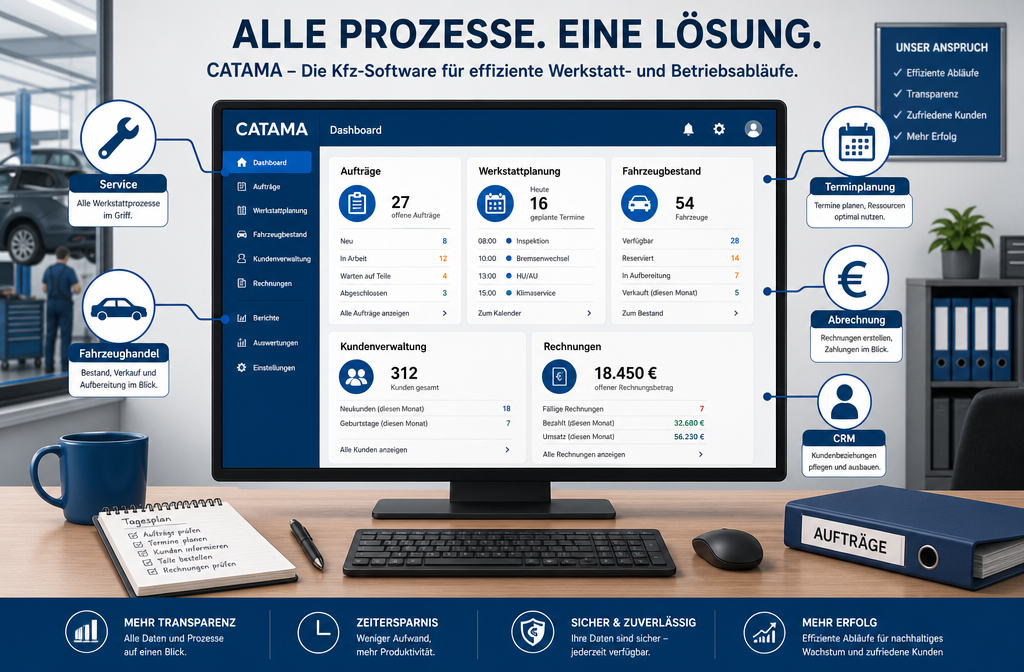
An overview of the main functional areas
| Area | Features |
|---|---|
| Workshop Planning | Schedule, capacity planning, real-time order status |
| Order Management | Receipt, Estimate, Order Creation, Status Tracking |
| Vehicle Management | Vehicle fleet, vehicle history, OCR capture of vehicle data |
| Parts & Bearings | Inventory Management, Order Processing, Tire Warehouse, Goods Receiving |
| Customer Relationship Management (CRM) | Contact information, vehicle assignments, communication history, follow-ups |
| Billing | Quotes, Invoices, E-Invoicing/XRechnung, Cash Book, Differential Taxation |
| Car dealership | Vehicle listings, sales process, document management, handover report |
Here’s a concrete example: A customer calls to schedule an inspection appointment. The front-desk employee immediately sees the vehicle’s history, the last service performed, upcoming inspection and emissions test dates, and any pending recommendations. The appointment is entered into the workshop scheduler, the work order is prepared, and the next morning, the mechanic can see right away which parts need to be ready.
Common mistake: Many businesses use separate tools for scheduling, invoicing, and customer management. This leads to data inconsistencies—information has to be entered multiple times, and data gets lost. CATAMA eliminates this problem because everything is stored in a single database.
What makes CATAMA different from standard workshop software?
The key difference: CATAMA is not just workshop software or just a sales system—it’s both in one. While most solutions on the market specialize in either service or vehicle sales, CATAMA combines the best of both worlds.
Three key differences
- Workshop + Sales = One System. Businesses that both repair and sell vehicles no longer need two separate programs. Vehicle data, customer history, and sales processes are directly linked. If you’re interested in the all-in-one solution for workshops and sales, you’ll find a detailed overview of its features there.
- Cloud-native, not retrofitted for the cloud. CATAMA was built as a cloud solution from the ground up. That means: no local server, automatic updates, and access from anywhere. Older programs were often retrofitted for the cloud, which leads to performance issues and limited functionality.
- Modular design with clear scalability. From sole proprietorships to multi-location businesses—CATAMA grows with you. There are different editions (Professional, Enterprise, Unlimited) tailored to business size and feature set.
Rule of thumb: Choose CATAMA if your business combines a workshop and retail operations under one roof, or if you want to switch from multiple standalone solutions to a single system.
What are the advantages of CATAMA over older workshop management programs?
Older workshop management programs are often based on local installations, use rigid forms, and offer no true integration between the workshop, sales, and CRM. CATAMA overcomes these limitations with a modern, cloud-based architecture.
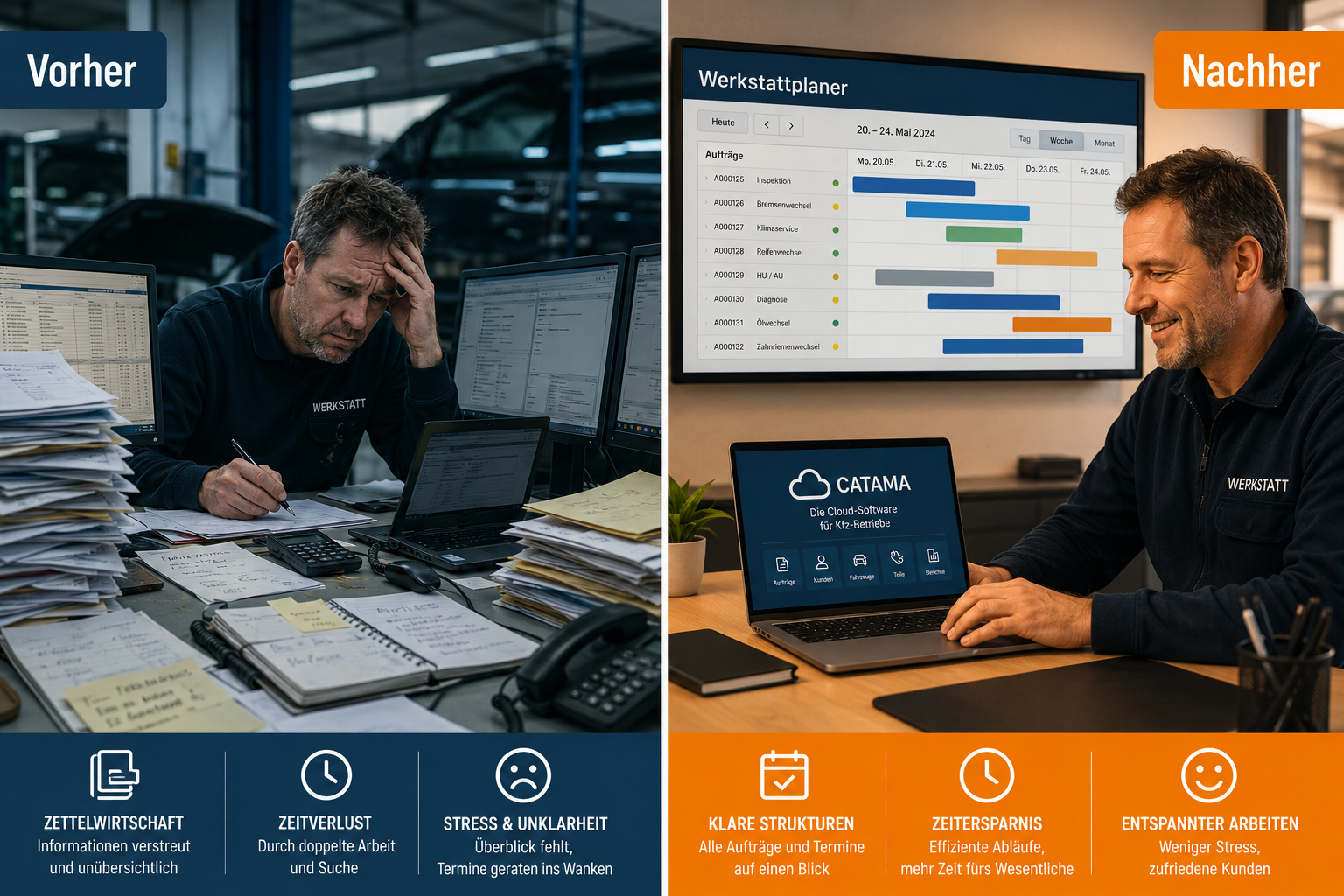
Advantages in a direct comparison
| Criterion | Older programs | CATAMA |
|---|---|---|
| Installation | Locally on a PC/server | Cloud-based, no server required |
| Updates | Manual, often subject to a fee | Automatic, included in the subscription |
| Access | Only on the work computer | From any device with a browser |
| Workshop + Retail | Separate modules or programs | An integrated system |
| Interfaces | Limited, often outdated | Stakis 4.0, Partslink24, Repdoc, and many more |
| Data backup | On one's own initiative | Automatic cloud backup |
| Scaling | Time-consuming; new licenses required | Flexibly customizable via subscription |
One concrete benefit: The Stakis 4.0 integration makes it possible to order parts directly from the order at Stahlgruber—without switching systems, without copying and pasting, and without introducing errors.
Edge Case: Businesses that work exclusively with a single wholesaler and do not engage in any vehicle sales may be able to get by with a simpler solution. However, as soon as multiple suppliers, vehicle sales, or branches come into play, the benefits of integrated software for auto repair shops and dealerships in the automotive industry become clear.
What features does CATAMA offer for customer management and workshop scheduling?
The CRM in CATAMA manages customer contacts, vehicle assignments, communication history, and automatic reminders. The workshop scheduling feature displays capacity, order status, and employee workload in real time.
Customer Relationship Management (CRM)
- Customer File: All contact information, vehicles, past orders, and pending quotes at a glance.
- Automatic reminders: MOT/emissions test appointments, inspection intervals, tire changes, and service campaigns are automatically tracked.
- Follow-up Management: Automated follow-up actions can be triggered after a visit to the shop or the sale of a vehicle.
- Prospect Management: Potential buyers are systematically recorded and matched with the appropriate vehicle.
The linked guide provides more information on ways to build customer loyalty at a car dealership.
Workshop Planning
- Visual Workshop Scheduler: Jobs are assigned to lifts and employees using drag-and-drop.
- Real-time status: Everyone can see whether an order is "in progress," "waiting for parts," or "complete."
- Capacity Overview: Available slots and bottlenecks are immediately visible.
- Time tracking by project: Work hours are directly assigned to the respective project, which simplifies post-project costing.
Typical benefits: At 7:30 a.m., a shop foreman with ten open jobs can check the workshop scheduler to see which parts have arrived, which mechanic is working on which job, and which customers are picking up their vehicles today. Without this overview, the day starts with back-and-forth questions and searching.
For businesses of what size is CATAMA best suited?
CATAMA is suitable for automotive businesses of all sizes—from one-person operations to multi-location companies with multiple teams. The various editions are tailored to different needs.
Which edition is right for which business?
- CATAMA Professional: For medium-sized businesses with a workshop and retail operations that require the full range of features.
- CATAMA Enterprise: For larger organizations with multiple departments or locations.
- CATAMA Unlimited: For businesses that need maximum flexibility and personalized support.
How much does CATAMA cost compared to other workshop software solutions?
CATAMA operates on a monthly subscription model. The exact prices depend on the edition you choose and the range of features included. Current prices and packages are available on the CATAMA product page.
Cost Comparison: What to Look For?
When comparing with other providers such as WerKS+, KSR, or Carly, it’s not just the monthly price that matters:
- Hidden costs: Some providers charge separately for updates, interfaces, or additional workstations.
- Server costs: On-premises solutions require dedicated hardware, maintenance, and backup—which incurs additional costs.
- Training costs: With CATAMA, support is included in the price, depending on the edition.
- Time savings: An integrated solution saves time every day that would otherwise be spent on duplicate data entry when using separate systems.
A common misconception: Companies often compare only the monthly price and overlook the fact that, with a standalone solution, they end up paying extra for accounting software, parts catalog integration, and a CRM system. CATAMA bundles these functions.
What interfaces does CATAMA have with other systems, such as accounting?
CATAMA offers interfaces to parts wholesalers, parts catalogs, accounting systems, and other industry-relevant services. This eliminates the need for manual data transfer between different programs.
Key interfaces
- Stakis / Stahlgruber: Order parts directly from the order.
- Partslink24: Access to manufacturers' original parts catalogs.
- Repdoc: Repair costs and parts information right in the system.
- Accounting: Export functions for common accounting software (e.g., DATEV-compatible formats).
- E-Invoice / XRechnung: Support for legally required electronic invoicing.
- OCR Vehicle Data Capture: Automatic recognition of vehicle data from documents.
A complete list of all available interfaces can be found on the CATAMA website.
How does CATAMA handle implementation and employee training?
The implementation of CATAMA typically involves just a few steps: registration, basic configuration, data migration (if desired), and training. Since CATAMA is cloud-based, there is no need to install it on local computers.
Typical Procedure
- Free trial: You can try CATAMA for free with no obligation.
- Basic configuration: Company information, employees, lifting platforms, and standard services are set up.
- Data Import: Existing customer and vehicle data can be imported.
- Training: CATAMA offers online training and support. Depending on the edition, personal support is included.
- Go-Live: Once setup is complete, you can start working right away.
Timeframe: For a small business, the initial setup is often completed within a few days. Larger businesses with extensive data migration should allow one to two weeks.
What are some common mistakes made when implementing CATAMA software?
The most common mistake is to simply carry over old workflows into the new system without adapting them to the software’s capabilities. CATAMA offers structured workflows—ignoring them means missing out on the majority of the efficiency gains.
The Five Most Common Mistakes
- No clear point of responsibility: At least one person in the company should be designated as the “CATAMA coordinator” to oversee the implementation.
- Skip training: Employees who aren't trained end up using only a fraction of the features and fall back into old habits.
- Do not clean up the data: Before importing old customer data, you should remove duplicates and outdated entries.
- Too much at once: It’s better to start with the core functions (orders, invoices, scheduling) and activate additional modules gradually.
- Do not solicit feedback: After two to four weeks, the team should discuss what is going well and where improvements are needed.
Can CATAMA also be used in motorcycle or truck repair shops?
CATAMA is primarily designed as software for automotive repair shops and dealerships in the passenger car industry. However, its core functions—order management, workshop scheduling, billing, and CRM—can also be used by motorcycle or truck repair shops.
Limitations: Specific features, such as parts catalog interfaces, are designed for passenger car parts suppliers. Businesses that deal exclusively in trucks or motorcycles should check whether the necessary supplier interfaces are available. For mixed operations (passenger cars + motorcycles), CATAMA generally works without any issues, as order and customer management is vehicle-type-independent.
Recommendation: If you're unsure, it's worth trying the free trial to see if it's a good fit for your business.
Is there a free trial version of CATAMA?
Yes. CATAMA offers a free trial period during which you can try out all of its core features. Registration is done online, with no obligation and no need to provide payment information.
You can register for free directly on the CATAMA website. This allows you to determine whether the software is a good fit for your business before making a purchase decision.
Improve Vehicle Sales with the Right Software for Auto Repair Shops and Dealerships in the Automotive Industry
In addition to their repair services, many auto shops also sell used or new vehicles. CATAMA covers the entire sales process—from the initial contact and vehicle presentation to the handover and post-sale support.
What CATAMA Offers to Retailers
- Vehicle Fleet Management: All vehicles with photos, documents, costs, and status at a glance.
- Sales process: Prospects are recorded, quotes are prepared, test drives are documented, and sales are tracked.
- Differential taxation: Accounting methods relevant to the used car trade are included.
- Document Management: Sales contracts, handover reports, and other documents are stored centrally.
The software for the automotive industry provides a detailed overview of how CATAMA structures vehicle sales.
Real-world example: A customer brings his vehicle in for a tire change. During the conversation, he mentions that he is thinking about trading in his car. The employee can immediately show him suitable vehicles from inventory within the same system, create a quote, and mark the customer as a potential buyer in the CRM—without switching systems.
Higher Profits Through Efficiency: How CATAMA Boosts Productivity and Revenue
Less administrative work means more time for productive work. CATAMA reduces manual data entry, prevents duplicate entries, and ensures that sales opportunities aren’t lost.
Tangible efficiency gains
- Fewer media breaks: Data is entered once and is available everywhere.
- Faster invoicing: With just one click, the order is converted into an invoice—including all line items and labor costs.
- Improved capacity utilization: The workshop scheduler shows available capacity, allowing gaps to be filled in a targeted manner.
- Structured sales opportunities: No prospect is lost because follow-ups are triggered automatically.
- Transparency for the team: Every employee knows what’s coming up next, which parts are missing, and which order takes priority.
If you’d like to learn more about this topic, you’ll find additional real-world examples in the guide *How Auto Repair Shops Save Time and Money with CATAMA Software *.
FAQ
What is CATAMA?
CATAMA is cloud-based software designed for automotive repair shops and dealerships in the passenger car industry. It combines workshop management, vehicle sales, CRM, billing, and inventory management into a single system.
Do I need my own server for CATAMA?
No. CATAMA runs entirely in the cloud. All you need is a modern browser and an internet connection.
Can I import my existing customer data into CATAMA?
Yes. CATAMA offers import functions for customer and vehicle data. For large data sets, CATAMA Support can assist with the import process.
Does CATAMA also work on tablets?
Yes. Since CATAMA is browser-based, it can be used on tablets, laptops, and desktop computers—even right in the workshop at the lift.
How often is CATAMA updated?
CATAMA receives regular updates with new features and improvements. Since the software is cloud-based, updates are installed automatically without requiring any action on the part of the user.
Can I use CATAMA just for the repair shop, without the sales module?
Yes. The modules are flexible. If you don't run a car dealership, you can simply leave the sales functions disabled and use only the repair shop functions.
Does CATAMA support e-invoicing / XRechnung?
Yes. CATAMA supports legally required electronic invoicing, including the XRechnung format.
Is phone support available?
Yes, depending on the edition you choose. The higher-tier editions (Enterprise, Unlimited) offer extended support, including personal assistance. A contact and support section is available for all editions.
How long does setup take?
For small businesses, basic setup can be completed in just a few days. Larger businesses with extensive data migration should allow one to two weeks.
Conclusion: Why CATAMA Is the Right Choice for Automotive Businesses
The demands on automotive businesses are increasing: Customers expect prompt communication, transparent pricing, and professional processes. At the same time, administrative burdens related to e-invoicing, data protection, and digital documentation are not getting any lighter. Specialized software for automotive repair shops and dealerships in the passenger car industry, such as CATAMA, is not a luxury but a business necessity.
Next Steps
- Try it out: Use the free trial version and test CATAMA in your own business.
- Compare: Review the different editions and prices, and choose the one that's right for you.
- Planning: Appoint an internal project lead and establish a realistic timeline.
- Schools: Involve all staff members so that the system is put to productive use from day one.
- Optimize: After four weeks, discuss as a team which features are working well and where adjustments might be needed.
For those looking to integrate their workshop and retail operations into a single system, reduce administrative overhead, and strengthen customer loyalty, CATAMA offers a well-designed solution that grows alongside your business.
