
Bis zu 40 Minuten pro Auftrag gehen in Kfz-Werkstätten verloren, wenn Teilenummern, Preise und Bestände manuell zwischen Lieferantenkatalog und Werkstattsoftware übertragen werden. Genau hier setzt die CATAMA mit Schnittstelle (API) zu AutoteilePilotPlus (ATP Plus) Teilekatalog an: Ein direkter Datenkanal, der Artikeldaten ohne Medienbruch in den Auftrag bringt. Was früher Copy-Paste-Arbeit war, läuft heute per Knopfdruck. Werkstätten und Händler im PKW-Segment gewinnen Geschwindigkeit, vermeiden Tippfehler und kalkulieren präziser.
Die folgenden Abschnitte erklären, wie die Integration funktioniert, welche konkreten Prozesse profitieren und worauf bei der Einrichtung zu achten ist.
Key Takeaways
- Die CATAMA mit Schnittstelle (API) zu AutoteilePilotPlus (ATP Plus) Teilekatalog überträgt Artikeldaten, Preise und Verfügbarkeiten direkt in den Werkstattauftrag.
- Manuelle Eingabefehler und Doppelerfassungen entfallen, die durchschnittliche Auftragsbearbeitung beschleunigt sich messbar.
- Die API arbeitet im Hintergrund cloudbasiert und benötigt keine zusätzliche Hardware vor Ort.
- Werkstätten profitieren von präziser Kalkulation, transparenten Margen und einer revisionssicheren Beleglinie.
- Die Integration fügt sich nahtlos in bestehende CATAMA-Workflows von Angebot über Auftrag bis Rechnung ein.
Was die CATAMA-Schnittstelle zu ATP Plus konkret leistet
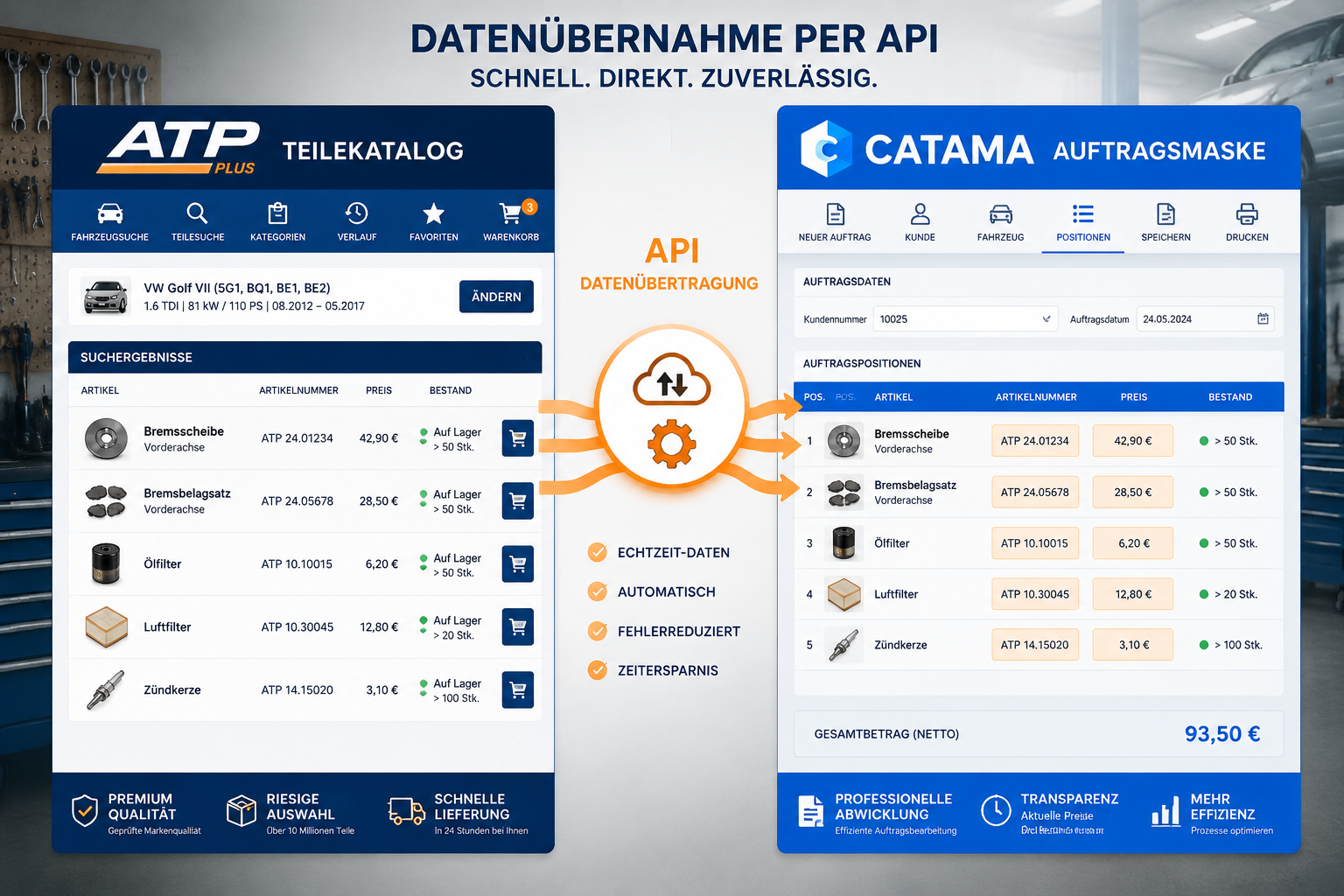
Eine API (Application Programming Interface) ist nichts anderes als eine standardisierte Sprache, in der zwei Programme miteinander kommunizieren. Im Fall der CATAMA mit Schnittstelle (API) zu AutoteilePilotPlus (ATP Plus) Teilekatalog bedeutet das: Die Werkstattsoftware fragt den ATP-Plus-Katalog in Echtzeit ab und übernimmt die zurückgelieferten Artikeldaten direkt in den geöffneten Beleg.
Vom Suchen zum Finden in Sekunden
Statt zwischen Browser-Tab und Werkstattsoftware zu wechseln, startet die Teilesuche direkt aus dem CATAMA-Auftrag heraus. Der Anwender wählt das Fahrzeug, übergibt die fahrzeugspezifischen Daten an ATP Plus und erhält gefilterte Ergebnisse zurück: Artikelnummer, Hersteller, Beschreibung, EK-Preis, UVP, Verfügbarkeit und Lieferzeit. Mit einem Klick landet das Teil als Position im Auftrag.
Das spart nicht nur Zeit, sondern reduziert auch eine der häufigsten Fehlerquellen im Werkstattalltag: falsch abgetippte Teilenummern.
Welche Daten genau übertragen werden
| Datenfeld | Nutzen für die Werkstatt |
|---|---|
| Artikelnummer (OE/IAM) | Eindeutige Identifikation, keine Verwechslungen |
| Bezeichnung | Klare Beschreibung auf Rechnung und Auftrag |
| EK-Preis | Echtzeitkalkulation der Marge |
| UVP / Listenpreis | Basis für Verkaufspreiskalkulation |
| Verfügbarkeit | Zuverlässige Termin- und Liefer-Zusagen |
| Hersteller / Marke | Transparenz für Kunden und Garantie |
| Bilder & Dokumente | Visualisierung in Beratung und Angebot |
Eingebettet in den Gesamtprozess
Die Schnittstelle ist kein isoliertes Feature. Sie ist Teil des durchgängigen Workflows der Auto Werkstatt Software CATAMA Kfz Suite, die von der Kundenanlage über die Fahrzeugerfassung bis zur Rechnung sämtliche Schritte abdeckt. Die ATP-Plus-Anbindung greift dort, wo Teile in den Prozess kommen müssen: in Kalkulationen, Angeboten, Aufträgen und im Bestellwesen.
„Eine gute Schnittstelle erkennt man daran, dass man sie nicht bemerkt. Daten fließen, der Prozess läuft, der Mitarbeiter konzentriert sich auf die Diagnose – nicht auf die Tastatur.“
Warum eine API-Integration manuelle Prozesse schlägt
Viele Betriebe arbeiten heute noch mit einem Mischmodell: Teile werden im Webshop des Lieferanten gesucht, die Daten anschließend in die Werkstattsoftware übernommen – manchmal per Copy-Paste, manchmal per CSV-Import, manchmal komplett manuell. Jeder dieser Schritte kostet Zeit und birgt Fehlerpotenzial.
Fehlerquellen, die mit der API verschwinden
- Zahlendreher bei Teilenummern führen zu falschen Bestellungen
- Veraltete Preise zerstören die kalkulierte Marge
- Falsche Bezeichnungen verwirren Kunden und führen zu Reklamationen
- Manuelle MwSt-Berechnung verursacht Rundungsdifferenzen
- Bestandsdaten ohne Echtzeitabgleich sorgen für Lieferversprechen, die nicht zu halten sind
Die direkte API-Anbindung eliminiert diese Schwachstellen, weil keine menschliche Hand zwischen Quelldaten und Zieldokument greifen muss.
Wirtschaftlicher Effekt auf den Auftragsdurchlauf
Ein praktisches Rechenbeispiel: Eine Werkstatt mit fünf Annahmen pro Tag und durchschnittlich acht Teilen pro Auftrag spart bei einer Ersparnis von nur 30 Sekunden pro Teil rund 20 Minuten täglich – pro Mitarbeiter. Hochgerechnet auf ein Jahr ergibt das einen messbaren Produktivitätsgewinn, der sich direkt im Deckungsbeitrag niederschlägt. Mehr dazu zeigt der Beitrag, wie Werkstätten mit CATAMA Zeit und Geld sparen.
Vergleich: Manueller Workflow vs. API-Integration
| Schritt | Manuell | Mit ATP-Plus-API |
|---|---|---|
| Teil suchen | Externer Browser, Tab-Wechsel | Direkt im Auftrag |
| Daten übernehmen | Abtippen oder Copy-Paste | Ein Klick |
| Preis prüfen | Separater Blick in Konditionen | Sofort sichtbar |
| Bestand prüfen | Telefonat oder Webshop | Live im Beleg |
| Fehlerquote | Erfahrungsgemäß 3-8% | Nahe null |
| Zeit pro Position | 45-90 Sekunden | 5-15 Sekunden |
Funktionsweise der CATAMA mit Schnittstelle (API) zu AutoteilePilotPlus (ATP Plus) Teilekatalog im Detail
Die technische Architektur hinter der Integration ist bewusst schlank gehalten. CATAMA läuft als cloudbasierte Lösung, ATP Plus liefert die Katalogdaten über sichere Webservices. Die Kommunikation findet verschlüsselt statt, eine zusätzliche Installation in der Werkstatt ist nicht erforderlich.
Authentifizierung und Zugangsdaten
Damit die API arbeiten kann, hinterlegt der Werkstattinhaber seine ATP-Plus-Zugangsdaten einmalig in den CATAMA-Einstellungen. Ab diesem Moment greift die Software im Namen des Betriebes auf den Katalog zu – inklusive aller individuell ausgehandelten Konditionen. Das ist wichtig, weil so jeder Betrieb seine eigenen EK-Preise sieht und nicht etwa einen anonymen Listenpreis.
Fahrzeugbezug per HSN/TSN oder VIN
Das Herzstück der Teilesuche ist der Fahrzeugbezug. CATAMA übergibt entweder die HSN/TSN-Schlüsselnummer oder die Fahrgestellnummer (VIN) an ATP Plus. Damit erhält die Werkstatt nur fahrzeugspezifisch passende Teile angezeigt – keine endlosen Trefferlisten, sondern relevante Ergebnisse.
Suchlogik und Filtermöglichkeiten
Innerhalb der Trefferliste lassen sich Ergebnisse weiter eingrenzen:
- Nach Hersteller: Markenpräferenz nach Kundenwunsch
- Nach Qualität: OE, OEM oder Aftermarket
- Nach Verfügbarkeit: Sofort lieferbar oder Bestellartikel
- Nach Preisrahmen: Budgetorientierte Auswahl
Übernahme in Angebot oder Auftrag
Ist das passende Teil gefunden, übernimmt CATAMA es per Klick in den aktuellen Beleg. Dabei wird automatisch:
- Die Position mit allen Daten angelegt
- Der EK-Preis hinterlegt
- Der Verkaufspreis nach Kalkulationsschema berechnet
- Die Mehrwertsteuer korrekt zugeordnet
- Bei Bedarf ein Bestellvorschlag generiert
Wer mehr über die Auftragsverarbeitung wissen möchte, findet weiterführende Informationen unter Aufträge, Rechnungen und Lieferscheine.
Praxisnutzen für Werkstätten und Handel
Theorie ist das eine, Alltagstauglichkeit das andere. Die folgenden Szenarien zeigen, wo die CATAMA mit Schnittstelle (API) zu AutoteilePilotPlus (ATP Plus) Teilekatalog im Tagesgeschäft den Unterschied macht.
Szenario 1: Direktannahme am Tresen
Ein Kunde steht mit seinem Wagen vor der Annahme. Der Service-Mitarbeiter scannt den Fahrzeugschein, CATAMA legt das Fahrzeug an, der Mitarbeiter wählt „Bremsbeläge vorn“ – und sieht sofort alle passenden Artikel mit Preisen und Lieferzeiten. Innerhalb von zwei Minuten steht das Angebot, der Kunde entscheidet, der Auftrag ist im System.
Szenario 2: Werkstattauftrag mit Zusatzarbeiten
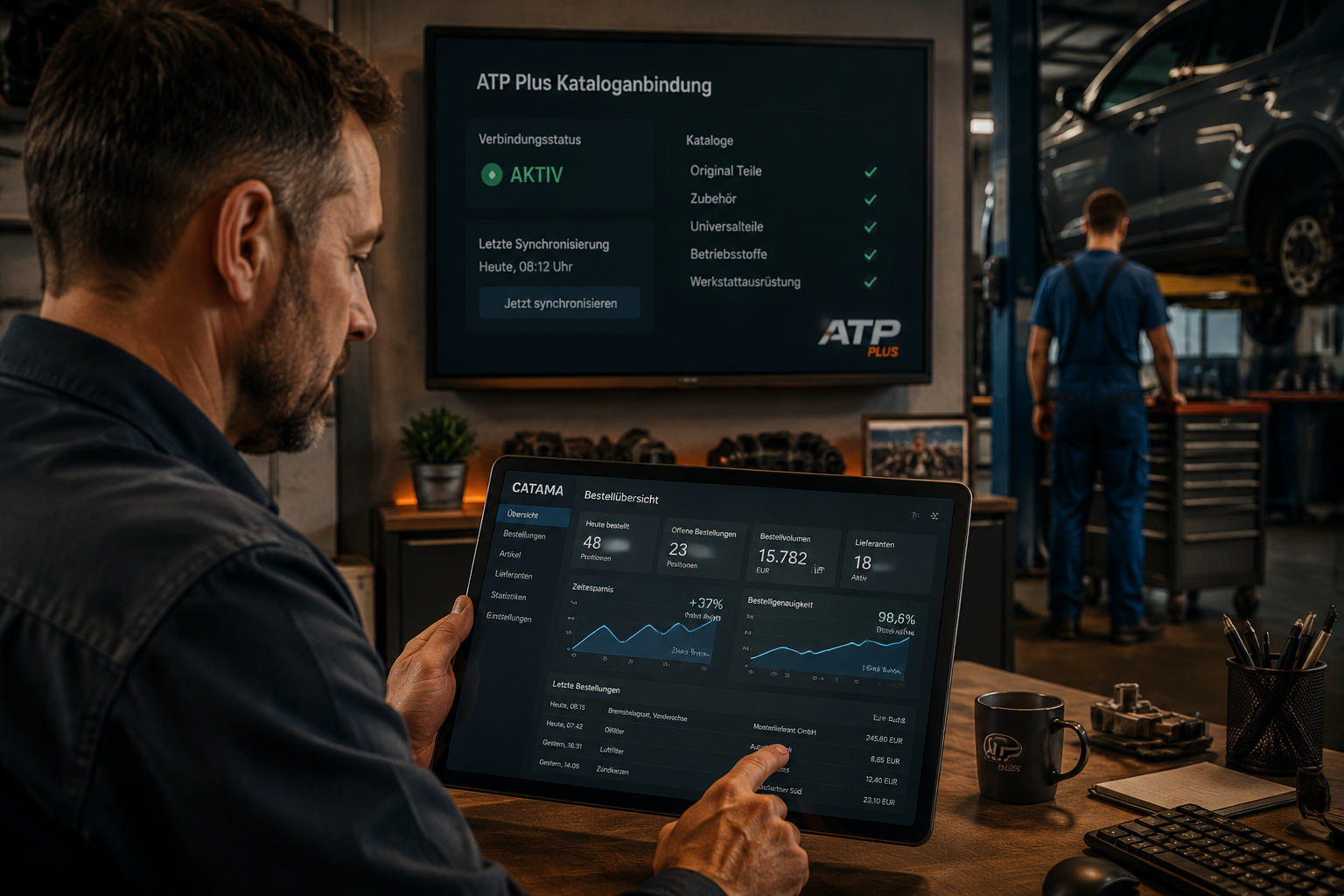
Bei einer Inspektion entdeckt der Monteur einen defekten Stabilisator. Statt das Teil später nachzutragen, ruft er den Auftrag am Werkstatt-Tablet auf, sucht den passenden Stabi über die ATP-Plus-Suche und ergänzt die Position. Die Werkstattleitung sieht in Echtzeit, was sich am Auftrag ändert, und kann den Kunden direkt informieren.
Szenario 3: Kalkulation für einen Großauftrag
Ein Flottenkunde fragt nach einem Angebot für 15 Fahrzeuge mit Reifenwechsel und Inspektion. Über die ATP-Plus-Schnittstelle lassen sich Mengen und Konditionen schnell durchkalkulieren, das Angebot ist in einem Bruchteil der Zeit fertig, die sonst nötig wäre.
Vorteile auf einen Blick
- Schnellere Annahme durch sofortige Teile- und Preisverfügbarkeit
- Höhere Abschlussquote im Angebotsprozess
- Weniger Reklamationen durch korrekte Artikelangaben
- Bessere Margenkontrolle durch tagesaktuelle EK-Preise
- Transparente Bestellungen mit lückenloser Nachverfolgbarkeit
Für Händler ergänzt die Schnittstelle die Automobilsoftware für den Kfz-Handel um genau die Komponente, die im Verkaufsgespräch entscheidet: lieferbare Teile zum aktuellen Preis.
Einrichtung und Inbetriebnahme der Schnittstelle
Die Integration ist so konzipiert, dass auch Betriebe ohne dedizierte IT-Abteilung schnell produktiv arbeiten können. Trotzdem gibt es einige Punkte, die vor dem ersten Einsatz geklärt sein sollten.
Voraussetzungen
- Aktiver CATAMA-Account in einer geeigneten Edition (z. B. CATAMA Professional oder höher)
- Gültiger Kundenvertrag mit AutoteilePilotPlus inkl. Zugangsdaten für die API
- Stabiler Internetzugang in der Werkstatt
- Browserfähige Endgeräte (PC, Notebook, Tablet)
Schrittweise Einrichtung
- Vertraglich klären: API-Zugang bei ATP Plus aktivieren lassen
- Zugangsdaten erhalten: Benutzer, Passwort, ggf. API-Key
- In CATAMA hinterlegen: Unter Einstellungen > Schnittstellen
- Testabfrage durchführen: Beispielfahrzeug suchen, Treffer prüfen
- Kalkulationsregeln festlegen: Welche Aufschläge sollen automatisch gelten?
- Mitarbeiter schulen: Kurze Einweisung zur Bedienung im Auftrag
Der gesamte Prozess ist in der Regel in unter einer Stunde abgeschlossen. Bei Fragen unterstützt der CATAMA-Support bei der Konfiguration.
Empfohlene Kalkulationslogik
CATAMA erlaubt es, für unterschiedliche Warengruppen unterschiedliche Aufschläge zu definieren. Eine typische Konfiguration könnte so aussehen:
| Warengruppe | EK-Beispiel | Aufschlag | VK |
|---|---|---|---|
| Verschleißteile | 50 € | 35 % | 67,50 € |
| Karosserieteile | 200 € | 25 % | 250 € |
| Elektronik | 400 € | 20 % | 480 € |
| Kleinteile | 5 € | 80 % | 9 € |
Diese Werte sind betriebsindividuell und sollten regelmäßig überprüft werden. Der Stundensatzrechner für Kfz-Werkstätten liefert ergänzend eine Basis für die Lohnseite der Kalkulation.
Zusammenspiel mit weiteren CATAMA-Schnittstellen
Selten arbeitet eine Werkstatt mit nur einem Teilelieferanten. Deshalb ist die ATP-Plus-Anbindung Teil eines breiteren Schnittstellen-Ökosystems, das CATAMA bereithält. Werkstätten können parallel weitere Kataloge anbinden und je nach Anwendungsfall den passenden Kanal nutzen.
Multi-Lieferanten-Strategie
Wer beispielsweise zusätzlich Original-Ersatzteile über Mercedes-Benz bezieht, kann die Mercedes-Benz WebParts Warenkorb Import Schnittstelle ergänzend nutzen. Wer mit klassischen Großhändlern arbeitet, findet in der Stakis/Stahlgruber-Schnittstelle eine bewährte Lösung. Eine Übersicht aller verfügbaren Anbindungen bietet die Seite Schnittstellen der CATAMA Software zu Lieferanten und E-Commerce.
Vorteile einer einheitlichen Belegstruktur
Egal aus welcher Quelle ein Teil kommt – im CATAMA-Auftrag werden alle Positionen identisch dargestellt. Kunden sehen eine saubere Rechnung, die Buchhaltung erhält strukturierte Daten, die Auswertung funktioniert über alle Lieferanten hinweg. Das ist gerade für die Anbindung an die Finanzbuchhaltung wichtig, etwa über das Kfz-Rechnungsprogramm mit DATEV-Schnittstelle.
Auswertbarkeit über alle Kanäle
Mit den passenden Reports lässt sich auswerten:
- Welcher Lieferant liefert am schnellsten?
- Wo erzielen wir die besten Margen?
- Welche Warengruppen werden über welchen Kanal beschafft?
- Welche Bestellungen sind noch offen?
Diese Daten sind die Grundlage für strategische Lieferantenentscheidungen.
Datensicherheit und Verfügbarkeit
Bei einer Cloud-basierten Schnittstelle stehen zwei Fragen im Raum: Was passiert mit meinen Daten, und was, wenn das Internet ausfällt?
Verschlüsselte Übertragung
Sämtliche API-Aufrufe zwischen CATAMA und ATP Plus erfolgen über verschlüsselte Verbindungen (HTTPS/TLS). Zugangsdaten werden nicht im Klartext gespeichert. Die Datenschutzrichtlinien der CATAMA Kfz Software regeln, wie mit Kunden- und Betriebsdaten umgegangen wird – konform zur DSGVO.
Hochverfügbares Rechenzentrum
CATAMA betreibt seine Infrastruktur in einem hochverfügbaren Rechenzentrum mit umfassender Datensicherheit. Backups, redundante Systeme und Monitoring sorgen für hohe Ausfallsicherheit. Der aktuelle Betriebszustand ist transparent über den CATAMA System Status einsehbar.
Was tun bei Internetausfall?
Da die API-Abfrage online erfolgt, ist eine Internetverbindung erforderlich. Bestehende Aufträge mit bereits übernommenen Teilen bleiben jedoch im System gespeichert und können auch offline-relevant weiterbearbeitet werden, sobald die Verbindung wiederhergestellt ist. Für kritische Bereiche empfiehlt sich ohnehin ein zweiter Internetzugang (z. B. LTE-Backup).
Häufige Fragen aus der Praxis
Funktioniert die Schnittstelle auch auf dem Tablet?
Ja. CATAMA ist webbasiert und lässt sich auf allen modernen Endgeräten nutzen. Gerade in der Werkstatt am Hebebühnen-Tablet ist die Direktsuche besonders praktisch.
Werden meine individuellen ATP-Plus-Konditionen berücksichtigt?
Ja. Die API gibt die EK-Preise zurück, die für Ihren Account hinterlegt sind. Verhandelte Konditionen, Bonusstufen und Aktionspreise fließen direkt ein.
Was kostet die Schnittstelle?
Die ATP-Plus-Integration ist je nach gewählter CATAMA-Edition Bestandteil des Funktionsumfangs. Details zu Editionen und Konditionen finden sich auf der Seite CATAMA Kfz Software – Lösungen und Preise 2026.
Kann ich mehrere Lieferantenkataloge gleichzeitig nutzen?
Ja, CATAMA unterstützt parallele Anbindungen. So lassen sich z. B. ATP Plus, Partslink24 und WM Kat gleichzeitig betreiben.
Wie hoch ist der Schulungsaufwand?
Erfahrungsgemäß sind Mitarbeiter nach einer kurzen Einweisung (ca. 30 Minuten) in der Lage, die Schnittstelle produktiv zu nutzen. Die Bedienung folgt der gewohnten CATAMA-Logik.
Fazit und nächste Schritte
Die CATAMA mit Schnittstelle (API) zu AutoteilePilotPlus (ATP Plus) Teilekatalog ist mehr als ein technisches Add-on. Sie ist ein Hebel, der den gesamten Annahme- und Auftragsprozess in der Kfz-Werkstatt beschleunigt und qualitativ aufwertet. Wer heute noch zwischen Webshop und Werkstattsoftware hin- und herwechselt, verliert in jedem Auftrag Zeit, Geld und Genauigkeit. Eine direkte API-Anbindung beseitigt diese Reibungsverluste.
Konkrete nächste Schritte für interessierte Betriebe:
- Bestandsaufnahme: Wie viel Zeit fließt aktuell in die manuelle Teile-Erfassung? Wo entstehen Fehler?
- ATP-Plus-Vertrag prüfen: Ist ein API-Zugang vorhanden oder muss er aktiviert werden?
- CATAMA-Edition wählen: Welche CATAMA-Suite passt zu Betriebsgröße und Anforderungen?
- Testphase einplanen: Mit einem definierten Pilotzeitraum die Effekte messen.
- Mitarbeiter einbinden: Das beste System wirkt nur, wenn es im Team akzeptiert ist.
Wer noch Fragen zur konkreten Umsetzung im eigenen Betrieb hat, findet im CATAMA-Kontaktbereich direkte Ansprechpartner. Eine gut konfigurierte Schnittstelle zahlt sich erfahrungsgemäß innerhalb weniger Monate aus – durch eingesparte Zeit, weniger Fehler und eine deutlich entspanntere Auftragsannahme.
