
Seven minutes. That’s how long it took the average service advisor in 2019 to correctly identify, price, and add a single replacement part to an order. Today, with CATAMA and its API interface to the PartsFinder parts catalog, it takes less than 30 seconds. This figure isn’t a marketing promise, but the result of a simple technical reality: Combining vehicle data, parts search, and order processing into a single system saves you money every day.
For auto repair shops and car dealerships, the speed of parts identification has long been a decisive competitive factor. Customers are no longer willing to wait. Margins are shrinking. And every manual data entry step carries the risk of incorrect orders. CATAMA, with its API interface to the PartsFinder parts catalog, eliminates precisely these weaknesses—cleanly, quickly, and fully integrated into the order workflow.
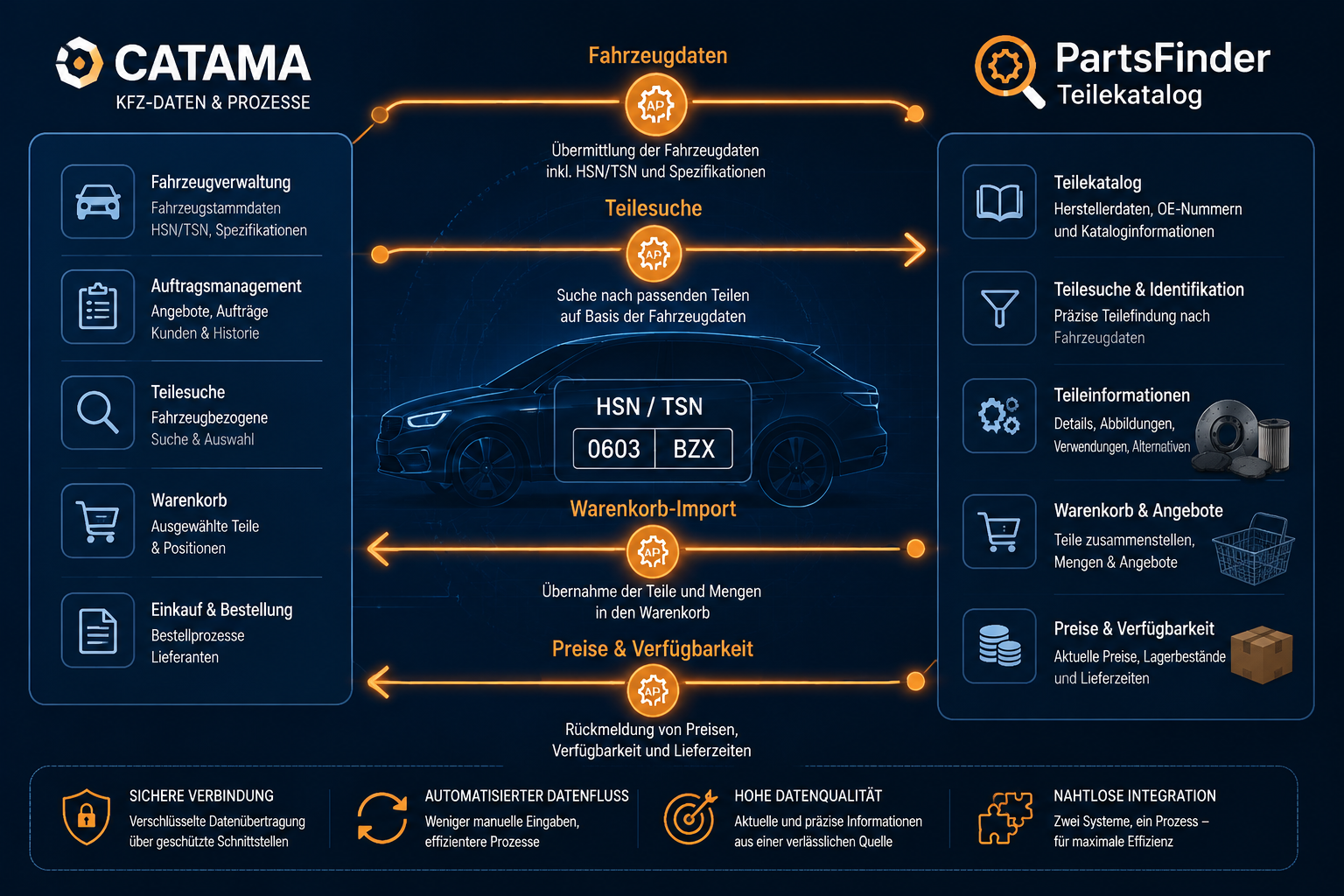
Key Takeaways
- Seamless Integration: The API connects the workshop system directly to the PartsFinder parts catalog—without any disruption.
- Save up to 90% of the time spent on part identification and order creation through direct data transfer.
- Fewer incorrect orders thanks to vehicle-specific parts searches using HSN/TSN and VIN.
- Higher margins thanks to up-to-date prices, availability, and one-step shopping cart import.
- Scalable for any business —from a single-location repair shop to a multi-location car dealership.
What exactly does CATAMA with an interface (API) to the PartsFinder parts catalog mean?
The connection between the CATAMA automotive software and the PartsFinder parts catalog is a direct, database-driven programming interface. It transmits vehicle-specific information from the CATAMA order to PartsFinder in real time and returns the corresponding parts data—including prices, inventory levels, and original part numbers—to the order.
Unlike traditional copy-and-paste workflows, there is no need to manually transfer entire blocks of data. The service advisor remains in the CATAMA system, initiates the part search with a single click, and imports the result as an order line item. The system uses standard protocols such as REST or SOAP for this purpose, depending on the provider’s configuration, and is part of CATAMA Software’s comprehensive range of interfaces.
What data is exchanged?
The API transmits structured information in both directions. That is the key to increased efficiency.
| Direction | Data Type | Example |
|---|---|---|
| CATAMA → PartsFinder | Vehicle Identification | HSN/TSN, VIN, Date of First Registration, Engine Code |
| CATAMA → PartsFinder | Search Parameters | Assembly, Part Number, Manufacturer |
| PartsFinder → CATAMA | Part Data | Item Number, EAN, Description |
| PartsFinder → CATAMA | Business Data | Cost Price, MSRP, Discount Group, Availability |
| PartsFinder → CATAMA | Logistics Data | Delivery Time, Storage Location, Minimum Order Quantity |
"You can tell a good interface by the fact that the user no longer notices it—only the time saved stands out."
Why Integration Is Crucial for Auto Repair Shops in Particular
The auto repair industry is facing a two-pronged challenge: the increasing complexity of modern vehicles and rising expectations regarding response times. Anyone who still switches back and forth manually between the parts catalog, inventory management system, and invoicing software loses several minutes per job—and when multiplied by the daily volume of jobs, that quickly adds up to hours.
CATAMA, with its interface (API) to the PartsFinder parts catalog, solves this problem at the structural level. Instead of using four programs simultaneously, employees work within a single interface. This not only reduces the training time for new staff but also lowers the error rate—an effect that the guide to saving time and money with CATAMA examines in detail.
The Three Biggest Drivers of Efficiency
- Eliminating typos – Item numbers are entered directly, not typed out.
- Avoiding Incorrect Orders – The vehicle-specific search excludes incompatible parts.
- Faster Invoicing – Parts, prices, and quantities are automatically included in the invoice.
Real-world example: Brake service in under three minutes
A specific scenario illustrates the benefits. A customer brings in a VW Golf VII for brake service. The service advisor scans the vehicle registration certificate, and CATAMA automatically retrieves the HSN/TSN codes. With a single click, PartsFinder opens, filtered specifically for this vehicle. Brake rotors, brake pads, and wear sensors are selected—the API transfers all data directly to the CATAMA order. The invoice is ready, and the order is placed with the supplier. Total time: 2 minutes and 40 seconds.
Technical Architecture of the API Integration
The interface is based on a modern, event-driven architecture. It communicates via encrypted HTTPS connections and uses token-based authentication. As a result, it meets the requirements for data security and GDPR compliance, which are now considered standard.
Authentication and Security
Each company receives unique login credentials, which are stored in the CATAMA configuration. All requests are transmitted in encrypted form. Sensitive customer data never leaves the system—only technical vehicle and parts data is transmitted.
Performance and Scalability
The API is designed to handle high query rates. Even when multiple service advisors are working simultaneously, the response time typically remains under one second. This is a crucial factor, especially in businesses that experience peak periods.
| Key figure | Typical value |
|---|---|
| Average response time | < 800 ms |
| Availability (SLA) | 99,5 % |
| Concurrent Requests per Operation | unlimited |
| Data Format | JSON / XML |
Integration into existing workflows
The integration is implemented without any changes to the workshop’s existing IT infrastructure. CATAMA runs as a cloud solution, as does PartsFinder. The API operates in the background. Those who already use other supplier interfaces, such as Stakis/Stahlgruber, WMKAT, or Partslink24, benefit from a consistent user interface across all catalogs.
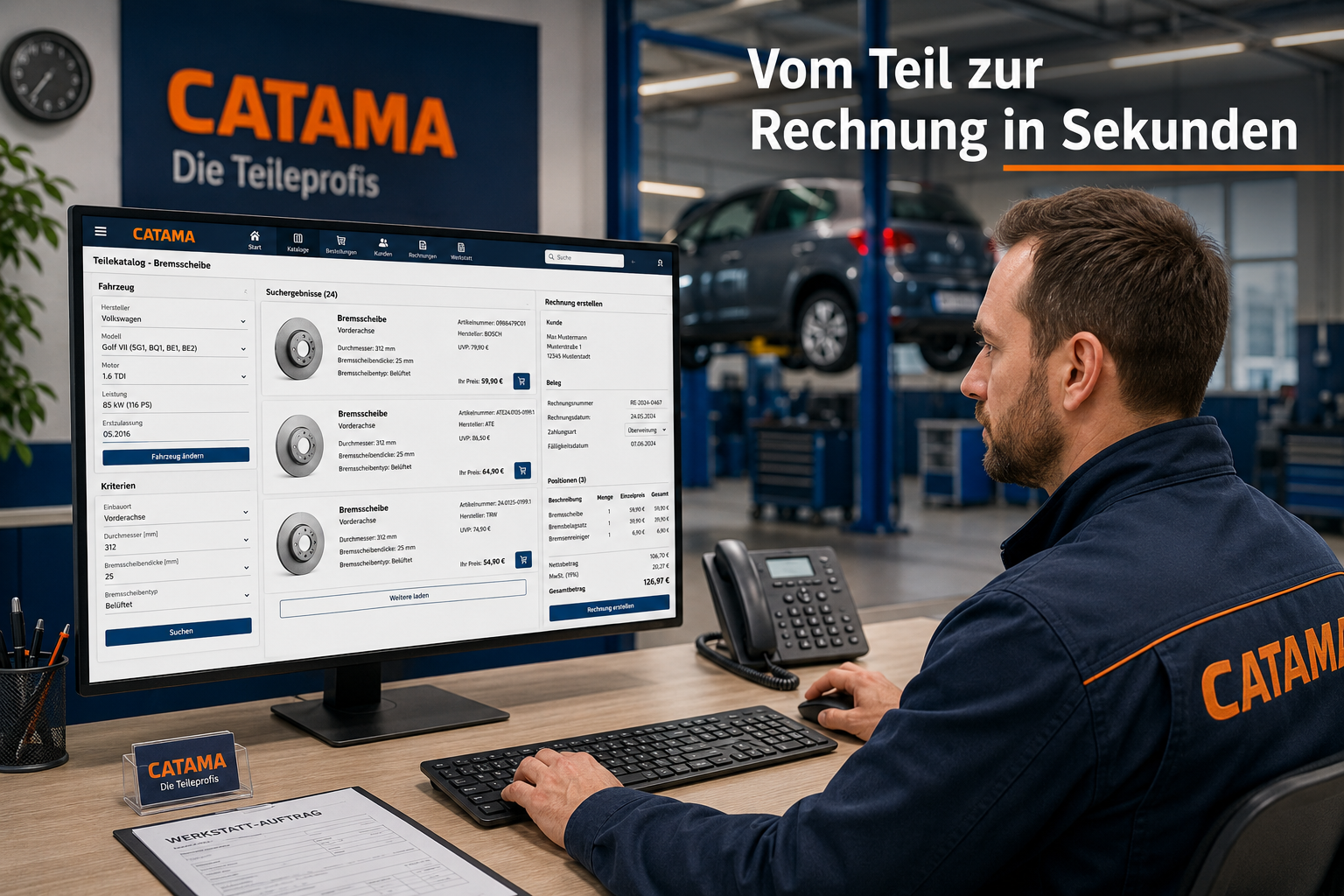
Detailed Benefits of CATAMA with an Interface (API) to the PartsFinder Parts Catalog
The economic benefits of a clean API connection are measurable. Repair shops regularly report double-digit percentage savings in time per job—and that has a direct impact on their hourly billing rate.
Time Savings in Part Identification
A manual search in the traditional parts catalog often takes several minutes per item. With the API integration, this time is reduced to just a few seconds because the vehicle has already been identified and all that remains is to select the appropriate assembly.
Reducing Incorrect Orders
Incorrectly ordered parts are expensive. Returns take time, sometimes cost money, and delay the order. Searching by VIN or HSN/TSN to match the specific vehicle makes ordering the wrong parts virtually impossible—provided the vehicle information in the order is correct.
Up-to-the-minute prices and availability
PartsFinder provides up-to-date wholesale prices and inventory levels in real time. This enables repair shops to calculate estimates accurately and clearly report their margins—without the risk that different prices will suddenly apply on the day the order is placed.
Transparency for the End Customer
Being able to provide customers with the exact cost of parts right at the time of drop-off builds trust. The quality of the drop-off service improves significantly when pricing information is available immediately.
Comparison: With and Without API Integration
| Step | Without an API | With the CATAMA PartsFinder API |
|---|---|---|
| Identify Vehicle | 2–3 min | 10 sec |
| Search for Parts | 4–6 min | 30 sec |
| Check Prices | 1–2 min | automatically |
| Add to Order | 2–3 min | 5 sec |
| Total time per order | 9–14 min | < 1 Min |
Application Scenarios for Workshops and Retail
CATAMA, with its interface (API) to the PartsFinder parts catalog, proves its value in a variety of scenarios. Independent repair shops, brand-authorized service centers, and pure-play car dealerships all benefit—though in different ways.
Independent repair shops
For independent repair shops, quick access to a multi-brand parts catalog is worth its weight in gold. They service vehicles from all manufacturers and need a system that accommodates this diversity without requiring employees to constantly switch between suppliers.
Authorized Dealerships
Dealerships use the API to supplement manufacturer catalogs such as Mercedes-Benz WebParts. PartsFinder often serves as a source for aftermarket parts, wear-and-tear items, and shop supplies—areas where the manufacturer’s original catalog is not always the most cost-effective choice.
Automotive Retail
In the automotive retail industry, integration helps with the preparation of used cars. Wear-and-tear parts, filters, brakes—everything that needs to be replaced before a sale can be quickly costed and ordered. This reduces time on the lot and improves the margin per vehicle sold.
Multi-site operations
Retail chains benefit particularly because the API enables centralized control. Purchasing terms, supplier preferences, and ordering processes can be defined uniformly—the CATAMA Enterprise Suite is designed specifically for such structures.
Implementation and Commissioning
The CATAMA setup, which includes an API interface to the PartsFinder parts catalog, is intentionally kept simple. Most companies are up and running within one business day.
Step by Step Toward Productive Use
- Contractual Activation – The business requires active PartsFinder access and the corresponding API license information.
- Configuration in CATAMA – The login credentials are stored in the configuration section; a test call verifies the connection.
- Customizing workflow interfaces – Standard workflows are enabled; custom fields, such as those for internal item numbers, can be mapped.
- Employee Training – One to two hours are usually sufficient, since the system is operated using the familiar CATAMA interface.
- Go-Live – After a brief period of parallel operation, the interface is fully operational.
Frequently Asked Questions During Implementation
- What happens if the API goes down? CATAMA remains fully functional. Only the automatic part search will be temporarily unavailable; manual entry is still possible.
- Can I use multiple supplier interfaces at the same time? Yes. Many companies combine PartsFinder with other providers and select the most cost-effective source for each order.
- How up-to-date are the prices? PartsFinder provides daily updated pricing directly from the supplier's system.
Cost-Effectiveness: What is the financial benefit of the interface?
The straightforward question that comes at the end of every investment decision is: Is it worth it? A conservative sample calculation illustrates the potential.
Assumptions:
- Service center with 4 service advisors
- 25 orders per day with parts search
- Average time saved per order: 8 minutes
- Billing rate: 110 €/hour
Invoice:
- 25 tasks × 8 min = 200 minutes = 3.33 hours per day
- 3.33 hours × 110 € = 366.67 € per day
- 220 workdays × €366.67 = €80,667 per year
Even if only half of that time is actually converted into additional billable workshop services, this results in a significant five-figure increase in revenue per year. The free hourly rate calculator for auto repair shops provides more information on how to calculate costs accurately.
"The interface pays for itself not in months—it pays for itself in weeks."
Data Protection, Compliance, and Data Security
Data protection is not a marketing pitch, but a legal obligation. CATAMA, which interfaces (via API) with the PartsFinder parts catalog, is designed so that no personal customer data needs to be transmitted to PartsFinder. Only technical vehicle data—HSN/TSN, VIN, and year of manufacture—is transmitted.
All connections are encrypted, and access is logged. CATAMA’s privacy policy transparently documents these measures. To ensure GoBD- and GDPR-compliant archiving, the entire order history is stored in the CATAMA system in an audit-proof manner.
CATAMA with an API to the PartsFinder Parts Catalog Compared to Other Solutions
What sets CATAMA integration apart from similar offerings? Three factors are key:
- Native Integration: The interface is not an add-on, but part of the core system. No third-party providers, no additional login methods.
- Multi-catalog strategy: PartsFinder is one of many sources. Users can decide on a per-order basis where to source the part—whether from PartsFinder, Repdoc, or a manufacturer's original.
- Complete process chain: From part search and ordering to e-invoicing with DATEV integration, everything is handled within a single system.
Overview of the CATAMA Interface Family
| Interface | Scope of Application |
|---|---|
| PartsFinder | Cross-Brand Parts Catalog |
| Stakis/Stahlgruber | Wholesale, Workshop Supplies |
| Repdoc | Repair Data, Labor Rates |
| Partslink24 | Multi-Brand OE Catalog |
| WMKAT | Genuine Parts |
| Mercedes-Benz WebParts | Brand-Specific Original Parts Catalog |
Best Practices for Production Use
Even the best interface is of little use if the team doesn't use it consistently. These practical tips have proven effective:
- Consistently and completely record vehicle data. The cleaner the HSN/TSN data, the more precise the parts search. OCR-assisted vehicle data entry helps with this.
- Preset standard assemblies. Those who regularly sell the same maintenance packages will benefit from predefined search filters.
- Define the supplier strategy. Which catalog is preferred for which part type? Clear rules prevent disputes.
- Train employees regularly. Even experienced users can discover new features in short refresher sessions.
- Measure key metrics. How many orders are processed via the API? What is the success rate? Data reveals opportunities for optimization.
Frequently Asked Questions About CATAMA with an Interface (API) to the PartsFinder Parts Catalog
Do I need any special hardware?
No. CATAMA is a cloud-based solution. All you need is a modern browser and a stable internet connection.
Can I test the interface?
Yes. CATAMA offers a free trial account that allows you to try out the interface using demo data.
How quickly does the equipment pay for itself?
In most businesses, within a few weeks, depending on the order volume.
What happens to my historical data?
Existing orders remain unchanged. The API only affects new transactions.
Conclusion and Next Steps
CATAMA, with its interface (API) to the PartsFinder parts catalog, is more than just a technical feature—it’s a strategic tool for speed, profit margins, and customer satisfaction. Repair shops and dealers that digitize their parts processes save measurable time, avoid errors, and lay the foundation for scalable growth.
Next steps:
- Assess your current situation: How much time do employees currently spend searching for parts and entering data manually?
- Request a trial account: A no-obligation trial will show you the difference in practice.
- Planning an Interface Strategy: Which suppliers and catalogs should be integrated in the future?
- Involving Employees: Successful digital transformation projects succeed only with the team, not in spite of it.
- Take advantage of a consultation: The CATAMA team can help you with custom configuration—it’s worth getting in touch.
Anyone who’s still manually entering part numbers in 2026 is leaving money on the table every day. The API integration with PartsFinder is a building block that helps modern auto repair shops make their processes future-proof—clearly documented, compliant with data protection regulations, and economically measurable.
