
Manuelle Teilenummer-Eingabe kostet einen durchschnittlichen Kfz-Betrieb täglich bis zu 90 Minuten Arbeitszeit. Multipliziert mit den Stundensätzen einer Servicekraft ergibt das pro Jahr eine fünfstellige Summe, die nirgendwo verrechnet wird. Genau hier setzt CATAMA mit Schnittstelle (API) zu Auteon Teilekatalog an: eine direkte, automatisierte Datenverbindung zwischen dem modernen Online-Teilekatalog von Auteon und der CATAMA Kfz-Software. Ergebnis: weniger Tippfehler, schnellere Auftragsdurchläufe und sauberere Kalkulationen.
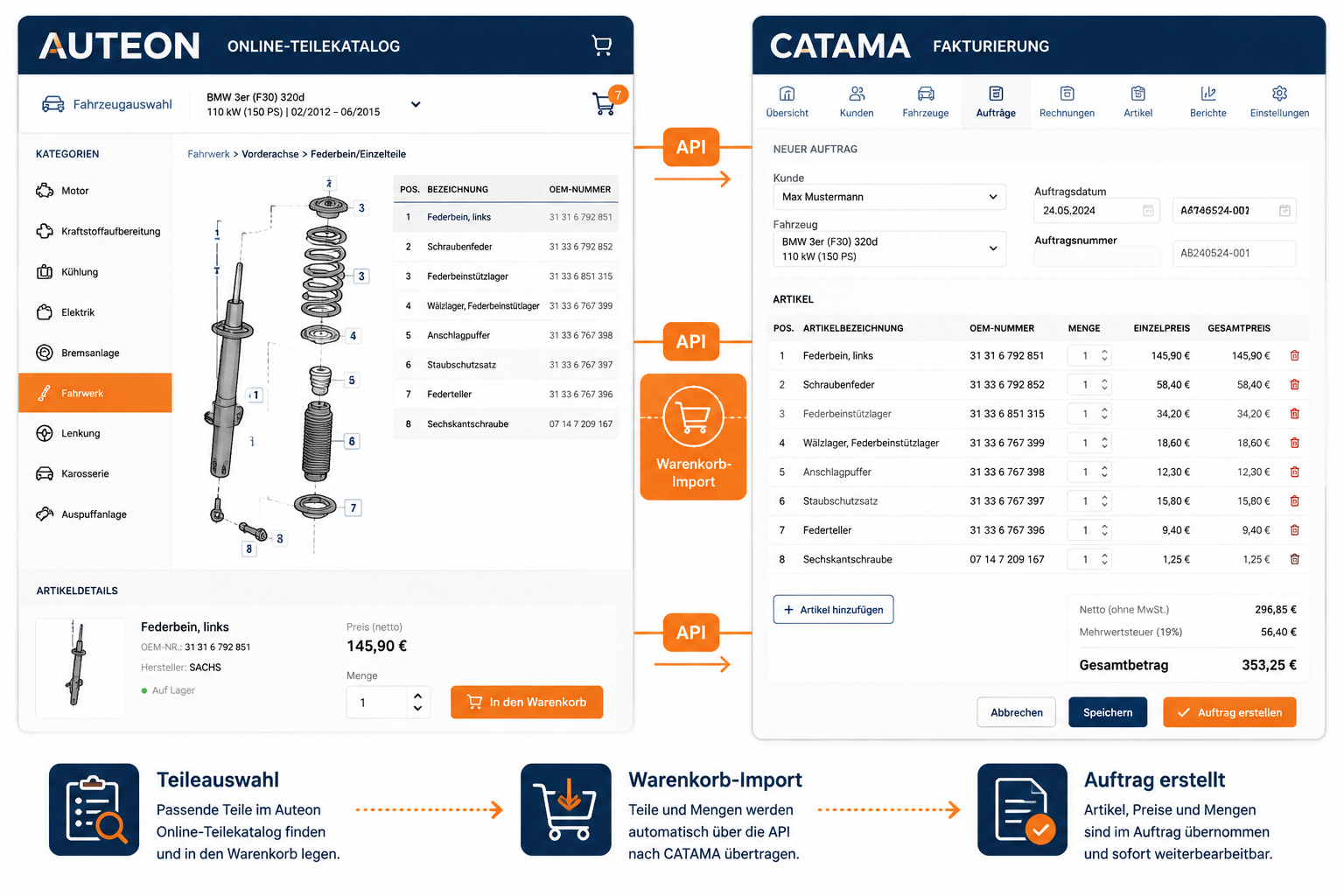
Die folgende Übersicht zeigt, wie die Integration funktioniert, welche konkreten Vorteile sie Werkstätten und Händlern bringt und worauf bei der Einrichtung zu achten ist.
Key Takeaways
- Direkte API-Anbindung: Teile aus dem Auteon Online-Katalog werden per Warenkorb-Import in CATAMA-Aufträge übernommen, ohne manuelles Abtippen.
- Zeitersparnis im Tagesgeschäft: Der digitale Datentransfer reduziert die Erfassungszeit pro Auftrag um bis zu 70 Prozent.
- Fehlerquote sinkt: Originalteilenummern, Bezeichnungen und Einkaufspreise werden 1:1 übernommen – keine Zahlendreher mehr.
- Saubere Marge: Einkaufspreise und Verkaufspreise lassen sich automatisch kalkulieren und in Angebote, Aufträge und Rechnungen überführen.
- Skalierbar: Die Schnittstelle eignet sich für Einzelwerkstätten ebenso wie für mehrere Standorte mit zentraler Faktura.
Was ist Auteon und warum lohnt sich die Anbindung?
Auteon ist eine moderne Online-Plattform für den Bezug von Kfz-Ersatzteilen, die sich an freie Werkstätten, Servicebetriebe und den Teilehandel richtet. Der Katalog umfasst Originalteile (OE) sowie hochwertige Identteile namhafter Hersteller. Über eine zeitgemäße Weboberfläche lassen sich Fahrzeuge identifizieren, passende Teile auswählen und Warenkörbe aufbauen.
Die Stärke von Auteon liegt in der strukturierten Datenbasis: Teilenummern, Hersteller, Beschreibungen, Brutto- und Nettopreise sind sauber kategorisiert. Genau diese Datenstruktur macht eine API-Anbindung an ein Werkstattmanagement-System wie CATAMA so effizient.
Ein Werkstattmitarbeiter recherchiert im Auteon-Katalog die benötigten Bremsbeläge, prüft die Verfügbarkeit, legt sie in den Warenkorb – und übernimmt diesen mit wenigen Klicks in den passenden CATAMA-Auftrag. Manuelles Übertragen von 12-stelligen Teilenummern entfällt vollständig.
„Eine API ist nur so gut wie der Workflow, den sie ermöglicht. Bei CATAMA und Auteon greifen beide Systeme so ineinander, dass der Anwender den Wechsel kaum bemerkt.“
CATAMA mit Schnittstelle (API) zu Auteon Teilekatalog: So funktioniert die Integration
Die technische Grundlage der Verbindung ist eine REST-basierte API (Application Programming Interface), die einen sicheren Datenaustausch zwischen Auteon und CATAMA ermöglicht. Für den Anwender bleibt diese Technik unsichtbar – im Vordergrund steht ein durchgängiger Prozess.
Der Ablauf im Tagesgeschäft
- Fahrzeug in CATAMA anlegen oder öffnen – inklusive HSN/TSN, Erstzulassung und Kilometerstand.
- Wechsel in Auteon – idealerweise mit vorausgefüllten Fahrzeugdaten, sodass die Teilesuche sofort startklar ist.
- Teile recherchieren und in den Warenkorb legen – im gewohnten Auteon-Interface.
- Warenkorb-Import in CATAMA – per Schnittstelle werden alle Positionen mit Teilenummer, Bezeichnung, Menge und Einkaufspreis übernommen.
- Kalkulation und Faktura in CATAMA – Aufschläge, Stundenarbeit und Zusatzleistungen werden ergänzt, Rechnung oder Angebot wird erzeugt.
Wer den vollständigen Prozess von der Annahme bis zur Rechnung verstehen möchte, findet eine Übersicht in diesem Beitrag zu allen Geschäftsprozessen im Kfz-Gewerbe.
Welche Daten werden übergeben?
| Datenfeld | Quelle Auteon | Ziel in CATAMA |
|---|---|---|
| Teilenummer (OE/IAM) | Katalogposition | Artikelnummer im Auftrag |
| Bezeichnung | Produktbeschreibung | Positionstext |
| Menge | Warenkorb | Mengenfeld |
| Einkaufspreis netto | Lieferantenpreis | EK-Preis |
| UVP / Listenpreis | Katalog | Basis für Verkaufspreis-Kalkulation |
| Hersteller | Produktstamm | Lieferant/Marke |
| Verfügbarkeit | Lagerstatus | Hinweisfeld |
Dadurch entstehen lückenlose Positionsdaten, die für Kalkulation, Buchhaltung und spätere Garantieabwicklung gleichermaßen verwendbar sind.
Konkrete Vorteile für Werkstätten und Handel
Die wirtschaftliche Wirkung einer sauberen API-Anbindung wird oft unterschätzt. Drei Bereiche profitieren besonders deutlich.
1. Zeitgewinn an der Direktannahme
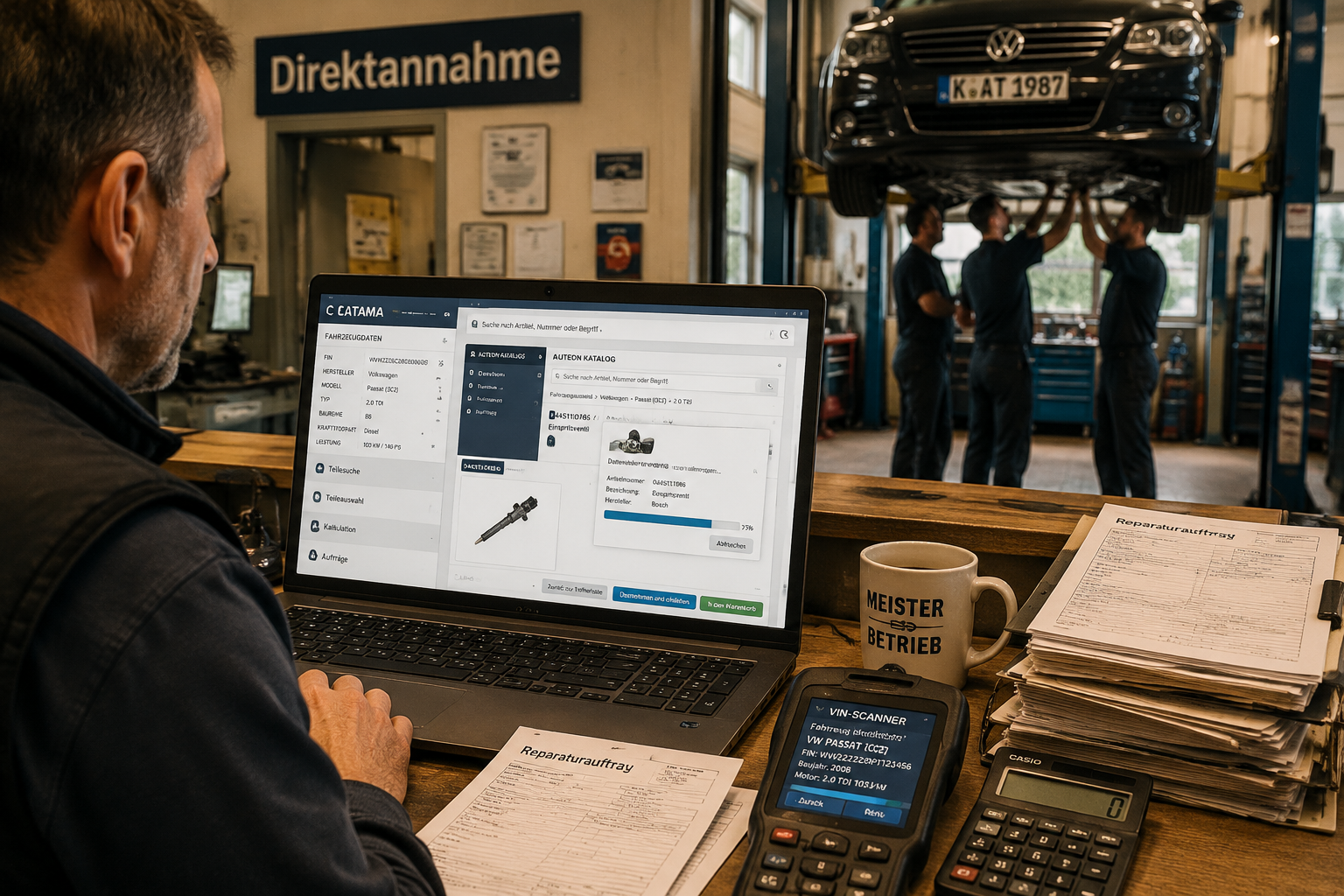
Die Direktannahme im Kfz-Service ist der Moment, in dem Kundenerwartung und betriebliche Effizienz aufeinandertreffen. Wenn der Servicemitarbeiter direkt am Fahrzeug die Teile recherchiert, in den Warenkorb legt und in den CATAMA-Auftrag überführt, kann das Angebot oft schon vor Verlassen der Annahmehalle erstellt werden.
2. Höhere Datenqualität
Manuelle Eingaben sind die häufigste Fehlerquelle in der Werkstattadministration. Eine vertauschte Ziffer in der Teilenummer bedeutet:
- falsche Bestellung
- Verzögerung der Reparatur
- Rückversandkosten
- unzufriedene Kunden
Durch den API-Import sind diese Fehlerketten praktisch ausgeschlossen.
3. Bessere Kalkulation und Marge
Der Einkaufspreis wandert direkt in CATAMA und steht für automatische Aufschlagskalkulationen zur Verfügung. Damit lassen sich Stundenverrechnungssätze und Teile-Margen sauber trennen. Wer den optimalen Stundensatz noch nicht kennt, kann den kostenlosen Stundensatzrechner für Kfz-Werkstätten nutzen.
Voraussetzungen und Einrichtung
Damit die Schnittstelle in der Praxis reibungslos läuft, müssen einige Grundvoraussetzungen erfüllt sein.
Technische Voraussetzungen
- Aktiver Auteon-Account mit API-Zugriffsrechten
- CATAMA-Lizenz in einer Edition mit Schnittstellenmodul (z. B. CATAMA Professional oder CATAMA Enterprise)
- Stabile Internetverbindung (die API kommuniziert in Echtzeit)
- Aktuelle Browser-Version für die Auteon-Weboberfläche
Organisatorische Voraussetzungen
Vor dem Going-Live sollten folgende Punkte geklärt sein:
- Artikelgruppen und Aufschlagsmatrix in CATAMA sind definiert.
- Lieferanten- und Herstellerstammdaten sind angelegt – mehr dazu in der Lieferanten- und Hersteller-Verwaltung.
- Benutzerrechte sind gesetzt: Wer darf Teile importieren, wer darf Preise ändern?
- Standardprozess für die Teile-Übernahme ist im Team kommuniziert.
Schritt-für-Schritt-Aktivierung
| Schritt | Tätigkeit | Verantwortlich |
|---|---|---|
| 1 | Auteon-Zugangsdaten anfordern | Werkstattleitung |
| 2 | API-Token in CATAMA hinterlegen | Administrator |
| 3 | Testimport mit Probefahrzeug | Service / IT |
| 4 | Aufschläge und Mappings prüfen | Buchhaltung |
| 5 | Schulung der Mitarbeiter | Werkstattleitung |
| 6 | Produktivstart | gesamtes Team |
Die Einrichtung dauert in der Regel weniger als einen halben Arbeitstag. Bei Fragen unterstützt das CATAMA Support-Team.
Vergleich: Auteon-Schnittstelle und weitere CATAMA-Integrationen
CATAMA setzt seit Jahren auf ein offenes Schnittstellen-Konzept. Die Auteon-Anbindung reiht sich in eine Reihe etablierter Integrationen ein.
| Schnittstelle | Hauptnutzen | Zielgruppe |
|---|---|---|
| Auteon | Moderner Online-Teilekatalog, schneller Warenkorb-Import | freie Werkstätten, Handel |
| Partslink24 | OE-Teile mehrerer Hersteller | Markenbetriebe |
| Repdoc | Reparaturkosten und Arbeitswerte | Karosserie, Kalkulation |
| WMKAT | Wessels+Müller Katalog | Freie Werkstätten |
| Stakis / Stahlgruber | Großhandel | Werkstätten mit Stahlgruber-Bezug |
| Mercedes-Benz WebParts | Original-Mercedes-Teile | Mercedes-Spezialisten |
Eine vollständige Übersicht aller verfügbaren Anbindungen bietet die Seite zu den CATAMA-Schnittstellen.
Praxisbeispiel: Vom Werkstatttermin zur Rechnung
Ein typischer Servicefall zeigt, wie sich die Auteon-Anbindung im Alltag auszahlt:
Ausgangslage: Ein Kunde bringt einen VW Golf VII mit Verdacht auf defekte Bremsen. Termin: Mittwoch, 09:30 Uhr.
- 09:30 Uhr – Fahrzeugannahme. Der Fahrzeugschein wird per OCR-Scanner eingelesen, das Fahrzeug ist in CATAMA angelegt.
- 09:35 Uhr – Sichtprüfung an der Hebebühne. Bremsbeläge und Scheiben vorne müssen ersetzt werden.
- 09:45 Uhr – Recherche in Auteon mit den übergebenen Fahrzeugdaten. Originalqualität-Beläge und passende Scheiben werden in den Warenkorb gelegt.
- 09:48 Uhr – Warenkorb-Import in den CATAMA-Auftrag. Alle Positionen erscheinen mit EK, UVP und Lieferzeit.
- 09:50 Uhr – Stundensätze und Arbeitswerte ergänzen, Angebot ausdrucken oder per E-Mail versenden.
- 09:55 Uhr – Kunde unterschreibt im Tablet, der Auftrag ist freigegeben.
Was früher 30 bis 45 Minuten gedauert hat, ist in unter 30 Minuten erledigt – inklusive sauberer Dokumentation.
Auswirkungen auf Buchhaltung und E-Rechnung
Saubere Stammdaten sind die Grundlage für alle nachgelagerten Prozesse. Wenn die Teilenummern und EK-Preise via API korrekt in CATAMA landen, profitieren auch:
- Lagerbuchhaltung: Bestände werden automatisch geführt – siehe Kfz-Warenwirtschaft.
- Ausgangsrechnung: Positionen erscheinen 1:1 in der Rechnung – ideal für die E-Rechnung im Kfz-Betrieb.
- DATEV-Export: Buchungssätze werden korrekt zugeordnet – Stichwort DATEV-Schnittstelle.
- Auswertungen: Welche Teile bringen welche Marge? Welche Lieferanten liefern pünktlich?
Damit erfüllt die Auteon-Integration nicht nur einen operativen Zweck, sondern stärkt auch die kaufmännische Steuerung des Betriebs.
Häufige Bedenken – und was wirklich dahintersteckt
„Brauchen wir wirklich eine Schnittstelle, wenn der Auteon-Katalog ohnehin im Browser läuft?“
Ja – denn der entscheidende Engpass ist nicht die Teilesuche, sondern die Datenübernahme. Ohne API muss jede Position einzeln abgetippt werden. Das kostet Zeit und produziert Fehler.
„Was passiert mit unseren bestehenden Preislisten?“
Bestehende Aufschlagsmatrizen bleiben unverändert. Die Auteon-API liefert nur die Basisdaten (Teilenummer, EK, UVP). Wie daraus der Verkaufspreis wird, entscheidet die CATAMA-Konfiguration.
„Ist die Schnittstelle DSGVO-konform?“
Die API-Kommunikation findet verschlüsselt statt. Es werden keine personenbezogenen Kundendaten an Auteon übertragen, sondern lediglich Fahrzeug- und Teiledaten. Weitere Details bietet die Seite zu Rechenzentrum und Datensicherheit.
„Können wir bei Bedarf wieder ohne API arbeiten?“
Selbstverständlich. Die Auteon-Schnittstelle ist ein optionales Modul. Der manuelle Weg bleibt jederzeit möglich – auch parallel zu anderen Lieferantenanbindungen.
Tipps für den Roll-out im Betrieb
Damit die neue Arbeitsweise akzeptiert wird, lohnt ein strukturierter Einführungsplan:
- Pilotnutzer benennen: Ein bis zwei Mitarbeiter testen die API zwei Wochen lang intensiv.
- Quick-Reference-Karte mit den fünf wichtigsten Klickschritten an jedem Arbeitsplatz auslegen.
- Wöchentliches Kurz-Feedback in den ersten vier Wochen, um Hürden zu identifizieren.
- Erfolgs-Kennzahlen definieren: Wie viele Aufträge pro Tag, welche Durchlaufzeit, welche Fehlerquote?
- Schulung wiederholen, sobald neue Mitarbeiter ins Team kommen.
Wer den breiteren Hintergrund zur Software sucht, findet weiterführende Informationen unter Wie Kfz-Werkstätten mit CATAMA Software Zeit und Geld sparen.
Wirtschaftlichkeit: Eine kurze Beispielrechnung
Ein mittelgroßer Betrieb mit zwölf Aufträgen pro Tag und durchschnittlich fünf Teilepositionen je Auftrag:
- 60 Positionen täglich × 45 Sekunden manueller Eingabezeit = 45 Minuten pro Tag
- Bei 220 Arbeitstagen ergibt das 165 Stunden im Jahr
- Bei einem internen Kostensatz von 60 Euro: 9.900 Euro jährliche Erfassungskosten
Selbst wenn die API-Schnittstelle nur 70 Prozent dieser Zeit einspart, bleiben rund 6.900 Euro Einsparung pro Jahr – ganz ohne Berücksichtigung von Fehlerkosten und Imageschäden durch verzögerte Aufträge.
Conclusion: Der nächste Schritt
Die Verbindung von CATAMA mit Schnittstelle (API) zu Auteon Teilekatalog ist mehr als ein technisches Feature – sie ist ein Hebel für nachhaltige Prozessverbesserung. Wer heute manuell Teilenummern abtippt, verschenkt Zeit, Geld und Datenqualität. Wer den API-Weg geht, gewinnt Effizienz an der Annahme, Margensicherheit in der Kalkulation und Transparenz in der Buchhaltung.
Konkrete nächste Schritte:
- Bestandsaufnahme: Wie viele Aufträge pro Tag laufen aktuell durch den Betrieb? Wo entstehen Zeitfresser?
- Edition prüfen: Welche CATAMA-Edition passt zu Ihrem Betrieb? Brauchen Sie die volle Bandbreite oder reicht eine schlankere Suite?
- Auteon-Zugang sichern: Account und API-Token bei Auteon anfragen.
- Pilotphase starten: Mit einem definierten Team und klaren KPIs testen.
- Optimierung verstetigen: Erfolge messen, Workflows iterativ verbessern, weitere Schnittstellen einbinden.
Wer den Schritt in eine vollständig digitalisierte Werkstattadministration gehen möchte, findet im CATAMA-Support den passenden Ansprechpartner – von der ersten Beratung bis zum Go-Live. Die nächste Generation der Werkstattorganisation arbeitet vernetzt, datenbasiert und papierarm. Die Auteon-Anbindung ist dafür ein zentraler Baustein.
