
Sieben Minuten. So lange dauert in vielen Werkstätten die manuelle Suche nach einem einzigen Ersatzteil – inklusive Kataloglogin, Fahrzeugauswahl, Preisabgleich und Übertragung in den Auftrag. Bei 30 Aufträgen pro Tag summiert sich das auf über drei Stunden reine Klickarbeit. Genau hier setzt CATAMA mit Schnittstelle (API) zu easypart Teilekatalog an: Die direkte Anbindung an die Teilerecherche von app.easypart.app verkürzt diesen Prozess auf Sekunden und übernimmt Artikelnummern, Preise sowie Bezeichnungen direkt in den CATAMA Auftrag.
Für Kfz-Werkstätten und den PKW-Handel bedeutet das nicht nur Zeitersparnis. Es bedeutet sauberere Daten, weniger Fehlbestellungen und eine durchgängige Prozesskette von der Annahme bis zur Rechnung.
Key Takeaways
- Die CATAMA mit Schnittstelle (API) zu easypart Teilekatalog bindet die Online-Teilerecherche von easypart direkt in die CATAMA Kfz-Software ein.
- Artikeldaten, Preise und Mengen werden ohne manuelles Abtippen in Aufträge, Angebote oder Rechnungen übernommen.
- Werkstätten reduzieren Suchzeiten, Bestellfehler und Doppelerfassungen spürbar.
- Die Schnittstelle ergänzt bestehende CATAMA Integrationen zu Lieferanten wie WMKat, Stakis, Partslink24 und Mercedes-Benz WebParts.
- Die Anbindung ist Teil der modularen CATAMA Suite und lässt sich passend zur Betriebsgröße aktivieren.
Warum eine API-Anbindung zum Teilekatalog heute zum Standard gehört
Die Anforderungen an Kfz-Betriebe sind in den letzten Jahren deutlich gestiegen. Kundinnen und Kunden erwarten schnelle Kostenvoranschläge, transparente Preise und kurze Standzeiten. Gleichzeitig steigt die Teilevielfalt durch neue Antriebe, Assistenzsysteme und Modellvarianten. Wer Teile noch per Telefon, Fax oder durch Wechsel zwischen mehreren Browserfenstern recherchiert, verliert Zeit – und Marge.
Eine API-Schnittstelle löst dieses Problem strukturell. Statt Daten manuell aus einem Katalog in die Werkstattsoftware zu übertragen, kommunizieren beide Systeme automatisiert miteinander. Die CATAMA mit Schnittstelle (API) zu easypart Teilekatalog ist genau auf diesen Anwendungsfall zugeschnitten: Sie verbindet die zentrale Auftrags- und Faktura-Plattform mit einer modernen Online-Teilerecherche.
Die Probleme manueller Teileerfassung
In der täglichen Praxis treten immer wieder dieselben Reibungspunkte auf:
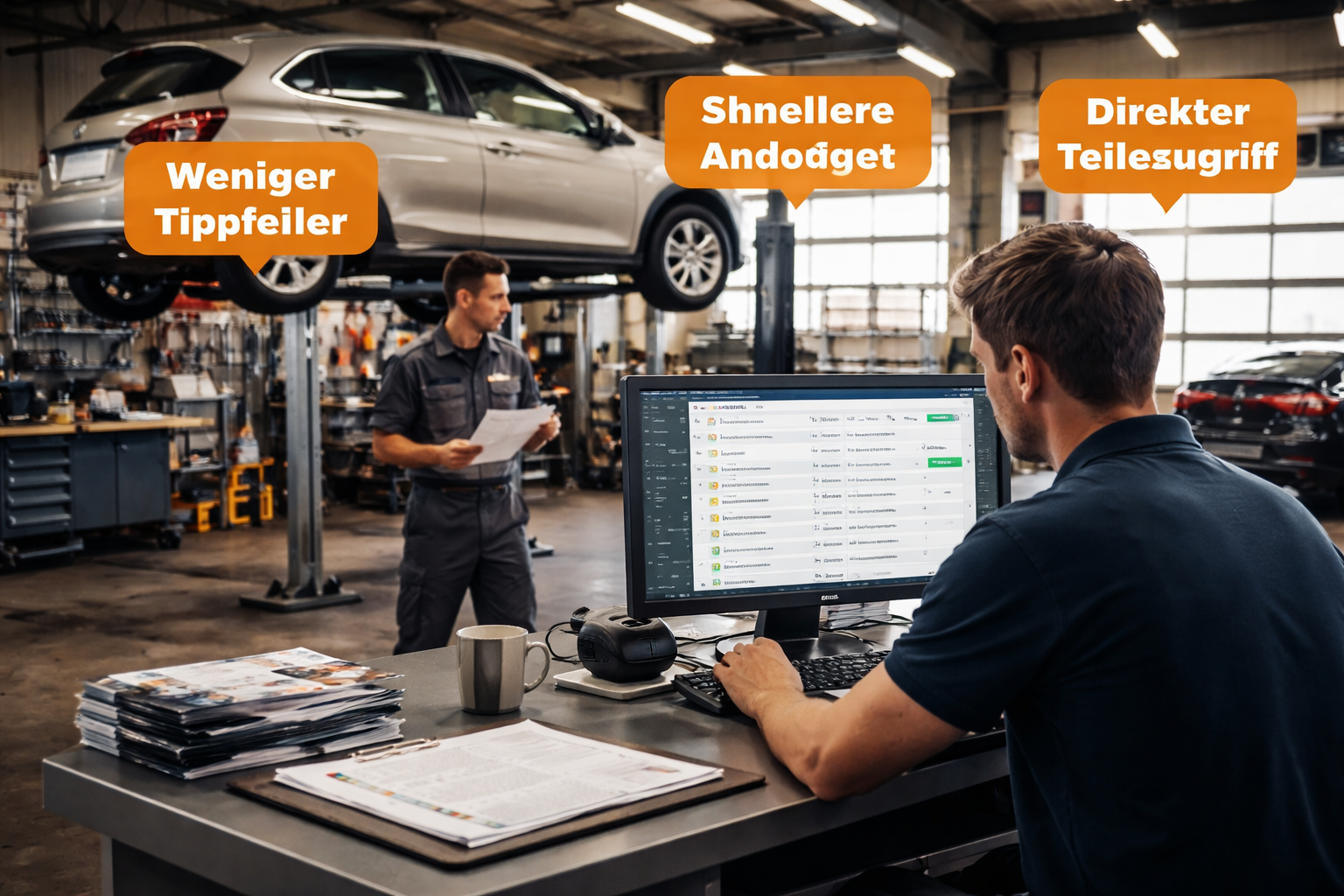
- Tippfehler bei langen Artikelnummern führen zu falschen Bestellungen.
- Veraltete Preise im Kalkulationsblatt mindern die Marge.
- Doppelerfassung in Katalog und Werkstattsoftware bindet Personal.
- Fehlende Nachvollziehbarkeit, welcher Mitarbeiter welche Position erfasst hat.
- Medienbrüche zwischen Browser, PDF, Telefon und Software.
Eine direkte Anbindung an easypart eliminiert diese Schwachstellen, weil die Teiledaten strukturiert und in Echtzeit in CATAMA ankommen.
Was leistet CATAMA mit Schnittstelle (API) zu easypart Teilekatalog konkret?
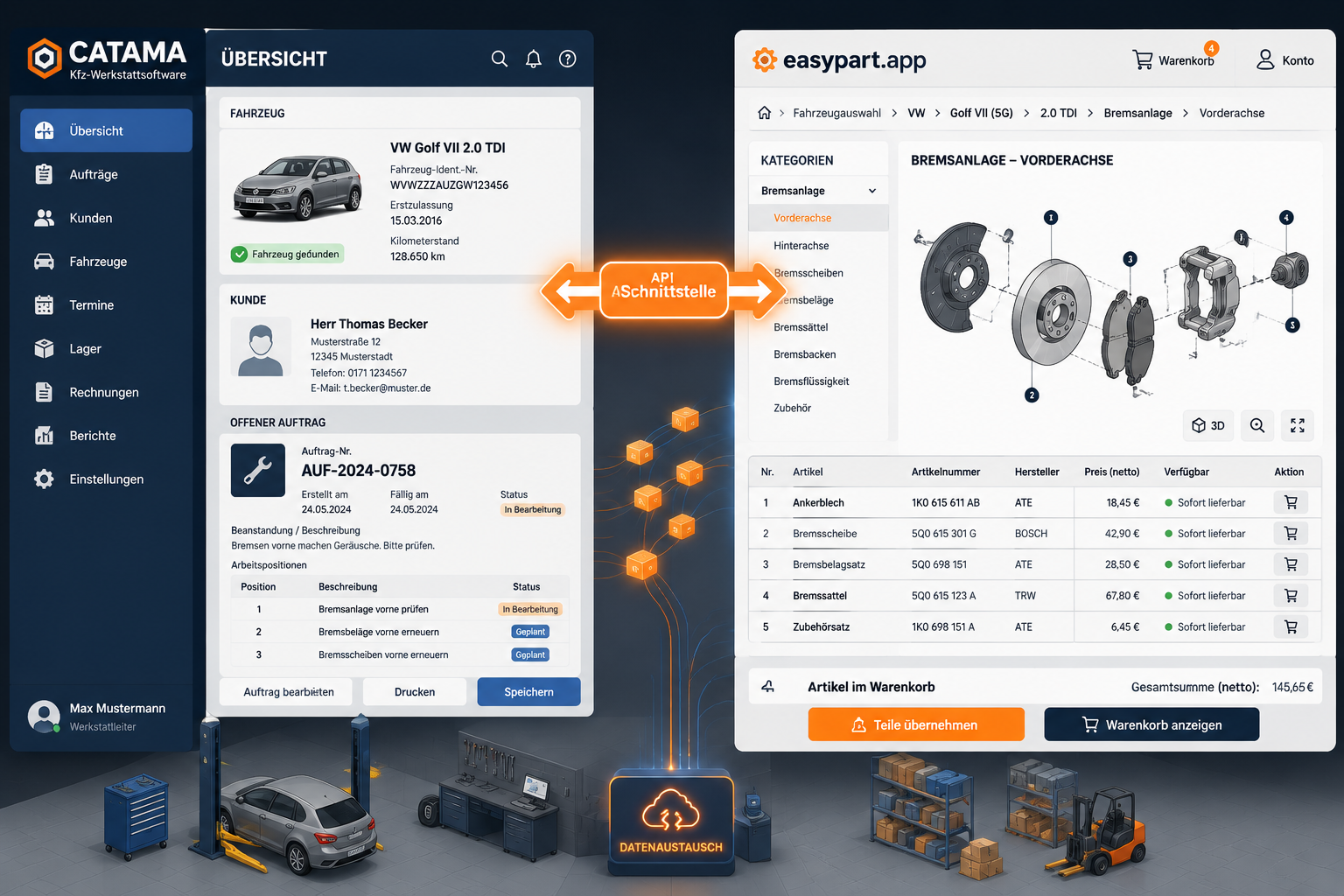
Die Schnittstelle ist mehr als ein einfacher Datenimport. Sie ist eine zweiseitige Verbindung, die Recherche, Auswahl und Übernahme verzahnt. Die Bedienung bleibt dabei in der gewohnten CATAMA Oberfläche, sodass keine zusätzliche Software erlernt werden muss.
Funktionsumfang im Überblick
| Funktion | Nutzen für die Werkstatt |
|---|---|
| Fahrzeugkontext-Übergabe | easypart erkennt das Fahrzeug aus dem CATAMA Auftrag automatisch |
| Artikelübernahme | Artikelnummer, Bezeichnung, Preis und Menge fließen in den Auftrag |
| Warenkorb-Import | Mehrere Positionen gleichzeitig übertragen |
| Preisaktualisierung | EK- und VK-Preise basierend auf aktuellen Katalogdaten |
| Bilder & Beschreibungen | Visuelle Bestätigung des richtigen Teils vor der Bestellung |
| Historie | Nachvollziehbare Zuordnung zu Auftrag und Mitarbeiter |
Typischer Ablauf in der Praxis
- Annahme eines Fahrzeugs in CATAMA, ggf. unterstützt durch die intelligente Fahrzeugerfassung per OCR.
- Öffnen des Auftrags und Aufruf der easypart-Anbindung direkt aus der Positionserfassung.
- easypart erhält den Fahrzeugkontext (z. B. über HSN/TSN) und zeigt passende Teile.
- Der Mitarbeiter wählt Teile aus, prüft Bilder und Preise und legt sie in den Warenkorb.
- Per Klick werden alle Positionen strukturiert in den CATAMA Auftrag übernommen.
- Der Auftrag wird wie gewohnt kalkuliert, freigegeben und in eine Rechnung überführt.
„Wer einmal mit einer durchgängigen API-Anbindung gearbeitet hat, kehrt nicht mehr zur manuellen Suche zurück. Die Zeitersparnis ist messbar – die Fehlerquote ebenso.“
Vorteile für Kfz-Werkstätten und den PKW-Handel
Die Vorteile lassen sich in vier Dimensionen bündeln: Zeit, Qualität, Marge und Kundenerlebnis. Jede dieser Dimensionen wirkt direkt auf die Wirtschaftlichkeit des Betriebs.
Zeit: Schnellere Angebote und Aufträge
Eine durchschnittliche Werkstatt erstellt täglich zwischen 10 und 40 Angebote oder Aufträge. Wenn pro Vorgang nur fünf Minuten eingespart werden, ergibt das pro Mitarbeiter mehrere Stunden pro Woche. Diese Zeit lässt sich entweder in zusätzliche Aufträge oder in Beratungsqualität investieren. Mehr Hintergrund dazu liefert der Beitrag Wie Kfz-Werkstätten mit CATAMA Software Zeit und Geld sparen.
Qualität: Weniger Fehler, sauberere Daten
Da Artikelnummern, Bezeichnungen und Preise direkt aus easypart übernommen werden, entfällt das Risiko von Tippfehlern. Die Daten sind in CATAMA strukturiert hinterlegt und stehen für Auswertungen, Garantiefälle und spätere Reparaturen zur Verfügung.
Marge: Aktuelle Preise und korrekte Kalkulation
Veraltete Preislisten sind ein stiller Margenkiller. Die API stellt sicher, dass die in CATAMA hinterlegten EK-Preise mit den aktuell verfügbaren Konditionen übereinstimmen. In Kombination mit dem Kfz Werkstatt Stundensatz Rechner lässt sich die Gesamtkalkulation präzise steuern.
Kundenerlebnis: Transparente und schnelle Kommunikation
Wenn ein Kunde anruft und nach dem Preis für eine Reparatur fragt, kann der Servicemitarbeiter direkt am Telefon einen belastbaren Vorab-Kostenvoranschlag erstellen. Die Schnittstelle macht aus einer 20-minütigen Recherche eine 2-minütige Antwort.
Übersicht der wichtigsten Vorteile
- Reduzierte Bearbeitungszeit pro Auftrag
- Geringere Fehlerquote bei Bestellungen
- Bessere Datenqualität für spätere Auswertungen
- Höhere Kundenzufriedenheit durch schnelle Auskünfte
- Entlastung des Service- und Verwaltungspersonals
- Konsistente Prozesse über alle Mitarbeiter hinweg
Integration in die CATAMA Suite und ergänzende Schnittstellen
Die CATAMA mit Schnittstelle (API) zu easypart Teilekatalog ist Teil eines umfassenden Schnittstellen-Ökosystems. CATAMA versteht sich als zentrale Drehscheibe für alle Daten eines Kfz-Betriebs – von der Akquise über die Werkstatt bis zur Buchhaltung. Eine Übersicht findet sich auf der Seite Schnittstellen der CATAMA Software zu Lieferanten & E-Commerce.
Ergänzende Schnittstellen im Überblick
| Schnittstelle | Einsatzbereich |
|---|---|
| WMKat | Reparaturkosten, AW-Werte und Ersatzteile |
| Repdoc | Reparaturzeiten und Arbeitswerte |
| Stakis & Stahlgruber | Teilebestellung über den Großhandel |
| Partslink24 | Originalteile-Kataloge der Hersteller |
| Mercedes-Benz WebParts | Warenkorb-Import für Mercedes-Teile |
| easypart | Universelle Teilerecherche über app.easypart.app |
Durch dieses Zusammenspiel kann jeder Betrieb die für seinen Markenmix und seine Lieferantenstruktur passende Kombination wählen. Eine freie Werkstatt nutzt vielleicht easypart und Stakis parallel, ein markengebundener Betrieb ergänzt Partslink24 oder Mercedes-Benz WebParts.
Passende CATAMA Edition wählen
Je nach Betriebsgröße und Anspruch stehen unterschiedliche Editionen zur Verfügung:
- CATAMA Professional – für mittelständische Werkstätten
- CATAMA Unlimited – maßgeschneidert mit erweitertem Support
- CATAMA Enterprise – für größere Betriebe und Filialstrukturen
Eine vollständige Produktübersicht inklusive Preisen 2026 findet sich auf der Seite CATAMA Kfz Software – Professionelle Lösungen & Preise 2026.
Technische Grundlagen der API-Anbindung
Auch wenn die Anwendung bewusst einfach gehalten ist, lohnt sich ein Blick hinter die Kulissen. Das Verständnis der technischen Architektur hilft, die Zuverlässigkeit und Sicherheit der Schnittstelle einzuordnen.
Was ist eine API?
API steht für Application Programming Interface – eine standardisierte Schnittstelle, über die zwei Softwaresysteme miteinander kommunizieren. Im Fall der CATAMA mit Schnittstelle (API) zu easypart Teilekatalog bedeutet das: CATAMA sendet eine Anfrage an easypart (z. B. „Welche Bremsbeläge passen zu Fahrzeug X?“), und easypart antwortet mit strukturierten Daten, die CATAMA direkt verarbeiten kann.
Sicherheit und Datenschutz
Die Kommunikation erfolgt verschlüsselt über das HTTPS-Protokoll. Authentifizierung und Autorisierung stellen sicher, dass nur berechtigte Betriebe auf ihre eigenen Daten zugreifen. Details zum Umgang mit personenbezogenen Daten regelt CATAMA in den Datenschutzrichtlinien.
Cloud-Architektur als Basis
Da sowohl CATAMA als auch easypart cloudbasiert arbeiten, sind Aktualisierungen, neue Datenbestände und Sicherheits-Patches sofort verfügbar. Mehr zur Cloud-Strategie der Software liefert der Ratgeber Kfz Werkstattsoftware: Die effiziente Cloud-Lösung für Werkstätten. Eine lokale Installation oder ein separater Server für die Teilerecherche ist nicht notwendig.
Verfügbarkeit und Stabilität
Betriebe können die Verfügbarkeit aller Systeme jederzeit über den CATAMA System Status einsehen. Bei Störungen liefert das Support-Ticketsystem schnelle Hilfe.
Praxisbeispiele: So wirkt die Schnittstelle im Alltag
Theorie ist das eine, gelebte Praxis das andere. Drei typische Szenarien zeigen, wie die Anbindung an easypart den Arbeitsalltag verändert.
Beispiel 1: Bremsenservice bei einem Kompaktwagen
Ein Kunde meldet ein quietschendes Geräusch beim Bremsen. Der Servicemitarbeiter legt den Auftrag in CATAMA an, startet die easypart-Recherche aus dem Auftrag heraus und wählt Beläge und Scheiben für die Vorderachse. Mit einem Klick werden vier Positionen inklusive Bilder und EK-Preisen in den Auftrag übernommen. Der Kostenvoranschlag ist in unter zwei Minuten fertig.
Beispiel 2: Inspektion mit umfangreichem Teilebedarf
Bei einer großen Inspektion fallen Filter, Öle, Zündkerzen und Kleinteile an. Über die easypart-Suche werden alle Positionen in einem Warenkorb gesammelt und gemeinsam an CATAMA übergeben. Die Werkstatt spart pro Inspektion rund 15 Minuten Erfassungszeit – bei 20 Inspektionen pro Woche sind das fünf gewonnene Arbeitsstunden.
Beispiel 3: Kostenvoranschlag am Telefon
Eine Kundin fragt telefonisch nach den Kosten für einen Auspuffwechsel. Der Mitarbeiter öffnet die Kontaktverwaltung, erstellt ein Angebot, ruft easypart auf und gibt innerhalb weniger Minuten einen belastbaren Preis. Die Anfrage wird so direkt in einen Auftrag überführt, statt in der Telefonwarteschleife zu versanden.
Was Werkstätten bei der Einführung beachten sollten
Eine Schnittstelle entfaltet ihren vollen Nutzen erst, wenn Prozesse und Mitarbeitende mitgedacht werden. Folgende Punkte haben sich in der Einführung bewährt:
Schrittweise Einführung
Wer CATAMA neu einführt, sollte zunächst die Kernprozesse – Auftragsannahme, Faktura, Rechnungsstellung – stabilisieren. Anschließend werden Schnittstellen wie easypart, WMKat oder Stakis aktiviert. Eine Übersicht über alle Prozesse liefert der Ratgeber Wie CATAMA alle Geschäftsprozesse im Kfz-Gewerbe digitalisiert.
Mitarbeiterschulung
Auch wenn die Bedienung intuitiv ist, profitieren Mitarbeitende von einer kurzen Einweisung. Wichtige Themen:
- Aufruf der easypart-Suche aus CATAMA
- Umgang mit Fahrzeugkontext und Suchergebnissen
- Übernahme von Einzelteilen vs. Warenkorb
- Prüfung von Preisen und Mengen vor der Auftragsübernahme
- Umgang mit nicht gefundenen Teilen
Stammdaten pflegen
Die Schnittstelle funktioniert am besten, wenn Fahrzeugdaten in CATAMA korrekt hinterlegt sind. HSN/TSN, Erstzulassung und Motorcode sollten gepflegt sein. Unterstützung bietet die HSN/TSN-Abfrage in CATAMA.
Auswertung und Optimierung
Nach einigen Wochen lohnt sich ein Blick auf die Auswertungen: Wie oft wird die Schnittstelle genutzt? Welche Mitarbeiter erstellen die meisten Aufträge mit easypart? Wo gibt es noch manuelle Erfassungen? Diese Erkenntnisse helfen, Prozesse weiter zu schärfen.
Wirtschaftliche Betrachtung: Rechnet sich die Anbindung?
Die Investition in eine Schnittstelle muss sich rechnen. Eine einfache Beispielrechnung verdeutlicht das Potenzial:
| Position | Annahme |
|---|---|
| Aufträge pro Tag | 20 |
| Zeitersparnis pro Auftrag | 5 Minuten |
| Gesparte Zeit pro Tag | 100 Minuten |
| Arbeitstage pro Jahr | 220 |
| Gesparte Stunden pro Jahr | ca. 366 |
| Stundensatz (intern) | 60 € |
| Wirtschaftlicher Wert pro Jahr | ca. 21.960 € |
Selbst wenn die tatsächliche Zeitersparnis nur halb so hoch ausfällt, bleibt ein deutlicher wirtschaftlicher Nutzen. Hinzu kommen schwer messbare, aber reale Effekte wie weniger Reklamationen, geringere Fehlbestellquoten und höhere Mitarbeiterzufriedenheit.
Wer tiefer in die wirtschaftliche Bewertung einsteigen will, findet im Beitrag Effiziente Kfz Werkstatt ERP Software weitere Anhaltspunkte.
Häufig gestellte Fragen
Benötigt jede Werkstatt einen eigenen easypart-Zugang?
Ja, jeder Betrieb nutzt seinen eigenen Account auf app.easypart.app. Dadurch sind individuelle Konditionen, Lieferanten und Einstellungen gewährleistet.
Funktioniert die Schnittstelle für alle Fahrzeugmarken?
Die Schnittstelle nutzt den Datenbestand von easypart, der ein breites Spektrum gängiger PKW-Marken abdeckt. Für markenspezifische Originalteile lassen sich ergänzende Anbindungen wie Partslink24 oder Mercedes-Benz WebParts kombinieren.
Kann die Schnittstelle auch beim Kfz-Handel eingesetzt werden?
Ja. Auch der Kfz-Handel profitiert, etwa bei der Aufbereitung von Gebrauchtfahrzeugen, wo Teile direkt in den Vorbereitungsauftrag übernommen werden.
Was passiert, wenn easypart einmal nicht erreichbar ist?
CATAMA bleibt vollständig funktionsfähig. Teile können dann wie gewohnt manuell erfasst oder über alternative Schnittstellen recherchiert werden. Der aktuelle Status ist im CATAMA System Status einsehbar.
Fazit:
Die CATAMA mit Schnittstelle (API) zu easypart Teilekatalog ist kein Nice-to-have, sondern ein direkter Hebel auf Effizienz, Datenqualität und Marge. Sie verbindet die zentrale Werkstattsoftware mit einer modernen Online-Teilerecherche und schafft einen durchgängigen Prozess von der Auftragsannahme bis zur Rechnung. Werkstätten und Handelsbetriebe gewinnen Zeit, reduzieren Fehler und können ihren Kundinnen und Kunden schneller belastbare Angebote machen.
Die nächsten konkreten Schritte:
- Aktuelle Prozesse prüfen: Wie viel Zeit fließt heute in die Teilesuche?
- CATAMA Edition wählen: Professional, Unlimited oder Enterprise – passend zur Betriebsgröße.
- easypart-Zugang sichern: Account auf app.easypart.app einrichten.
- Schnittstelle aktivieren: Über den Systemeinstellungen des CATAMA kann die Anbindung aktiviert werden.
- Mitarbeitende einbinden: Kurzschulung planen, damit das Potenzial vom ersten Tag an genutzt wird.
- Ergänzende Schnittstellen prüfen: WMKat, Repdoc, Stakis oder Partslink24 sinnvoll kombinieren.
Wer die Digitalisierung im Kfz-Betrieb ernst nimmt, kommt an integrierten Schnittstellen nicht vorbei. Die Anbindung an easypart ist dabei einer der unmittelbar spürbaren Bausteine – und ein klares Zeichen, dass moderne Werkstattorganisation nicht beim Schraubenschlüssel endet, sondern bei den Daten beginnt.
