
Sieben Minuten. So lange dauert es im Durchschnitt, ein Ersatzteil manuell im Katalog zu suchen, die Artikelnummer abzutippen und in das Werkstattsystem zu übertragen. Multipliziert mit 30 Positionen pro Tag entstehen schnell mehrere Stunden reiner Suchzeit – Zeit, die in der Werkstatt fehlt. Genau hier setzt CATAMA mit Schnittstelle (API) zu Dolphin Teilekatalog an: Eine direkte Datenbrücke, die Ersatzteile aus dem Dolphin-Katalog ohne Umwege in die Auftragsbearbeitung übernimmt – inklusive Preis, Beschreibung und Verfügbarkeit.
Für Kfz-Werkstätten und Handelsbetriebe der PKW-Branche bedeutet das einen Quantensprung in Sachen Effizienz. Statt mit mehreren Programmen zu jonglieren, läuft der gesamte Prozess von der Fahrzeugidentifikation bis zur Rechnungsstellung in einem System. Dieser Beitrag zeigt im Detail, wie die Integration funktioniert, welche Vorteile sie bringt und worauf bei der Einrichtung zu achten ist.
Key Takeaways
- Direkter Datenfluss: Artikel aus dem Dolphin Teilekatalog werden per API ohne manuelle Eingabe in CATAMA übernommen.
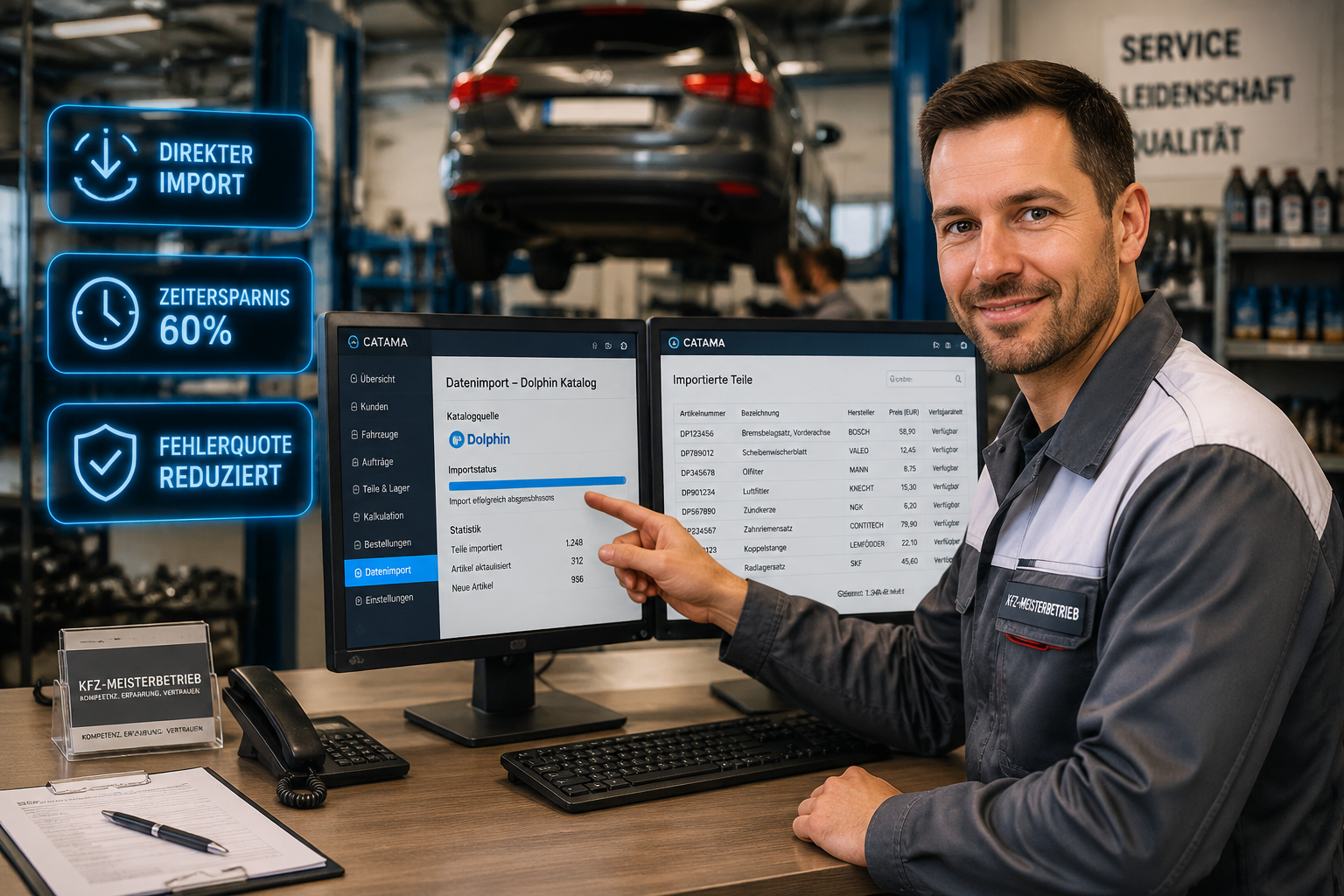
- Zeitersparnis bis zu 60 % bei der Auftragserfassung durch Wegfall doppelter Datenpflege.
- Fehlerreduktion: Tippfehler bei Artikelnummern und Preisen gehören der Vergangenheit an.
- Volle Integration: Warenkorb, Bestellwesen und Faktura greifen nahtlos ineinander.
- Skalierbar: Geeignet für kleine Werkstätten ebenso wie für große Mehrmarkenbetriebe und freie Werkstattketten.
Was ist CATAMA mit Schnittstelle (API) zu Dolphin Teilekatalog?
CATAMA ist eine cloudbasierte Kfz-Werkstattsoftware, die Werkstattmanagement, Faktura, Warenwirtschaft und Kundenverwaltung in einer einzigen Lösung bündelt. Der Dolphin Teilekatalog wiederum ist ein etablierter elektronischer Ersatzteilkatalog, der von vielen freien Werkstätten und Teilegroßhändlern genutzt wird. Er enthält Millionen Artikeldaten, Querverweise zu OE-Nummern und detaillierte Fahrzeugzuordnungen.
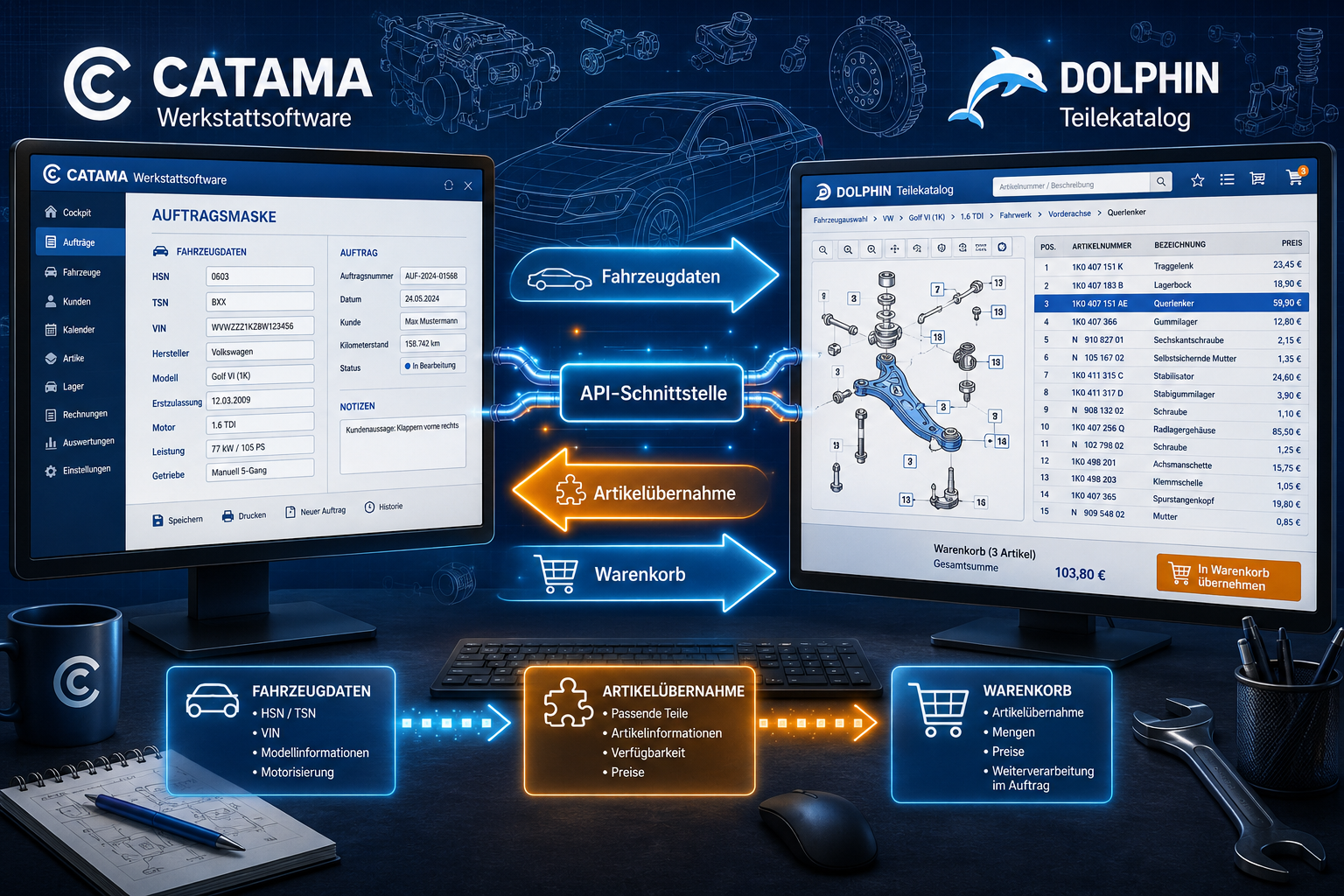
Die Schnittstelle (API) zwischen beiden Systemen sorgt dafür, dass beide Welten technisch miteinander sprechen. Statt einer manuellen Übergabe via Copy & Paste oder dem mehrfachen Eintippen einer Artikelnummer übergibt Dolphin den vollständigen Warenkorb direkt an CATAMA. Dort landen die Positionen exakt im richtigen Auftrag, beim richtigen Fahrzeug und beim richtigen Kunden.
Wie funktioniert die technische Anbindung?
Die API arbeitet im Hintergrund nach einem klar definierten Datenstandard. Der Ablauf folgt einem festen Muster:
- Im CATAMA-Auftrag wird das Fahrzeug ausgewählt (HSN/TSN oder VIN).
- Per Klick wird der Dolphin Teilekatalog geöffnet – die Fahrzeugdaten werden mitübergeben.
- Im Katalog erfolgt die Teilesuche, der Warenkorb wird befüllt.
- Per Übernahme-Button wandern alle Positionen samt Preis und Beschreibung zurück in den CATAMA-Auftrag.
Damit entfällt der Medienbruch komplett. Die Schnittstellen der CATAMA Software zu Lieferanten und E-Commerce bilden ein umfassendes Ökosystem, in das sich Dolphin nahtlos einfügt.
Warum eine API-Schnittstelle zum Teilekatalog unverzichtbar ist
Werkstätten arbeiten heute mit immer engeren Margen und gleichzeitig steigenden Kundenanforderungen. Wer einen Kostenvoranschlag erst nach Stunden liefern kann, verliert den Auftrag oft an den Wettbewerber. Eine direkte Anbindung an den Teilekatalog ist daher kein „Nice-to-have“, sondern ein entscheidender Wettbewerbsfaktor.
„Jede Minute, die ein Serviceberater am Tresen mit Tippen verbringt, ist eine Minute, in der er nicht beratend für den Kunden da ist.“
Die wichtigsten Vorteile auf einen Blick
| Bereich | Ohne API-Schnittstelle | Mit CATAMA-Dolphin-API |
|---|---|---|
| Erfassung pro Position | 60–90 Sekunden | 5–10 Sekunden |
| Fehlerquote bei Artikelnummern | hoch | nahezu null |
| Preisaktualität | manuell zu prüfen | tagesaktuell aus Dolphin |
| Bestellprozess | mehrfach erfasst | einmalig, direkt durchgereicht |
| Auftragsdokumentation | lückenhaft | vollständig digital |
Konkrete Zeitersparnis im Werkstattalltag
Eine durchschnittliche Werkstatt mit fünf Mitarbeitern erfasst rund 40 bis 60 Aufträge pro Woche. Bei 8 bis 15 Positionen je Auftrag ergeben sich schnell 400 bis 900 Einzelpositionen. Mit der API-Anbindung schmilzt der reine Erfassungsaufwand von mehreren Arbeitstagen pro Monat auf wenige Stunden zusammen. Ein detaillierter Blick darauf, wie Kfz-Werkstätten mit CATAMA Software Zeit und Geld sparen, zeigt das volle Einsparpotenzial.
Die Funktionsweise der CATAMA mit Schnittstelle (API) zu Dolphin Teilekatalog im Detail
Damit die Vorteile in der Praxis greifen, lohnt ein Blick auf die einzelnen Funktionsbausteine. Die Schnittstelle ist mehr als nur ein Datenkanal – sie ist ein durchdachter Workflow.
Fahrzeugdaten als Schlüssel
Alles beginnt mit dem Fahrzeug. CATAMA übergibt die wichtigsten Identifikationsmerkmale an Dolphin:
- HSN/TSN (Herstellerschlüsselnummer und Typschlüsselnummer)
- VIN (Fahrzeug-Identifizierungsnummer)
- Erstzulassung und Motorisierung
- KBA-Daten zur Eingrenzung der Varianten
Wie wichtig diese Daten für die korrekte Teilezuordnung sind, beschreibt der Ratgeber zu HSN, TSN und KBA-Schlüsselnummern ausführlich.
Suche, Auswahl und Warenkorb
Im Dolphin-Katalog navigiert der Anwender durch die gewohnte Oberfläche: Baugruppen, Explosionszeichnungen, OE-Querverweise und Aftermarket-Alternativen. Wird ein Artikel ausgewählt, landet er im Warenkorb. Mehrere Artikel können gesammelt werden, ohne dass zwischendurch zurück in CATAMA gewechselt werden muss.
Rückübergabe in den CATAMA-Auftrag
Nach Abschluss der Suche erfolgt die Rückübergabe per API. Folgende Daten werden übernommen:
- Artikelnummer (Lieferanten- und ggf. OE-Nummer)
- Artikelbezeichnung
- Einkaufs- und Verkaufspreis
- Mengeneinheit und Anzahl
- ggf. Pfand oder Altteilesteuer
Apropos Altteilesteuer: Wie diese korrekt abgerechnet wird, erklärt der Leitfaden zur Altteilesteuer im Kfz-Gewerbe.
Bestellung direkt aus dem Auftrag
Sobald die Positionen im Auftrag erfasst sind, kann direkt aus CATAMA heraus eine Bestellung beim Teilelieferanten ausgelöst werden. Das Bestellwesen ist nahtlos in die Warenwirtschaft eingebunden, sodass Lagerbestände, Wareneingänge und offene Bestellungen jederzeit transparent bleiben.
Vorteile für Kfz-Werkstätten und PKW-Handel
Die Integration adressiert nicht nur Serviceberater, sondern den gesamten Betrieb. Vom Meister über den Lagerverwalter bis zur Buchhaltung profitieren alle Bereiche.
Für den Serviceberater
- Schnellere Kostenvoranschläge direkt am Tresen
- Aktuelle Preise und Lieferzeiten bei Kundengesprächen
- Weniger Rückfragen, weniger Nacharbeit
- Mehr Zeit für die eigentliche Kundenberatung
Für den Werkstattleiter
- Bessere Auslastungsplanung durch zeitnahe Auftragsfreigaben
- Transparente Kostensituation pro Auftrag
- Geringere Standzeiten von Fahrzeugen, weil Teile schneller bestellt sind
Für die Buchhaltung
- Saubere Belegdaten ohne manuelle Nachpflege
- Automatische Übergabe an die Fakturierung
- Vereinfachte Schnittstellen zu DATEV und E-Rechnung
Das passende Kfz-Rechnungsprogramm mit DATEV-Schnittstelle und E-Rechnung komplettiert den durchgängigen Prozess.
Für den Kfz-Handel
Auch reine Handelsbetriebe profitieren: Wer Gebraucht- oder Neuwagen aufbereitet, kann Anbauteile, Reparaturteile und Zubehör direkt über die API kalkulieren. Mehr dazu zeigt die spezialisierte Automobilsoftware für den Kfz-Handel.
Einrichtung und technische Voraussetzungen
Die Aktivierung der CATAMA mit Schnittstelle (API) zu Dolphin Teilekatalog ist erfreulich unkompliziert. Da CATAMA als Cloud-Lösung läuft, sind keine Server-Installationen notwendig.
Voraussetzungen im Überblick
- CATAMA-Lizenz – idealerweise ab der CATAMA Professional Suite für vollen Funktionsumfang
- Aktiver Dolphin-Zugang mit gültigen Zugangsdaten
- Stabile Internetverbindung (Cloud-Architektur)
- Aktueller Webbrowser (Chrome, Edge, Firefox in jeweils aktueller Version)
Schritte zur Einrichtung
Die Aktivierung erfolgt in wenigen Minuten:
- Anmeldung in CATAMA mit Administratorrechten
- Aufruf der Schnittstellenkonfiguration
- Eintragen der Dolphin-Zugangsdaten (Benutzer, Passwort, Mandanten-ID)
- Testverbindung
- Freischaltung für die Anwender
Bei Fragen steht der Kontakt und Support für die CATAMA Cloud-Softwarelösung zur Verfügung.
Schulung der Mitarbeiter
Auch wenn die Bedienung intuitiv ist, lohnt eine kurze Einweisung. Erfahrungsgemäß sind Mitarbeiter nach 30 bis 60 Minuten praktischem Üben sicher im Umgang. Die typischen Anwendungsfälle wie Direktannahme, Reparaturauftrag oder Garantiefall sollten dabei einmal durchgespielt werden. Der Ratgeber zur Bedeutung der Direktannahme im Kfz-Service liefert wertvolle Impulse für den Workflow.
CATAMA mit Schnittstelle (API) zu Dolphin Teilekatalog im Vergleich zu anderen Anbindungen
Dolphin ist nicht die einzige Teilekatalog-Schnittstelle, die CATAMA bietet. Vielmehr ist sie Teil eines breiten Schnittstellen-Portfolios, das je nach Lieferantenstruktur des Betriebs kombiniert werden kann.
Übersicht verfügbarer Schnittstellen
| Schnittstelle | Zielgruppe | Hauptnutzen |
|---|---|---|
| Dolphin | freie Werkstätten, Großhandel | breite Artikeldatenbasis |
| Stakis / Stahlgruber | Mehrmarkenbetriebe | etablierter Großhändler |
| Partslink24 | Markenwerkstätten | OE-Daten vieler Hersteller |
| WMKAT | freie Werkstätten | Reparaturkosten-Kalkulation |
| Repdoc | Werkstätten | Arbeitswerte und Teile |
| Mercedes-Benz WebParts | Mercedes-Servicepartner | OE-Originalteile |
Wann lohnt sich speziell die Dolphin-Anbindung?
Die Dolphin-Schnittstelle ist besonders dann sinnvoll, wenn der Betrieb:
- überwiegend mit Aftermarket-Teilen arbeitet
- mehrere Fahrzeugmarken bedient
- Wert auf eine große Artikeldatenbank legt
- bereits Dolphin als Beschaffungsplattform nutzt
In Kombination mit weiteren Schnittstellen lassen sich auch hybride Szenarien abbilden – etwa wenn für bestimmte Marken OE-Teile über Partslink24 und für freie Reparaturen Aftermarket-Ware über Dolphin bezogen wird.
Praxisbeispiel: Ein typischer Arbeitstag mit der Integration
Um die Theorie greifbar zu machen, hier ein konkretes Beispiel aus dem Alltag einer mittelgroßen freien Werkstatt mit drei Hebebühnen.
Montag, 8:15 Uhr: Ein Kunde bringt seinen VW Golf zur Inspektion. Der Serviceberater scannt den Fahrzeugschein, CATAMA legt automatisch das Fahrzeug an – inklusive HSN, TSN und VIN. Mit einem Klick öffnet sich Dolphin direkt mit den richtigen Fahrzeugdaten.
8:18 Uhr: Im Katalog werden Ölfilter, Luftfilter, Innenraumfilter und Motoröl ausgewählt. Der Warenkorb wird per Knopfdruck zurück an CATAMA übergeben.
8:20 Uhr: Im Auftrag stehen alle Positionen mit Preisen. Der Berater ergänzt die Arbeitspositionen aus dem Hinterlegungskatalog. Das Angebot ist nach fünf Minuten fertig und wird per E-Mail an den Kunden geschickt.
8:35 Uhr: Der Kunde bestätigt per Klick. Die Bestellung wandert automatisch zum Lieferanten.
11:00 Uhr: Die Teile sind eingetroffen, der Mechaniker beginnt die Arbeit. Der Vorgang ist sauber dokumentiert, die Fahrzeughistorie lückenlos erfasst.
Was früher 30 Minuten reine Erfassungszeit gekostet hätte, ist in unter sieben Minuten abgewickelt.
Häufige Fragen zur CATAMA-Dolphin-Integration
Kann ich die Schnittstelle auch ohne Premium-Lizenz nutzen?
Die Schnittstelle steht in der Regel ab den höherwertigen CATAMA-Editionen zur Verfügung. Ein Blick auf die CATAMA Software-Lösungen und Preise 2026 verschafft Klarheit über die jeweils enthaltenen Module.
Was kostet die Anbindung?
Die API-Anbindung selbst ist in den entsprechenden CATAMA-Editionen enthalten. Es fallen jedoch die normalen Dolphin-Nutzungsgebühren beim Katalog-Anbieter an. Die Refinanzierung erfolgt typischerweise binnen weniger Wochen allein durch die eingesparte Arbeitszeit.
Werden Preise und Bestände in Echtzeit übernommen?
Ja. Da die API live auf Dolphin zugreift, sind Preise und Verfügbarkeiten beim Zeitpunkt der Übernahme aktuell. Dadurch werden Fehlkalkulationen vermieden.
Lässt sich die Schnittstelle mit anderen kombinieren?
Selbstverständlich. CATAMA ist offen aufgebaut und kann mehrere Katalog- und Lieferantenschnittstellen parallel betreiben. Das ist insbesondere für Mehrmarken- und Mischbetriebe ein großer Vorteil.
Wie sicher sind die Daten?
CATAMA wird in zertifizierten Rechenzentren in Deutschland betrieben. Die Datenübertragung zur Dolphin-API erfolgt verschlüsselt. Details regelt die Datenschutzrichtlinie der CATAMA Kfz-Software.
Tipps für den maximalen Nutzen aus der Schnittstelle
Damit die Investition in die digitale Anbindung den größtmöglichen Effekt entfaltet, lohnen sich einige flankierende Maßnahmen.
Stammdaten sauber pflegen
Die beste Schnittstelle hilft nichts, wenn Kunden- und Fahrzeugstammdaten unvollständig sind. Eine konsequente Pflege der zentralen Fahrzeug- und Kundenverwaltung ist die Basis.
Workflows standardisieren
Wer immer den gleichen Ablauf nutzt – Fahrzeug öffnen, Dolphin starten, Warenkorb übernehmen, Bestellung auslösen – arbeitet schneller und macht weniger Fehler. Eine kurze interne Arbeitsanweisung schafft Klarheit.
Auswertungen nutzen
CATAMA liefert detaillierte Reports zu Umsätzen, Margen und Bestelltrends. Diese sollten regelmäßig analysiert werden, um Einkaufskonditionen zu verbessern und Lagerhüter zu identifizieren.
Mitarbeiter einbeziehen
Die beste Software nützt nichts, wenn die Anwender sie nicht akzeptieren. Workshops, Kurzschulungen und ein offenes Ohr für Verbesserungsvorschläge zahlen sich aus. Häufig kommen die besten Optimierungsideen direkt aus dem Team.
Wirtschaftliche Betrachtung: Return on Investment
Die Investition in eine moderne Werkstattsoftware mit Dolphin-API rechnet sich in der Regel sehr schnell. Eine vereinfachte Beispielrechnung:
- 5 Mitarbeiter erfassen täglich je 8 Aufträge mit je 6 Positionen
- Zeitersparnis pro Position: ca. 50 Sekunden
- Tägliche Ersparnis: 5 x 8 x 6 x 50 Sek. = 12.000 Sekunden = 200 Minuten = 3,3 Stunden
- Monatliche Ersparnis (20 Arbeitstage): ca. 66 Stunden
- Bei einem internen Stundensatz von 45 Euro: 2.970 Euro pro Monat
Selbst wenn nur die Hälfte dieser theoretischen Ersparnis realisiert wird, deckt sie die Softwarekosten um ein Vielfaches. Eine fundierte Berechnung des eigenen Stundensatzes ermöglicht der kostenlose Stundensatzrechner für Kfz-Werkstätten.
Zukunftsausblick: KI, OCR und automatisierte Workflows
Die Integration des Dolphin Teilekatalogs ist nur ein Baustein. CATAMA entwickelt sich kontinuierlich weiter. Bereits heute steht eine intelligente Fahrzeugerfassung durch OCR-Technologie zur Verfügung, die Fahrzeugscheine automatisch auswertet. In Verbindung mit der API-Anbindung an Dolphin entsteht so ein nahezu vollautomatischer Erfassungsprozess: Scan – Stammdaten – Teilesuche – Auftrag – Bestellung. In den nächsten Jahren werden KI-gestützte Funktionen weitere Effizienzsprünge ermöglichen, etwa bei Teilevorschlägen anhand vergangener Reparaturen oder bei vorausschauender Lagerhaltung.
Fazit und nächste Schritte
Die CATAMA mit Schnittstelle (API) zu Dolphin Teilekatalog ist mehr als ein technisches Detail – sie ist ein strategischer Hebel für mehr Effizienz, weniger Fehler und höhere Kundenzufriedenheit in Kfz-Werkstätten und Handelsbetrieben. Wer heute noch manuell Artikelnummern abtippt, verschenkt bares Geld und wertvolle Beratungszeit.
Konkrete nächste Schritte:
- Bestandsaufnahme: Wie viele Positionen werden aktuell pro Tag manuell erfasst? Welche Lieferanten sind die wichtigsten?
- Bedarf prüfen: Passt Dolphin zur Lieferantenstruktur? Welche weiteren Schnittstellen sind sinnvoll?
- Demo anfordern: Eine kostenfreie Testphase der Cloud-Werkstattsoftware gibt einen praxisnahen Eindruck.
- Mitarbeiter einbinden: Frühzeitig kommunizieren und schulen, damit die Akzeptanz im Team von Anfang an hoch ist.
- Start mit klarem Fahrplan: Schrittweise Einführung, begleitet vom CATAMA-Support.
Die Digitalisierung des Werkstattalltags ist keine Zukunftsmusik mehr – sie ist heute schon Realität. Wer jetzt die Weichen stellt, wird in den kommenden Jahren den Vorsprung gegenüber dem Wettbewerb spürbar ausbauen.
