
CATAMA is a cloud-based software solution for motorcycle repair shops that consolidates all business processes—from order intake and inventory management to invoicing—into a single system. The solution is specifically tailored to the workflows in motorcycle repair shops and addresses typical requirements such as seasonal spikes in orders, accessory sales, and detailed vehicle histories. CATAMA scales from a one-person master workshop to a multi-location company and is available as a cloud solution that requires no local installation.
Key Takeaways
- Industry-specific rather than generic: CATAMA maps typical motorcycle shop processes, including seasonal business, accessory sales, and modifications.
- All in one system: customer data, vehicle history, service orders, parts management, invoices, and communication are all managed centrally.
- Seasonal management: Scheduling and workshop capacity utilization can be managed efficiently, especially during peak periods (spring/summer).
- Real-time transparency: Mechanics, service advisors, and office staff can view the current order status at any time.
- Complete vehicle history: Maintenance, modifications, repairs, and installed parts are fully documented.
- Automatic customer reminders: Inspections, vehicle inspections (HU/AU), tire changes, and seasonal checks are triggered automatically.
- Professional documents— such as quotes, purchase orders, delivery notes, and invoices—are created quickly and consistently.
- Inventory and Parts Management: Spare parts and accessories can be planned in advance, orders are traceable, and downtime is reduced.
- Scalable: From small businesses to branch networks—CATAMA grows with you.
- Cloud-based: No local server required, access from anywhere, automatic updates.
What features does CATAMA offer specifically for motorcycle repair shops?
CATAMA offers features that are precisely tailored to the way motorcycle repair shops operate—not as an adaptation of car repair software, but as a well-thought-out comprehensive solution designed specifically for the motorcycle industry.
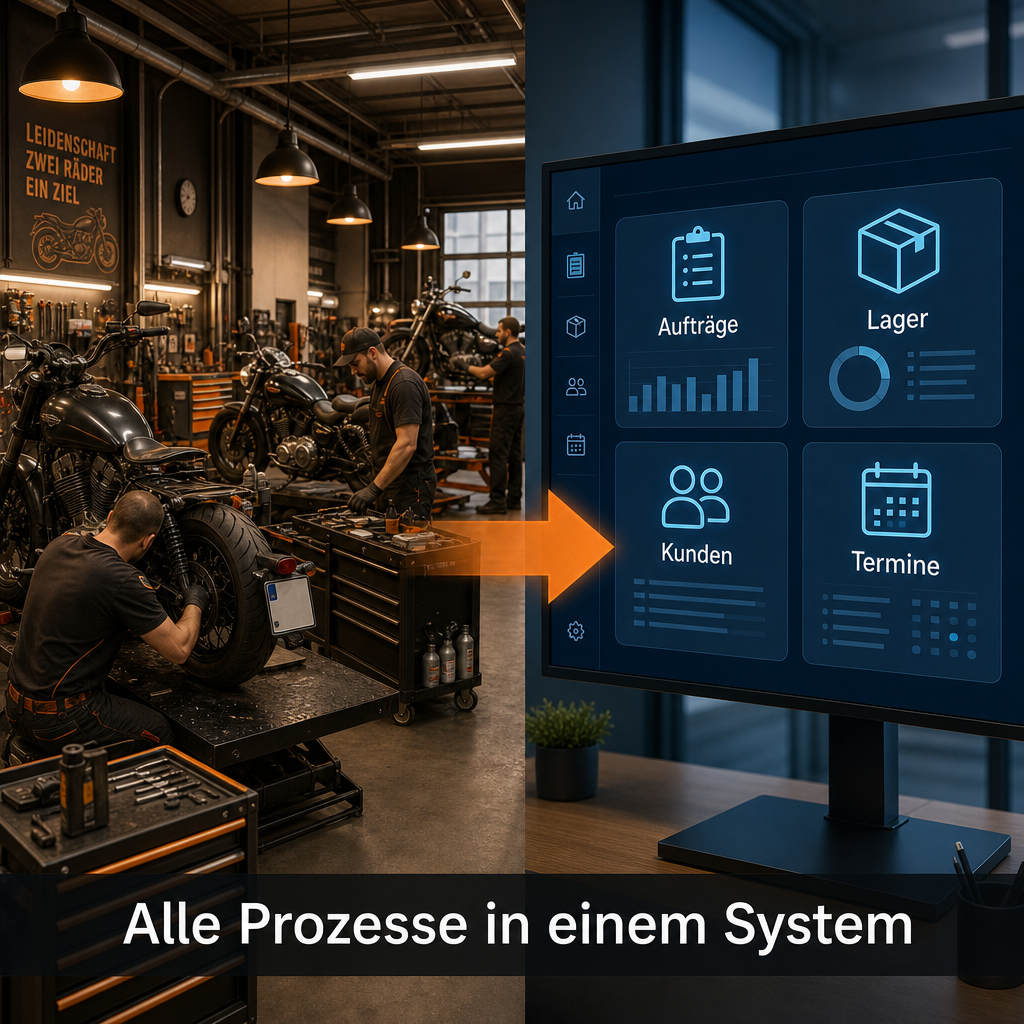
Overview of Core Features
| Functional area | What CATAMA Specifically Offers |
|---|---|
| Order Management | Create, assign, track, and bill workshop orders—with real-time status updates |
| Vehicle History | Complete documentation of all maintenance, modifications, repairs, and parts installed for each motorcycle |
| Scheduling | Workshop scheduler with capacity control, specifically designed for seasonal peaks |
| Customer Management | Contact information, vehicle assignments, communication history, and automatic reminders |
| Parts & Bearings | Inventory Management, Order Processing, Goods Receipt Posting, and Accessories Management |
| Invoice | Quotes, orders, delivery notes, invoices – standardized and GoBD-compliant |
| Accessories & Attachments | Integration of accessory sales and repair services into the overall process |
| Interfaces | Integration with parts catalogs, accounting software, and suppliers |
Particularly relevant for motorcycle shops: The software clearly distinguishes between different types of jobs. A tire change, a major modification involving aftermarket parts, and a simple oil change are all tracked and billed differently. This saves time and reduces errors.
If you would like a complete overview of the available modules, you can find details in the CATAMA Automotive Software Complete Solution for Workshops and Dealerships.
What does CATAMA do better than other workshop software?
The key difference: CATAMA is not simply office software repurposed with a workshop module tacked on. The software was developed from the ground up for automotive service shops and therefore supports industry-specific workflows that generic solutions simply cannot match.
Specific advantages over general-purpose software:
- Integrated vehicle database: Motorcycles are recorded with all relevant data—HSN/TSN, VIN, engine type, year of manufacture, and equipment. No need to manually gather this information.
- Seasonal Capacity Planning: Motorcycle repair shops experience extreme fluctuations between winter and summer. CATAMA offers a workshop scheduler that helps manage these peaks.
- Accessories as a business segment: Many motorcycle repair shops sell helmets, clothing, and accessories. CATAMA integrates this sales activity directly into the repair process rather than managing it separately.
- The advantage of the cloud: No local server, no IT overhead. Updates are delivered automatically. This is a real cost advantage, especially for smaller businesses.
A common mistake: garages choose software based on the lowest price—and then realize that the solution doesn’t support industry-specific processes. This leads to workarounds, manual lists, and duplicate data entry. Learn more in our guide to the benefits of industry-specific software for auto repair shops.
How much does CATAMA cost per month for a small motorcycle repair shop?
CATAMA offers various plans that differ in terms of features and the number of users. The exact monthly cost depends on the plan you choose. Current prices and plans can be viewed directly on the CATAMA product page, which includes a pricing overview.
Information on the pricing structure:
- CATAMA Professional: For businesses with higher demands in terms of reporting, interfaces, and the number of users.
- CATAMA Enterprise / Unlimited: For larger businesses or chains with specific requirements.
Since CATAMA is cloud-based, there are no costs for local servers, maintenance, or manual updates. This significantly reduces total costs compared to traditional on-premises solutions.
Can I manage spare parts inventory and orders with CATAMA?
Yes. CATAMA includes a comprehensive inventory management module that covers stock levels, orders, goods received, and inventory counts. Spare parts and accessories for motorcycles can be managed using minimum stock levels, supplier assignments, and order suggestions.
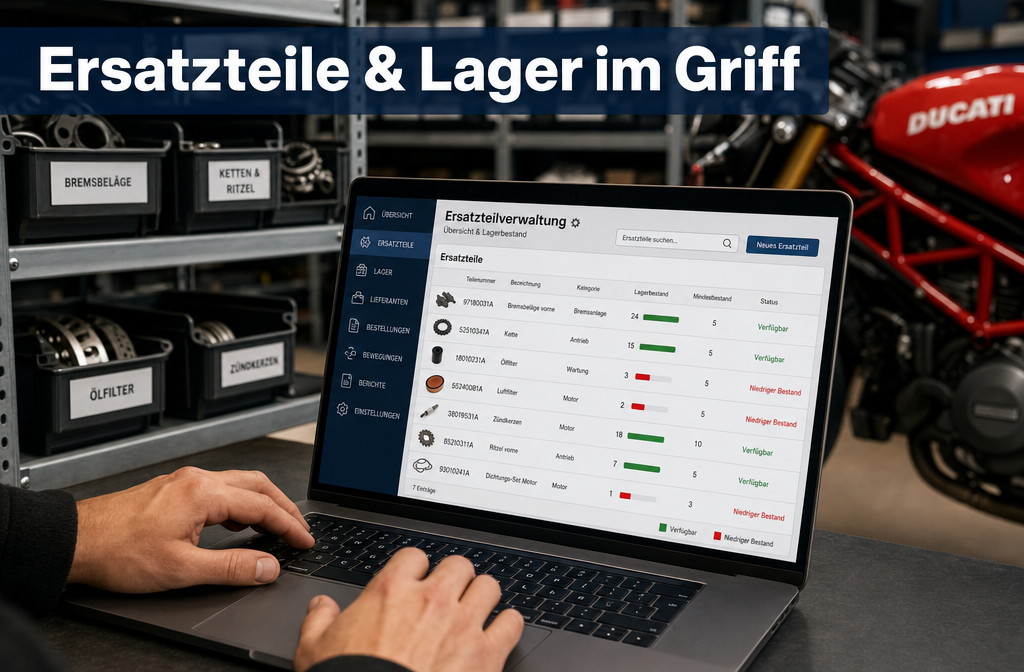
Here's how parts management works in practice:
- Create parts: Enter items with part numbers, suppliers, purchase prices, and selling prices.
- Inventory Management: Automatic inventory adjustments upon goods receipt and order entry.
- Order recommendations: If stock falls below the minimum level, the system generates order recommendations.
- Posting goods received: Deliveries are recorded and assigned directly to the warehouse.
- Perform inventory: Compare inventory levels with actual counts directly in the system.
Especially important for motorcycle repair shops: Accessories and add-on parts (e.g., handlebar grips, mirrors, luggage systems) can be managed in the same way as standard wear-and-tear parts. This makes it much easier to bundle repair services with parts sales.
For more information on inventory management, visit the page on automotive inventory management and warehouse management.
Is CATAMA also suitable for electric motorcycles?
Yes. CATAMA is not limited to specific types of powertrains. Electric motorcycles can be created and managed in exactly the same way as models with internal combustion engines. The vehicle database does not distinguish between different types of powertrains; instead, it records each vehicle individually with its specific characteristics.
Specifically, this means:
- Vehicle data: Manufacturer, model, year of manufacture, chassis number—regardless of the type of powertrain.
- Service history: Maintenance intervals and specific tasks (e.g., battery checks, software updates) are documented.
- Parts: Parts specific to electric motorcycles can also be kept in stock and assigned to orders.
Edge Case: Those who service only electric motorcycles should check whether manufacturer-specific diagnostic interfaces are required. CATAMA handles the business and organizational aspects—manufacturer-specific diagnostic systems remain independent of this.
How easy is it for employees to use CATAMA?
CATAMA is a browser-based cloud solution and does not require installation on individual computers. The user interface is designed so that workshop staff without IT knowledge can use it. New employees usually get the hang of it within a few days.
Features that make operation easier:
- Clear structure: Orders, customers, vehicles, and inventory are logically separated and accessible via a central navigation menu.
- Role-based views: Mechanics see their work orders, while the office sees invoices and reports—everyone gets exactly the information that's relevant to them.
- Templates: Recurring tasks (e.g., inspections, tire changes) can be saved as templates and accessed with just a few clicks.
- OCR vehicle data capture: Vehicle data can be automatically captured by taking a photo of the vehicle registration certificate, which reduces manual data entry errors.
Common mistake: Companies only train the manager or office staff, but not the mechanics. This results in status updates not being posted and a loss of transparency. All users should receive a brief introduction.
If you'd like to know how CATAMA digitizes its entire business operations, you'll find a detailed overview in the guide *From Acquisition to Billing: How CATAMA Digitizes All Business Processes*.
What mistakes do repair shops make when choosing software?
The three most common mistakes when selecting software for motorcycle repair shops are: buying a system that is too cheap, not testing it thoroughly enough, and failing to involve the staff.
Common pitfalls in detail:
- Choosing generic software: Accounting software with an attached order management module is no substitute for an industry-specific workshop solution. Features such as vehicle history, parts allocation, and workshop scheduling are completely missing.
- Don’t skip the trial period: Anyone who buys software without testing it in their day-to-day operations risks making costly mistakes. CATAMA offers a free trial—you should take advantage of it.
- Failure to involve employees: If mechanics and service advisors do not accept the software, they will find ways to work around it. Involving them early on is crucial.
- Ignoring interfaces: Choosing software that doesn't integrate with your existing accounting system or parts catalogs creates data silos.
- Don't forget about scalability: A system that works for three employees must still be able to handle ten employees and a second location.
- Underestimating data migration: Moving existing customer and vehicle data requires careful planning. Without a clear migration plan, data gaps will result.
Practical tip: Before making a decision, create a list of your ten most important daily tasks and check whether the software supports them. It’s not the feature list that matters, but whether the software covers your specific processes.
What are the common pitfalls when implementing workshop software?
Implementation rarely fails because of the software itself, but rather because of how it is implemented. The biggest risks are: not enough time for the transition, lack of data maintenance, and unrealistic expectations.
Checklist for a successful implementation:
- Choose the right time: Don't launch the initiative during peak season. Winter or quieter weeks are better.
- Prepare master data: Clean up customer data, vehicle data, and product master data before migration.
- Train all employees: It’s not just office staff—workshop employees need training too.
- Plan for parallel operation: Run the old and new systems in parallel for two to four weeks.
- Designate a contact person: Appoint one person within the company to serve as the internal CATAMA representative.
- Gather feedback: After two weeks, collect specific feedback and adjust processes accordingly.
Following these tips will significantly reduce the implementation time. For more tips on improving efficiency, see the guide “How Auto Repair Shops Save Time and Money with CATAMA Software.”
Can CATAMA integrate with existing accounting software?
Yes. CATAMA offers interfaces to common accounting systems, including a DATEV interface for automated data exchange with tax advisors. Invoice data, journal entries, and supporting documents can be exported without having to transfer them manually.
Available interfaces (selection):
- DATEV: Automatic export of accounting data to the tax advisor.
- E-Invoice / XRechnung: GoBD-compliant electronic invoicing.
- Parts catalogs: Integration with systems such as Stakis, Partslink24, WMKat, and Repdoc for parts search and price inquiries.
- Suppliers: Electronic order processing with connected wholesalers.
The interface overview is documented on the page about CATAMA interfaces with suppliers and e-commerce.
Guideline: Users of DATEV can immediately take advantage of the direct integration. Users of other accounting software should determine before making a decision whether a CSV or standard export is sufficient or whether a custom interface is required.
Does CATAMA also support multiple locations and branches?
Yes. CATAMA is multi-client capable and supports operations across multiple locations. Since the software is cloud-based, all branches access the same database—customer data, vehicle histories, and inventory levels are available across all locations.
This is particularly relevant for motorcycle businesses that operate a branch or a separate sales location in addition to their main workshop. Jobs can be assigned by location, while analyses and reports provide an overview of the entire business.
For larger businesses with specific needs, the CATAMA Enterprise Suite offers advanced features for multi-site operations.
Is there a free trial version of CATAMA?
Yes. CATAMA offers a free trial that allows businesses to test the software in their daily work environment before making a commitment. You can register online at Free Trial of CATAMA Cloud Workshop Software.
During the trial period, the key features are available, allowing you to verify whether the software actually maps your own processes. This is far more informative than any demo presentation.
Recommendation: During the trial period, work through at least five real orders from start to finish—from order acceptance and parts allocation to invoicing. This is the only way to determine whether the software works in day-to-day operations.
Improved customer retention through automated reminders
Motorcycle repair shops rely on regular customers. CATAMA helps build customer loyalty by sending automatic reminders for upcoming appointments—a feature that measurably boosts service revenue.
Automated reminders include:
- Scheduled inspections and maintenance intervals
- HU/AU Dates
- Seasonal Inspections (Spring Inspection, Winterization)
- Tire Change
- Expiration of the TÜV inspection or warranty
These reminders are generated directly from the vehicle history. The business doesn't have to maintain separate lists or keep track manually of which customer is due for service and when. This reduces administrative work while also ensuring that customers return regularly.
The article " Customer Loyalty at Car Dealerships: Successful Strategies" describes additional strategies for building customer loyalty.
Conclusion
Choosing the right software for motorcycle repair shops determines whether a business operates efficiently or sinks into administrative chaos. CATAMA offers a solution specifically tailored to the needs of motorcycle repair shops: seasonal planning, accessory sales, comprehensive vehicle history, and integrated parts management—all in one cloud-based system.
Next steps:
- Try it out: Use the free trial version and work through at least five real-world orders.
- Review workflows: Identify the ten most important daily processes and verify whether CATAMA supports them.
- Involve the team: Include mechanics and office staff in the evaluation process early on.
- Select an edition: Choose the CATAMA edition that best suits your business size and requirements.
- Plan the transition: Choose a quiet time (ideally fall or winter) for the changeover.
By following these steps, you lay the groundwork for a motorcycle business that operates at a professional level—not only in terms of craftsmanship but also in terms of organization.
FAQ
Is CATAMA only suitable for motorcycle repair shops?
No. CATAMA is designed for all automotive businesses, but it is particularly well-suited to the specific workflows of motorcycle repair shops—including seasonal business and accessory sales.
Do I need my own server for CATAMA?
No. CATAMA is a cloud-based solution and runs in a browser. All you need is an internet connection and a modern browser.
Can I import my existing customer data into CATAMA?
Yes. Existing data can be imported. The scope and procedure depend on your current system.
How often is CATAMA updated?
As cloud-based software, CATAMA receives regular updates that are installed automatically. Businesses do not need to worry about manual updates.
Does CATAMA support e-invoicing?
Yes. CATAMA supports electronic invoicing in the XRechnung format and is GoBD-compliant.
Can I also manage used motorcycles with CATAMA?
Yes. Vehicles can be entered as inventory and managed with all relevant data, including differential taxation.
How long does it take to implement CATAMA?
For a small business, the basic setup can be completed in a few days. Larger businesses requiring extensive data migration should allow two to four weeks.
Are there training courses available for CATAMA?
Yes. CATAMA offers support and training opportunities. Contact information is available on the Contact and Support page.
What happens to my data if I cancel my CATAMA subscription?
The data belongs to the company. You should export all your data before canceling your subscription. For details, please refer to the Terms of Use.
