
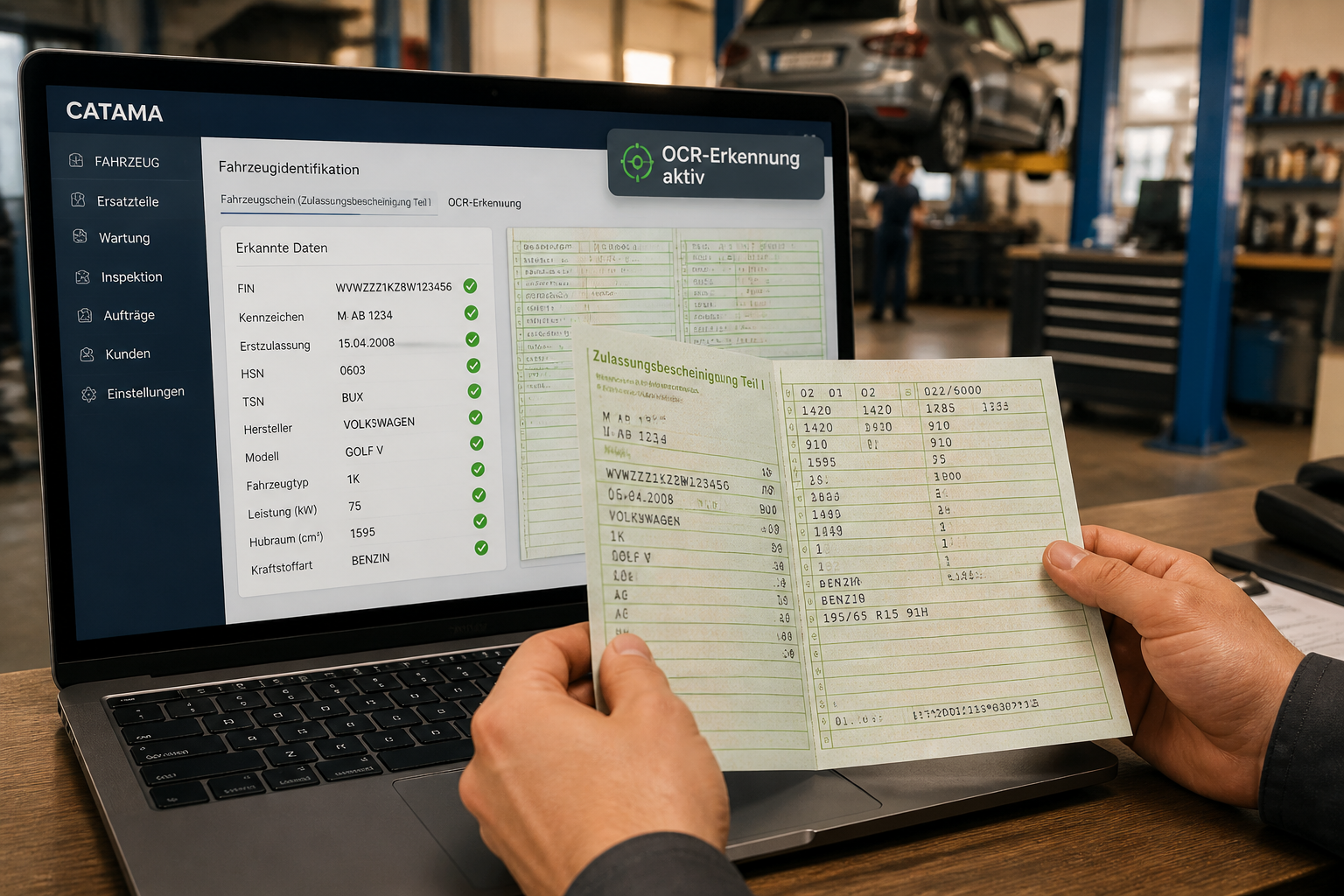
The OCR scanner for vehicle registration certificates in CATAMA uses optical character recognition to automatically extract all relevant vehicle and owner data from Part I of the registration certificate and transfer it directly into the automotive software. Instead of manually entering the VIN, license plate number, HSN/TSN, and address data, all it takes is a drag-and-drop upload or a smartphone photo. The result: error-free data records in seconds instead of minutes, and the scanned vehicle registration certificate is immediately archived with the data record.
Key Takeaways
- A scan replaces the manual entry of over 20 data fields, including VIN, license plate number, HSN/TSN, horsepower, engine displacement, and owner information.
- Files can be uploaded via drag-and-drop (PDF, JPG, JPEG, PNG) or, on mobile devices, directly from a smartphone using a QR code [1].
- A VIN check automatically prevents duplicate vehicle records.
- A confirmation dialog before importing ensures that data is imported with proper oversight rather than blindly.
- Germany and Austria are supported with country-specific scanning logic.
- The scanned vehicle registration certificate is attached to the record and can be accessed at any time [2].
- Existing customers are automatically recognized, and new customers are created directly as needed.
- No external hardware is required —the OCR process runs entirely within the cloud-based CATAMA software [4].
- System-wide scanning functionality, including mobile vehicle registration and barcode recognition [4].
What exactly does the OCR scanner for vehicle registration certificates do in CATAMA?
The OCR scanner for vehicle registration certificates in CATAMA is a feature integrated into the automotive industry software that uses optical character recognition (OCR) to extract all relevant data from the Certificate of Registration, Part I, and automatically assigns it to the correct fields in the software [1][2].
Specifically, this means:
- Vehicle identification: VIN, license plate number, make, model
- Registration and model data: HSN/TSN, vehicle class, national identification numbers
- Technical specifications: Engine displacement, fuel type, power (kW and hp), seating capacity, color, weight
- Date and inspection information: Initial registration, vehicle inspection information
- Emissions and regulatory data: EURO/Emissions class
- Contact and address information: Name or company name, street, ZIP code, city
The OCR industry has made significant strides since 2020 thanks to deep learning and computer vision. Since 2024, these technologies have enabled advanced field-to-data mapping for vehicle documents with automatic validation [6]. CATAMA leverages these advancements for intelligent image preprocessing and reliable recognition—even for documents that are not perfectly scanned [5].
“Scan the vehicle registration certificate instead of typing in the data—go from document to complete customer and vehicle record in seconds.”
Why is manual data entry a problem in auto repair shops?
Manual data entry is the biggest time-consuming task when it comes to recording vehicle and customer information at auto repair shops and dealerships. Every vehicle registration form contains over 20 individual data fields, and each field carries the risk of errors.
Common problems:
| Problem | Impact |
|---|---|
| Typo in FIN/VIN (17 characters) | Incorrect parts orders, erroneous warranty claims |
| Swapped HSN/TSN | Incorrect vehicle identification in spare parts catalogs |
| Incorrect address information | Invoices are being returned, and the billing process is stalling |
| Duplicate vehicle records | Confusing database, inaccurate reports |
| Time required per vehicle | 5–10 minutes of typing per entry |
Anyone who processes 5 to 15 vehicles a day—whether at the service reception desk, in sales, or in the inventory system—can easily lose an hour or more each day just typing data. That’s time that could be spent at the lift or talking to customers.
Centralized vehicle and customer management is severely hampered by inaccurate master data. A single digit transposition in the VIN can ripple through the entire workshop workflow—from quote generation to parts ordering to invoicing.
What specific benefits does the OCR scanner for vehicle registration certificates offer in CATAMA?
The benefits can be divided into three categories: time savings, data quality, and process optimization.
A. Time savings in the workshop
- Time required per vehicle: From 5–10 minutes manually to less than 30 seconds per scan
- Estimate: With 10 vehicles per day, a business saves an estimated 45–90 minutes daily (assumption: 5–9 minutes saved per vehicle)
- No disruption: Capture the document, verify the data, and create the customer/vehicle record directly—all in a single workflow
B. Data Quality
- Structured field mapping, rather than manual free-text entry, reduces errors in critical data such as FIN/VIN, license plate numbers, and HSN/TSN
- Duplicate checking using VIN/FIN automatically prevents duplicate records
- Instant documentation: The scan is saved directly to the vehicle record and can be accessed at any time
C. Process Optimization
- Improved processing speed in sales, service intake, and inventory management
- Optional flags when adding a vehicle: "Lead" and "Commissioned Vehicle" can be selected directly during the scanning process
- Smart assignment: Existing customers are recognized, and new customers are automatically created as needed
If you'd like to learn more about how CATAMA manages the entire workshop workflow, you'll find all the relevant modules in the overview of the automotive workshop software.
Who is the OCR scanner suitable for—and who is it not suitable for?
Ideal for:
- Independent repair shops with a high volume of service requests
- Car dealers (used and new cars) who regularly add vehicles to their inventory
- Car dealerships that carry multiple brands and handle various types of vehicles on a daily basis
- Businesses in Germany and Austria, since the OCR logic is country-specific
Less relevant for:
- Businesses that work exclusively with Swiss vehicle registration documents (currently focusing on Germany and Austria)
- Repair shops with very low vehicle throughput (fewer than 2–3 vehicles per week), where time savings are less significant
Rule of thumb: If you enter or update more than 10 vehicles per week, you’ll see a noticeable benefit from using an OCR scanner. For fewer vehicles, there is still a benefit, but it’s less significant.
Germany and Austria: How does cross-border recognition work?
CATAMA offers specialized scanning logic for both countries, including country-specific OCR processing. This is important because vehicle registration certificates in Germany and Austria differ in layout, field labels, and data formats.
Differences that CATAMA automatically takes into account:
| Characteristic | Germany | Austria |
|---|---|---|
| Postal code format | 5 digits | 4 digits |
| Document Title | Certificate of Registration, Part I | Registration certificate |
| Key numbers | HSN/TSN | National Keys |
| Specific fields | Germany-specific codes | AT-specific fields |
All country-specific fields are automatically mapped to the corresponding CATAMA fields. The result: a standardized workflow for businesses in the DACH region, regardless of whether a German or Austrian vehicle registration certificate is scanned.
For Austrian businesses, CATAMA also offers a specialized automotive accounting program tailored to Austria that meets the country-specific requirements for accounting and tax documentation.
How does the OCR scanner fit into the overall CATAMA workflow?
The OCR scanner is not a standalone tool, but is directly integrated into the entire automotive industry software suite. This means that the data captured via scanning flows seamlessly into all downstream processes.
Typical workflow:
- Service Check-in: Customer arrives with vehicle → Scan vehicle registration → Customer and vehicle are immediately added to the system
- Order Management: Create an order with correct vehicle data → no need to contact HSN/TSN for parts orders
- Automated invoicing: All vehicle data is available for invoicing via e-invoicing and the DATEV interface
- Digital documentation: Vehicle registration certificate is archived with the data record → tax documentation and reporting requirements are met
- Customer Relationship Management: Complete customer data from the very first contact → better follow-up communication
With the release of v26-4, the scanning functionality has been expanded system-wide: In addition to vehicle registration documents, CATAMA now also recognizes spare part barcodes and supports inventory counting via "scan-to-count" [4].
Anyone who wants to understand the entire digitalization process in an automotive business will find a comprehensive overview in the guide *From Acquisition to Billing *.
 Data Security and the GDPR: How Is Scanned Data Protected?
Vehicle registration certificates contain personal data—name, address, and vehicle information. The processing of this data is subject to the GDPR, and automotive businesses are responsible for handling it properly.
How CATAMA ensures data security:
- Cloud-based solution with a data center in Germany: All data is stored and processed in a German data center
- Encrypted transmission: Documents are uploaded and processed via encrypted connections
- Access control: Only authorized users can access vehicle registration scans and customer data
- Archiving at the record level: The scanned vehicle registration certificate is stored directly in the vehicle or customer record—no loose files on local computers
Details about the infrastructure and security measures can be found on the Data Center and Data Security page.
Practical tip: If you use an OCR scanner, make sure that your company’s privacy policy also covers the digital processing of vehicle registration documents. A brief note on the order form is usually sufficient.
How much does the OCR scanner cost, and which CATAMA edition do I need?
The OCR scanner for vehicle registration certificates is available in several CATAMA editions. Specific availability depends on the selected suite.
CATAMA offers various editions:
- CATAMA Professional – for medium-sized workshops and dealers
- CATAMA Enterprise – for larger businesses, without compromise
- CATAMA Unlimited – a customized solution with full support
Current prices and the exact feature set for each edition are available in the product overview with prices for 2026.
Decision-making guide: If you plan to use the OCR scanner extensively (more than 10 scans per day), you should at least consider the Professional Edition, as it includes fully integrated advanced features such as job management and automatic invoice generation.
Comparison: OCR Scanners vs. Manual Data Entry vs. External Scanning Solutions
| Criterion | Manual entry | External scanner | CATAMA OCR Scanner |
|---|---|---|---|
| Time required per vehicle | 5–10 min. | 1–3 min. (plus import time) | Less than 30 seconds |
| Error rate | High (typo) | Medium (Import error) | Low (automatic assignment) |
| Media break | None (but slowly) | Yes (export/import required) | None (directly in the system) |
| Duplicate check | Manual | Depending on the tool | Automatically via VIN |
| Archiving | Separately | Separately | In the dataset |
| Additional hardware | None | Scanner/app required | None (a smartphone is sufficient) |
| Support for Germany and Austria | Manually adjustable | Varies | Integrated |
The key advantage of the integrated CATAMA approach: no data silos. The data goes directly where it’s needed—in the vehicle database, to the customer, or into the order. External solutions always require an additional import step, which takes time and creates opportunities for errors.
Frequently Asked Questions (FAQ)
What file formats does the OCR scanner support?
PDF, JPG, JPEG, and PNG. Files can be uploaded via drag-and-drop, file selection, or—on mobile devices—via a QR code from a smartphone [1].
Do I need special hardware for the scan?
No. The OCR process runs entirely in the cloud. All you need is a smartphone with a camera or an existing office scanner [2].
Does the scanner also recognize Austrian vehicle registration certificates?
Yes. CATAMA offers country-specific scanning logic for Germany and Austria, with automatic mapping of the respective field names and formats.
What happens if a vehicle already exists in the system?
The VIN/FIN duplicate check automatically identifies existing records and prevents duplicate entries. Existing customers are also identified.
Is the data imported automatically?
No, not blindly. A confirmation dialog displays all recognized data. The data is only applied after manual verification and confirmation [3].
Is the scanned vehicle registration certificate saved?
Yes. The scan is automatically saved with the vehicle record and can be accessed at any time [2].
Does the scanner work on mobile devices?
Yes. Using a QR code, you can take a photo of the vehicle registration certificate directly with your smartphone and upload it. Mobile functionality was further expanded in version v26-4 [4].
Which data fields are recognized?
Over 20 fields, including VIN, license plate number, chassis number/transmission number, make, model, engine displacement, horsepower, fuel type, date of first registration, next inspection date, emissions class, and owner’s name and address [1].
Is the OCR scanner GDPR-compliant?
CATAMA processes all data in a German data center using encrypted transmission and role-based access control. The scanned documents are archived directly in the database and are not stored on local computers.
Can I also use the scanner for existing vehicles?
Yes. When creating a record from a scan, you can choose whether to create the vehicle as a customer vehicle or an inventory vehicle. Optional flags, such as "Lead" or "Consignment Vehicle," are also available.
How accurate is OCR recognition?
Modern OCR systems that utilize deep learning achieve very high recognition rates for clearly legible documents. CATAMA uses intelligent image preprocessing and color analysis to deliver reliable results even when scan quality is suboptimal [5][6]. The confirmation dialog addresses any remaining uncertainties.
Is there a way to test it?
You can request a no-obligation consultation or demo via the CATAMA contact page.
Summary
The OCR scanner for vehicle registration documents in CATAMA solves a specific, everyday problem faced by auto repair shops: the time-consuming and error-prone manual entry of vehicle and customer data. Instead of taking 5–10 minutes per vehicle, the process now takes less than 30 seconds—while delivering higher data quality and complete documentation.
Key points at a glance:
- A single upload is all it takes to automatically capture over 20 data fields
- Duplicate checks and confirmation dialogs ensure clean data
- Germany and Austria are supported with country-specific approaches
- The scanner is fully integrated into the entire CATAMA workflow—from service intake to invoicing
- No additional hardware required
Next steps:
- Assess your needs: How many vehicles are tracked per week? With 10 or more vehicles, the ROI is clearly noticeable.
- Select an edition: The product overview shows which CATAMA edition includes the OCR scanner.
- Request a demo: Book a no-obligation consultation via the contact page and see the scanner in action.
“Scan your vehicle registration instead of typing in the data. Go from document to complete customer and vehicle record in seconds. Optimized for Germany and Austria.”
References
[1] Vehicle Registration Scanner – https://www.catama-software.de/bereiche/fahrzeugschein-scanner/[2] Catama Software: Intelligent Vehicle Detection Using OCR Technology – https://www.catama-software.de/features/catama-software-intelligente-fahrzeugerfassung-durch-ocr-technologie/
[3] Retrieving Vehicle Data via OCR Recognition – https://support.catama-software.de/knowledge-base/fahrzeugdaten-per-ocr-erkennung-ermitteln/
[4] Catama Software: The #1 Cloud-Based Auto Repair Billing Software – https://www.catama-software.de/ratgeber/catama-software-das-1-kfz-rechnungsprogramm-aus-der-cloud/
[5] Werkstatt Office Pro Releases New Vehicle Registration Scanner – https://www.openpr.de/news/1309483/Werkstatt-Office-PRO-veroeffentlicht-neuen-FahrzeugscheinScanner.html
[6] Process the Digital Vehicle Registration Certificate with Ki – https://konfuzio.com/de/fahrzeugschein-digital-mit-ki-verarbeiten/