
Parts list import for Kawasaki – efficiency through automated spare parts processes
Imagine this: A customer calls, urgently needing a spare part for their Kawasaki. Previously, this meant flipping through catalogs, typing in part numbers, and manually entering prices – a time-consuming process prone to errors. With Kawasaki parts list import in CATAMA software, this tedious work is a thing of the past. Digital transformation in automotive workshops is no longer a luxury, but a necessity to remain competitive. Integrating manufacturer parts lists directly into your workshop software not only saves time but also dramatically reduces error rates and improves customer satisfaction.
This article explains how the parts list import for Kawasaki works in CATAMA, what specific advantages it brings to your business, and how you can make optimal use of this function.
Key Takeaways
- ⚡ Time savings : The automated parts list import for Kawasaki eliminates manual data entry and reduces administrative effort by up to 70%.
- 💰 Automatic price update : Kawasaki spare parts prices are automatically synchronized, thus avoiding calculation errors.
- 🔄 Seamless integration : Direct import of original Kawasaki parts lists into the CATAMA database without media breaks.
- 📊 Improved warehouse management : Complete item master data including descriptions, numbers and prices for precise inventory control
- ✅ Error reduction : Digital processes significantly minimize typos and mix-ups with part numbers.
Why importing parts lists is essential for Kawasaki
The challenge of traditional spare parts processes
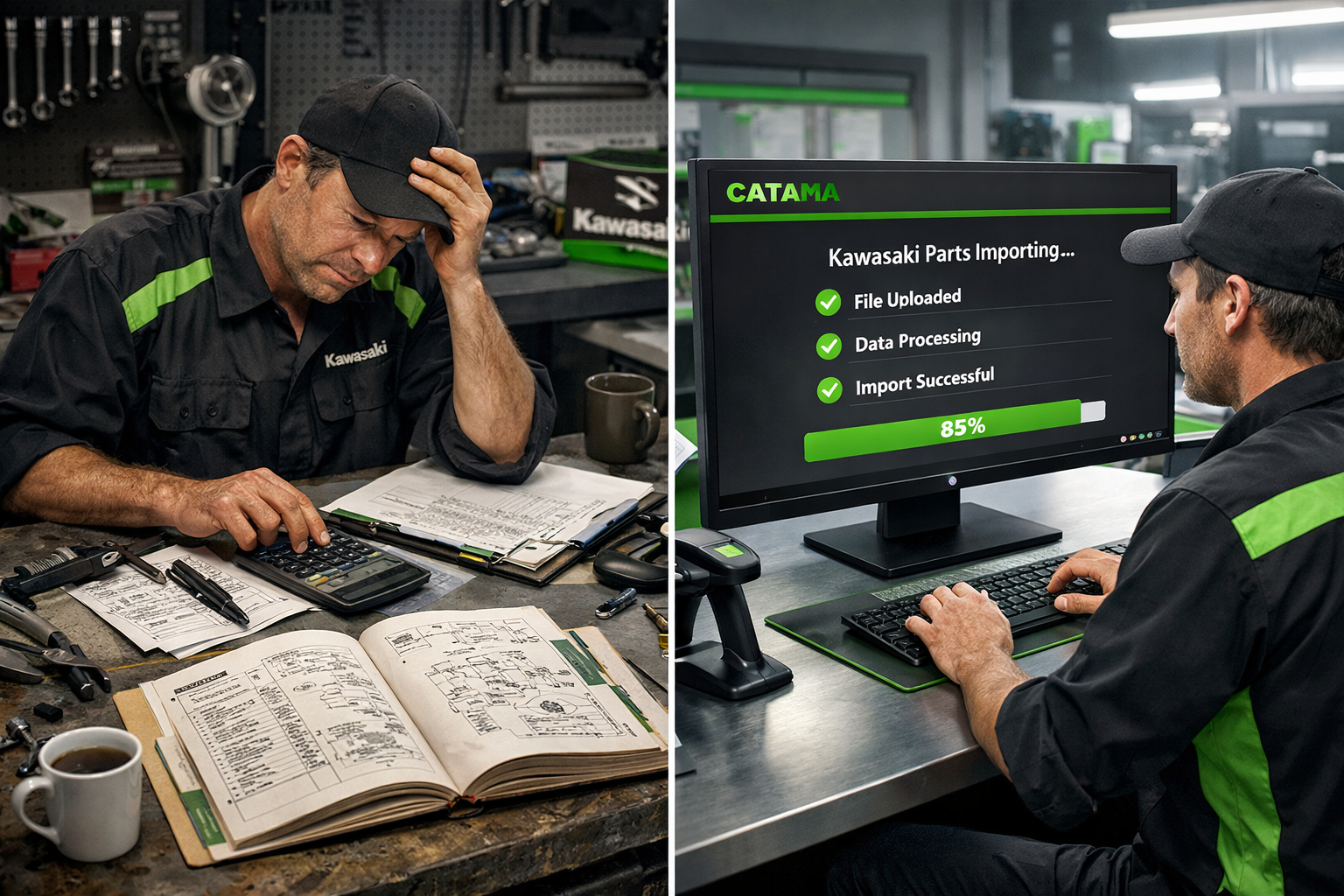
Workshops that work with Kawasaki motorcycles know the problem: managing spare parts can become an administrative nightmare. Traditionally, mechanics and workshop staff had to manually transfer part numbers from printed catalogs or PDF files into their systems.
An experienced workshop manager from Munich recently reported: “We used to spend an average of 15-20 minutes per Kawasaki repair just researching and recording spare parts. With 10 Kawasaki jobs per week, that amounted to over three hours of pure administrative work – time we couldn't use productively.”
This manual approach carries several risks:
- Typographical errors in part numbers lead to incorrect orders.
- Outdated prices in manual lists cause calculation problems.
- Time wasted due to repeated data entry
- Inconsistent article titles make searching difficult.
- Lack of transparency regarding availability and delivery times
Digital transformation in the automotive industry
The automotive industry is undergoing a fundamental digital transformation. Modern automotive workshops require industry-specific software that automates and simplifies administrative processes. Parts list import for Kawasaki is a prime example of digital process automation that delivers measurable efficiency gains.
According to a recent industry analysis, workshops can reduce their office work by an average of 60-70% through digital workshop management [1]. This time saving can be directly invested in productive activities such as repairs and customer service.
CATAMA Software: Parts list import for Kawasaki in practice
How does the automated import work?
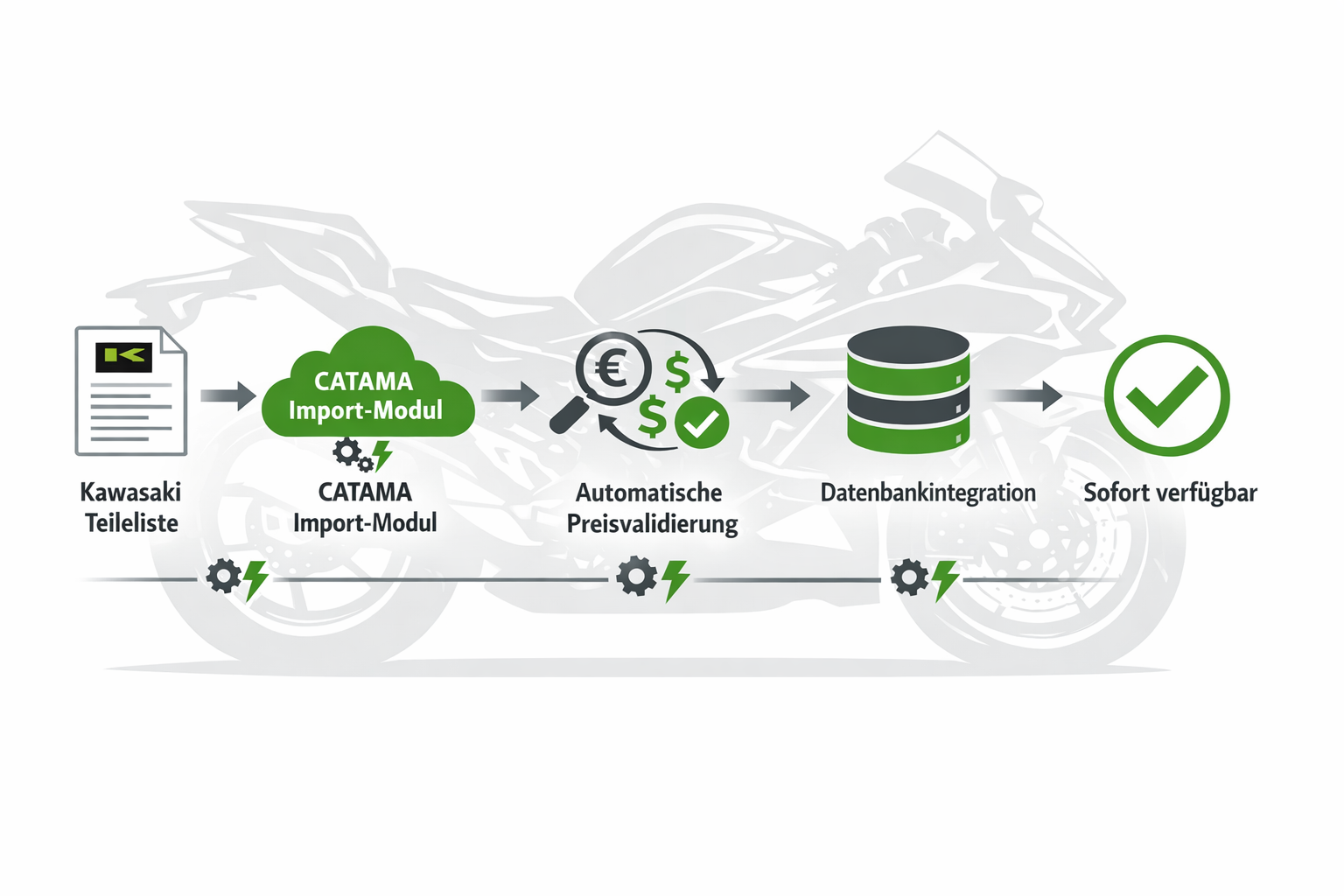
parts lists for Kawasaki into CATAMA is a well-designed process that combines maximum efficiency with minimal error potential. The software supports various standard formats such as CSV and Excel, enabling the integration of original Kawasaki parts lists [1][2].
The import process in detail:
- Preparation : Kawasaki parts lists are provided in a compatible format (CSV, Excel).
- Import module : The import function is started via the CATAMA interface.
- Mapping : Automatic assignment of data fields (part number, description, price, etc.)
- Validation : The system checks the data for completeness and consistency.
- Integration : The Kawasaki articles are transferred to the central article database.
- Price update : Automatic update for future imports
The CATAMA Enterprise Suite offers this functionality as an integral part of its comprehensive workshop management solution.
Automatic price updates – Always up-to-date calculations
A particularly valuable feature is the automatic price update function . When Kawasaki updates its price lists, these can easily be re-imported. CATAMA recognizes existing items based on the part number and automatically updates the prices.
Advantages of automatic price updates:
- ✅ No more manual price updates necessary
- ✅ Always up-to-date calculation bases
- ✅ Avoidance of price differences in billing
- ✅ Transparency for customers through accurate cost estimates
- ✅ Reduction of recalculations and complaints
This function is particularly important for workshops that regularly work with Kawasaki vehicles and want to ensure professional digital order processing .
Integration into workshop workflows
Parts list import for Kawasaki is not an isolated feature, but seamlessly integrated into the overall CATAMA workflow optimization. Once the Kawasaki parts are in the system, they are available for various processes:
Creating cost estimates : When preparing quotes, mechanics can directly access the complete Kawasaki parts database. Searching by part number or description instantly delivers the correct items with current prices.
Order processing : During the repair, required Kawasaki parts can be directly assigned to the order. The system automatically takes stock levels into account and can generate order suggestions if necessary.
Automatic invoicing : After completion of the work, all Kawasaki parts used are automatically included in the invoice – with correct descriptions, part numbers and current prices[8].
Warehouse management : The imported Kawasaki items can be linked to the merchandise management and inventory control system to monitor minimum stock levels and reorder in a timely manner.
Specific advantages for your workshop operations
Time savings in the workshop: Measurable efficiency gains
Implementing parts list import for Kawasaki results in quantifiable time savings:
| process | Before import | With import | Time saving |
|---|---|---|---|
| Find part number | 3-5 min. | 10-20 seconds. | 85% |
| Create article | 2-3 min. | Automatically | 100% |
| Research price | 1-2 min. | Automatically | 100% |
| Create offer | 15 min. | 5 min. | 67% |
| Create invoice | 10 min. | 3 min. | 70% |
This time saving adds up: A workshop with 10 Kawasaki orders per week saves over 200 hours per year – that's more than a full month's work!
Error reduction and quality assurance
Manual data entry is prone to errors. A study shows that a 3-5% error rate is common when manually recording part numbers. With 1000 parts recorded per year, this translates to 30-50 incorrect entries, leading to:
- Incorrect orders
- Delayed repairs
- Dissatisfied customers
- Additional costs
parts lists for Kawasaki reduces this error rate to almost zero, as the data is taken directly from the manufacturer.
ROI calculation: When does the investment pay off?
Investing in professional workshop software with a parts list import function pays for itself quickly. Here's an example calculation:
Cost:
- CATAMA software (e.g., Professional Suite ): approx. €100-150/month
- Setup and training: one-time fee of approximately €500
Savings per month:
- Time savings (approx. 17 hours at €50 per hour): 850€
- Mistakes avoided (approx. 2-3 incorrect orders at €100 each): 250€
- Improved customer satisfaction (estimated): 200€
- Total: approx. €1,300 per month
ROI: The investment pays for itself in the first month! From the second month onwards, the software generates real added value of over €1,000 per month.
Technical Implementation and Best Practices
Step-by-step: Setting up parts list import for Kawasaki
Setting up parts list import in CATAMA is straightforward, especially with support from the CATAMA team:
1. Prepare the data source.
Obtain the current Kawasaki parts lists in a compatible format (CSV or Excel). These can often be obtained directly from the manufacturer or wholesaler.
2. Configure import mapping.
In CATAMA, you define once which columns of the Kawasaki list correspond to which fields in CATAMA:
- Part number → Item number
- Description → Item name
- Price → Selling price
- EAN/GTIN → Barcode
- Weight, dimensions, etc.
3. Perform a test run.
First, import a small dataset to check the configuration. CATAMA offers a preview function that shows how the data will be interpreted.
4. Perform full import.
After successful validation, you can import the complete Kawasaki parts list. Depending on the size of the list, this will take a few minutes.
5. Plan regular updates.
Set up a process to import updated parts lists and prices quarterly or as needed.
The CATAMA support team assists with initial setup and data migration[1], so that even businesses without in-depth IT knowledge can benefit from this feature.
Integration with other CATAMA modules
The parts list import for Kawasaki unfolds its full effect in combination with other CATAMA functions:
Interfaces to suppliers : While CATAMA already interfaces to Stakis, Partslink24 and other systems , Kawasaki Import complements these possibilities for brand-specific parts lists.
Workshop planner : Imported Kawasaki parts can be scheduled directly in the workshop planner for orders, including availability checks.
Vehicle invoicing program : As an integrated vehicle invoicing program, CATAMA uses the imported data for professional invoices with all the necessary details.
DATEV interface : For accounting purposes , Kawasaki items are automatically assigned correct accounting accounts and can be exported via the DATEV interface.
Scalability for different company sizes
The parts list import for Kawasaki is available in various CATAMA editions:
Small and medium-sized businesses ( CATAMA Professional Suite ): Perfect for workshops with regular Kawasaki business that require complete workflow integration.
Large companies and chains ( CATAMA Enterprise ): For multi-site operations with centralized parts management and complex requirements.
Individual requirements ( CATAMA Unlimited ): Tailor-made solutions with dedicated support for specific import requirements.
Comparison: Manual vs. automated parts management
Traditional methods and their limitations
Many workshops still use outdated methods:
Paper catalogs : Physical Kawasaki catalogs quickly become outdated, are unwieldy, and offer no search function. Looking up part numbers can take minutes.
Excel lists : Self-maintained Excel spreadsheets require constant manual updates, are prone to errors, and offer no integration with invoicing systems.
Simple inventory management systems : Basic systems without an import function require manual item entry for each individual Kawasaki part.
These methods lead to:
- 🔴 High time commitment
- 🔴 Susceptibility to errors
- 🔴 Outdated information
- 🔴 Inconsistent data maintenance
- 🔴 Lack of integration
The CATAMA solution: Cloud-based workshop software
In contrast, CATAMA offers a modern alternative cloud-based workshop software
✅ Centralized data storage : All Kawasaki parts in a single database
✅ Automatic updates : Prices and availability are always up-to-date
✅ Full integration : Seamless connection to all workshop processes
✅ Error minimization : Virtually no data entry errors thanks to automated import
✅ Scalability : Grows with your business
✅ Access from anywhere : Cloud-based, available on all devices
Practical example: Transformation of a motorcycle workshop
A medium-sized motorcycle repair shop in Stuttgart specialized in Japanese brands, particularly Kawasaki. Before implementing CATAMA, the three-person team spent approximately two hours daily on administrative tasks related to spare parts.
Before CATAMA:
- Manually typing part numbers from PDF catalogs
- Please inquire about prices by phone with the dealer
- Enter each part number individually into the old system
- Common mistakes when ordering
- Delayed order processing
After CATAMA implementation with parts list import:
- Complete Kawasaki parts list with 15,000 items imported in 30 minutes
- Automatic price update when manufacturer changes
- Part number search in seconds
- Error rate virtually zero
- Order processing 60% faster
Result: The workshop was able to increase its capacity by 25% without hiring additional staff. The time saved was invested in customer consultations and more complex repairs.
Data protection and compliance at CATAMA
GDPR-compliant data processing
As a German software solution, CATAMA places great emphasis on data protection and GDPR compliance . While the imported Kawasaki parts lists primarily contain product data, strict security standards still apply.
- 🔒 Encrypted data transfer : All imports are made via secure connections.
- 🔒 Data centers in Germany : Data is stored exclusively in German data centers.
- 🔒 Regular backups : Automatic data backup prevents data loss.
- 🔒 Access controls : Role-based permissions for employees
- 🔒 Audit trails : Traceability of all data changes
Future security through continuous development
CATAMA is continuously developing its software. The roadmap for 2026 includes innovative features such as AI-supported process optimization and expanded interfaces[1]. Parts list import for Kawasaki is being continuously improved:
Planned expansions:
- Automatic detection of parts list formats
- AI-supported price validation and plausibility check
- Integration of availability and delivery time information
- Extended mapping options for complex data structures
- Mobile import functions for field service employees
First steps: How to get started with CATAMA
Free test and consultation
Interested workshops can test CATAMA without obligation. The free trial access allows for a thorough evaluation of the software, including its import functions.
What you can expect during the test period:
- Full access to all features of the selected edition
- Option to import your own Kawasaki parts lists
- Personal introduction by the CATAMA team
- Support with configuration
- No obligations or hidden costs
Onboarding and training
CATAMA offers comprehensive support for getting started:
1. Needs analysis : A CATAMA expert analyzes your specific requirements regarding Kawasaki parts management and other processes.
2. Data migration : The support team will help you import your existing data and Kawasaki parts lists[1].
3. Training : Your employees will be trained in the use of the software, with a focus on the functions relevant to you.
4. Go-Live Support : In the initial phase, the team is available to answer questions and provide support in optimizing workflows.
5. Continuous support : Even after onboarding, CATAMA offers various support options , from a ticket system to a personal contact person.
Pricing models and investment
CATAMA offers transparent pricing models for different farm sizes. The current prices for 2026 are clearly structured:
Flexible licensing models:
- Monthly billing without long-term contract commitment
- Scalable user licenses
- Different editions depending on the range of functions
- Transparent pricing with no hidden costs
Investing in CATAMA with parts list import for Kawasaki is not an expense, but an investment that quickly pays for itself through time savings, error reduction and improved customer satisfaction.
Frequently asked questions about parts list import
Which file formats are supported for Kawasaki import?
CATAMA supports standard formats such as CSV and Excel[1][2]. If your Kawasaki parts list is in a different format, the support team can help with the conversion.
How often should Kawasaki parts lists be updated?
Quarterly updates are recommended, or updates should be made whenever there are significant price changes from the manufacturer. The import process is so efficient that even more frequent updates are easily possible.
Are existing items overwritten or supplemented?
CATAMA uses the part number to determine if an item already exists. Existing items are updated (e.g., price), and new items are added. Your individual customizations are retained.
Can I define my own markups on imported prices?
Yes, CATAMA allows you to define pricing schemes that automatically calculate markups on purchase prices. This also works for imported Kawasaki parts.
What happens to quotes that have already been created when prices are updated?
Quotes that have already been created and sent retain their original prices. Only new quotes use the updated prices – this way you avoid price discrepancies.
Conclusion: Increased efficiency through intelligent automation
The parts list import function for Kawasaki in the CATAMA software is more than just a practical feature – it's a prime example of how digital transformation brings concrete, measurable benefits to automotive businesses. The combination of automated import and intelligent price update functionality eliminates time-consuming manual processes and drastically reduces potential errors.
Key findings:
🎯 Massive time savings : Up to 200 hours per year with average usage
💰 Fast ROI : Investment pays for itself in the first month
✅ Error minimization : Virtually zero data entry errors thanks to automated import
📈 Scalability : Grows with your business and your requirements
🔒 Security : GDPR compliant with German data centers
For workshops that regularly work on Kawasaki vehicles, this feature is a real game-changer. It allows them to focus on what matters most: excellent customer service and high-quality repairs.
Your next steps
Are you ready to take your workshop administration to the next level? Here's your action plan:
- Try it for free : Take advantage of the non-binding trial access and try out the parts list import yourself.
- Arrange a consultation : Contact the CATAMA team for a personal needs analysis and demonstration.
- Prepare data : Collect your current Kawasaki parts lists and consider which other processes you would like to digitize.
- Involve your team : Discuss the benefits with your employees and prepare them for the digital transformation.
- Get started : Implement CATAMA and experience how much time and hassle you can save through automated processes.
The future of workshop management is digital, automated, and efficient. With CATAMA and parts list import for Kawasaki, you're perfectly equipped to succeed in this future. Start your digital transformation today!
