
Entering part numbers by hand costs the average automotive business up to 90 minutes of working time every day. Multiplied by the hourly rates of a service employee, that adds up to a five-figure sum every year which is never invoiced to anybody. This is exactly where CATAMA with an interface (API) to the Auteon parts catalogue comes in: a direct, automated data connection between the modern online parts catalogue from Auteon and the CATAMA automotive software. The result: fewer typing errors, faster job turnaround times and cleaner calculations.
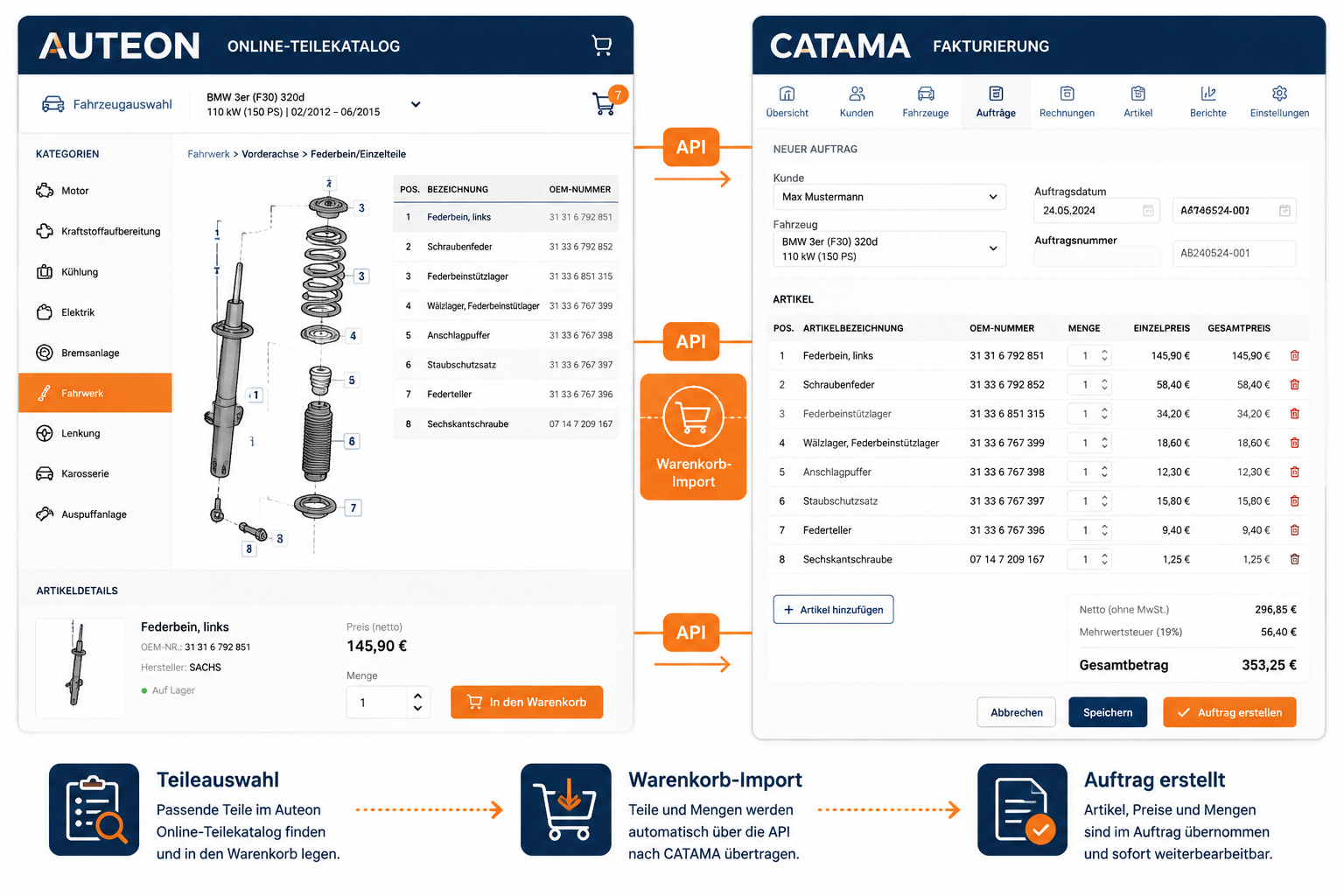
The following overview shows how the integration works, which concrete benefits it brings to workshops and dealers, and what to bear in mind during set-up.
Key Takeaways
- Direct API connection: parts from the Auteon online catalogue are transferred into CATAMA jobs by shopping basket import, without any manual retyping.
- Time savings in day-to-day business: the digital data transfer reduces the data entry time per job by up to 70 per cent.
- The error rate falls: original part numbers, descriptions and purchase prices are transferred 1:1 – no more transposed digits.
- Clean margins: purchase prices and sales prices can be calculated automatically and carried over into quotations, jobs and invoices.
- Scalable: the interface is just as suitable for a single workshop as it is for several locations with central invoicing.
What is Auteon and why is the connection worthwhile?
Auteon is a modern online platform for sourcing automotive spare parts, aimed at independent workshops, service businesses and the parts trade. The catalogue covers original equipment (OE) parts as well as high-quality matching-quality parts from well-known manufacturers. A contemporary web interface makes it possible to identify vehicles, select the right parts and build up shopping baskets.
Auteon’s strength lies in its structured data base: part numbers, manufacturers, descriptions, gross and net prices are all neatly categorised. It is precisely this data structure that makes an API connection to a workshop management system such as CATAMA so efficient.
A workshop employee looks up the required brake pads in the Auteon catalogue, checks availability, adds them to the shopping basket – and transfers it into the matching CATAMA job with just a few clicks. Copying 12-digit part numbers by hand is no longer necessary at all.
“An API is only as good as the workflow it makes possible. With CATAMA and Auteon, the two systems mesh so closely that the user barely notices the switch.”
CATAMA with an interface (API) to the Auteon parts catalogue: how the integration works
The technical basis of the connection is a REST-based API (Application Programming Interface) that enables a secure exchange of data between Auteon and CATAMA. For the user this technology remains invisible – what counts is an end-to-end process.
The workflow in day-to-day business
- Create or open the vehicle in CATAMA – including HSN/TSN, date of first registration and mileage.
- Switch over to Auteon – ideally with the vehicle data pre-filled, so that the parts search is ready to go straight away.
- Research the parts and add them to the shopping basket – in the familiar Auteon interface.
- Shopping basket import into CATAMA – the interface transfers every line item together with part number, description, quantity and purchase price.
- Calculation and invoicing in CATAMA – mark-ups, labour hours and additional services are added, and the invoice or quotation is generated.
Anyone who would like to understand the complete process from vehicle check-in through to the invoice will find an overview in this article about all business processes in the automotive trade.
Which data is transferred?
| Data field | Source in Auteon | Target in CATAMA |
|---|---|---|
| Part number (OE/IAM) | Catalogue item | Article number in the job |
| Description | Product description | Line item text |
| Quantity | Shopping basket | Quantity field |
| Net purchase price | Supplier price | Purchase price |
| RRP / list price | Catalogue | Basis for the sales price calculation |
| Manufacturer | Product master data | Supplier/brand |
| Availability | Stock status | Information field |
This produces complete line item data that can be used equally well for calculation, accounting and later warranty processing.
Concrete benefits for workshops and dealers
The economic impact of a clean API connection is often underestimated. Three areas benefit particularly clearly.
1. Time gained at the direct vehicle check-in
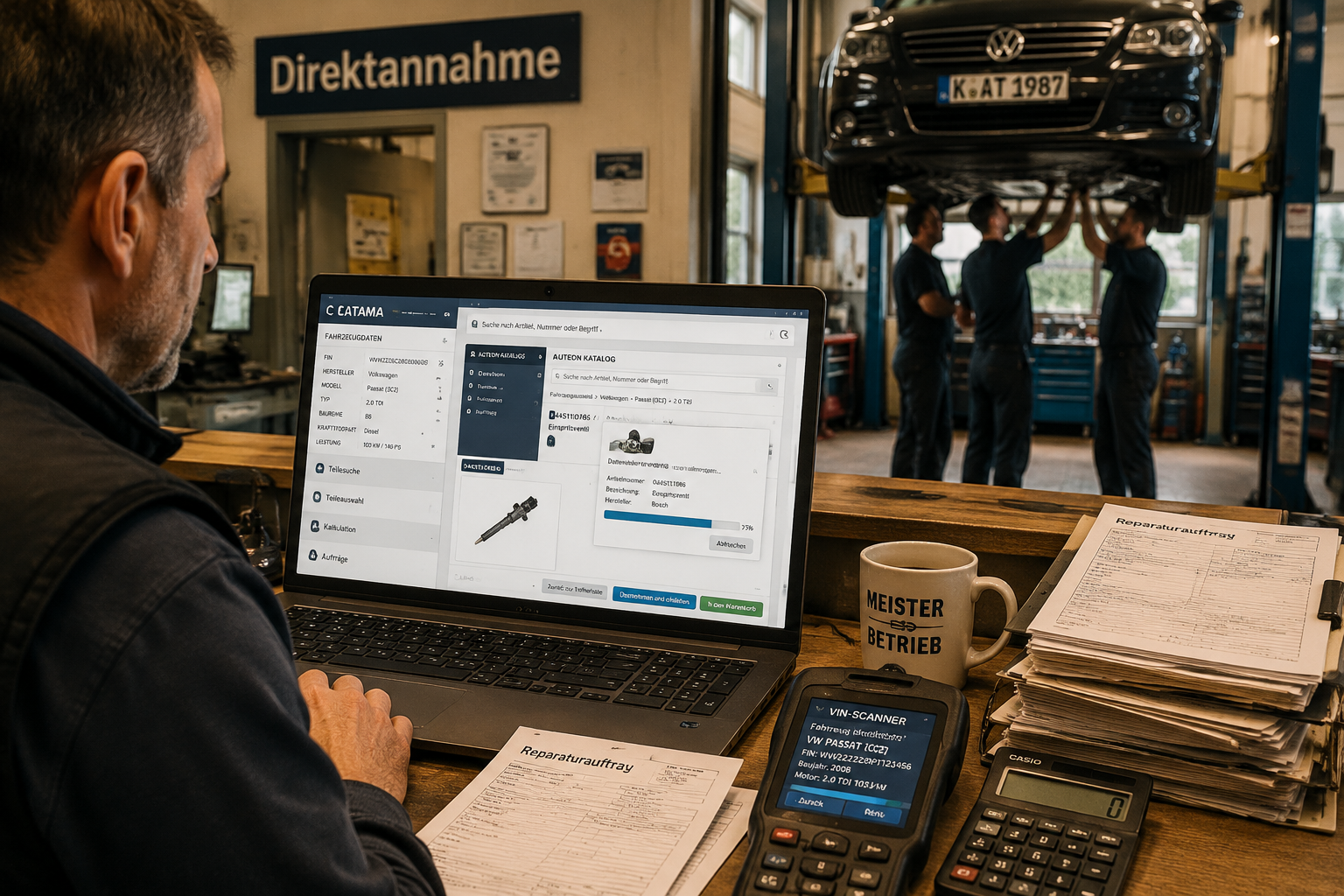
The direct vehicle check-in in automotive service is the moment when customer expectations and operational efficiency meet. When the service adviser researches the parts directly at the vehicle, adds them to the shopping basket and carries them over into the CATAMA job, the quotation can often be produced before the customer has even left the reception area.
2. Higher data quality
Manual entries are the most frequent source of errors in workshop administration. A single transposed digit in the part number means:
- the wrong order
- a delay to the repair
- return shipping costs
- dissatisfied customers
Thanks to the API import, these chains of errors are practically ruled out.
3. Better calculation and margins
The purchase price passes straight into CATAMA and is available there for automatic mark-up calculations. This makes it possible to keep hourly labour rates and parts margins neatly separate. Anyone who does not yet know their optimum hourly rate can use the free hourly rate calculator for automotive workshops.
Requirements and set-up
For the interface to run smoothly in practice, a few basic requirements have to be met.
Technical requirements
- An active Auteon account with API access rights
- A CATAMA licence in an edition that includes the interface module (CATAMA Enterprise or CATAMA Unlimited)
- A stable internet connection (the API communicates in real time)
- An up-to-date browser version for the Auteon web interface
Organisational requirements
The following points should be clarified before going live:
- Article groups and the mark-up matrix in CATAMA have been defined.
- Supplier and manufacturer master data have been created – more on this in the supplier and manufacturer management.
- User permissions have been set: who is allowed to import parts, and who may change prices?
- The standard process for transferring parts has been communicated within the team.
Step-by-step activation
| Step | Task | Responsible |
|---|---|---|
| 1 | Request the Auteon access credentials | Workshop management |
| 2 | Store the API token in CATAMA | Administrator |
| 3 | Test import with a trial vehicle | Service / IT |
| 4 | Check mark-ups and mappings | Accounting |
| 5 | Train the members of staff | Workshop management |
| 6 | Go live | the entire team |
As a rule, the set-up takes less than half a working day. If you have any questions, the CATAMA support team will be happy to help.
Comparison: the Auteon interface and other CATAMA integrations
CATAMA has relied on an open interface concept for years. The Auteon connection joins a whole series of well-established integrations.
| Interface | Main benefit | Target group |
|---|---|---|
| Auteon | Modern online parts catalogue, fast shopping basket import | independent workshops, dealers |
| Partslink24 | OE parts from several manufacturers | Franchised dealerships |
| Repdoc | Repair costs and labour values | Bodywork, calculation |
| WMKAT | Wessels+Müller catalogue | Independent workshops |
| Stakis / Stahlgruber | Wholesale | Workshops sourcing from Stahlgruber |
| Mercedes-Benz WebParts | Genuine Mercedes parts | Mercedes specialists |
A complete overview of all the available connections is provided by the page about the CATAMA interfaces.
Practical example: from the workshop appointment to the invoice
A typical service case shows how the Auteon connection pays off in everyday practice:
Starting point: a customer brings in a VW Golf VII with suspected faulty brakes. Appointment: Wednesday, 09:30.
- 09:30 – vehicle check-in. The vehicle registration document is read in with the OCR scanner, and the vehicle is created in CATAMA.
- 09:35 – visual inspection on the ramp. The front brake pads and discs need to be replaced.
- 09:45 – research in Auteon using the vehicle data that has been passed over. Original-quality pads and matching discs are added to the shopping basket.
- 09:48 – shopping basket import into the CATAMA job. Every line item appears with its purchase price, RRP and delivery time.
- 09:50 – add the hourly rates and labour values, then print the quotation or send it by e-mail.
- 09:55 – the customer signs on the tablet and the job is released.
What used to take 30 to 45 minutes is now done in under 30 minutes – including clean documentation.
Effects on accounting and e-invoicing
Clean master data is the foundation for all downstream processes. When the part numbers and purchase prices land correctly in CATAMA via the API, the following also benefit:
- Stock accounting: stock levels are maintained automatically – see automotive inventory management.
- Outgoing invoices: the line items appear 1:1 on the invoice – ideal for e-invoicing in the automotive business.
- DATEV export: accounting records are allocated correctly – see the DATEV interface.
- Reports: which parts deliver which margin? Which suppliers deliver on time?
The Auteon integration therefore does not merely serve an operational purpose; it also strengthens the commercial management of the business.
Common concerns – and what really lies behind them
“Do we really need an interface if the Auteon catalogue runs in the browser anyway?”
Yes – because the decisive bottleneck is not the parts search but the data transfer. Without an API, every line item has to be typed in individually. That costs time and produces errors.
“What happens to our existing price lists?”
Existing mark-up matrices remain unchanged. The Auteon API only supplies the base data (part number, purchase price, RRP). How the sales price is derived from that is decided by the CATAMA configuration.
“Is the interface GDPR-compliant?”
The API communication is encrypted. No personal customer data is transmitted to Auteon, only vehicle and parts data. Further details are provided by the page about the data centre and data security.
“Can we go back to working without the API if we need to?”
Of course. The Auteon interface is an optional module. The manual route remains available at any time – including in parallel with other supplier connections.
Tips for the roll-out in your business
To make sure the new way of working is accepted, a structured introduction plan is worthwhile:
- Appoint pilot users: one or two members of staff test the API intensively for two weeks.
- Put out a quick reference card with the five most important click steps at every workstation.
- Short weekly feedback rounds during the first four weeks, in order to identify obstacles.
- Define success metrics: how many jobs per day, what turnaround time, what error rate?
- Repeat the training as soon as new members of staff join the team.
If you are looking for the wider background to the software, you will find further information under how automotive workshops save time and money with CATAMA software.
Cost-effectiveness: a short sample calculation
A medium-sized business with twelve jobs per day and an average of five parts line items per job:
- 60 line items per day × 45 seconds of manual entry time = 45 minutes per day
- Over 220 working days that adds up to 165 hours per year
- At an internal cost rate of 60 euros: 9,900 euros in annual data entry costs
Even if the API interface saves only 70 per cent of that time, around 6,900 euros of savings per year remain – without even taking into account the cost of errors and the damage to your reputation caused by delayed jobs.
Conclusion: the next step
The combination of CATAMA with an interface (API) to the Auteon parts catalogue is more than a technical feature – it is a lever for lasting process improvement. Anyone who still types part numbers in by hand today is giving away time, money and data quality. Anyone who takes the API route gains efficiency at the check-in, margin certainty in the calculation and transparency in the accounts.
Concrete next steps:
- Take stock: how many jobs per day currently pass through the business? Where do the time-wasters arise?
- Check the edition: which CATAMA edition suits your business? Do you need the full range, or is a leaner suite enough?
- Secure Auteon access: request an account and an API token from Auteon.
- Start a pilot phase: test with a defined team and clear KPIs.
- Make the optimisation permanent: measure your successes, improve workflows iteratively and integrate further interfaces.
Anyone who would like to take the step towards a fully digitalised workshop administration will find the right point of contact at CATAMA support – from the first consultation through to the go-live. The next generation of workshop organisation works in a connected, data-driven and largely paperless way. The Auteon connection is a central building block for that.
