
A used car dealer in northern Germany reported losing around four hours a week simply through maintaining vehicle data twice – once in the DMS and once on Mobile.de. Four hours that did not go into sales conversations, test drives or sourcing new stock. This is exactly where the Mobile.de API in CATAMA comes in: it connects the central vehicle record directly to Germany’s highest-reach classifieds portal — automatically, bidirectionally and across branches. Managing stock instead of copying it manually saves time, reduces errors and gets vehicles online faster.
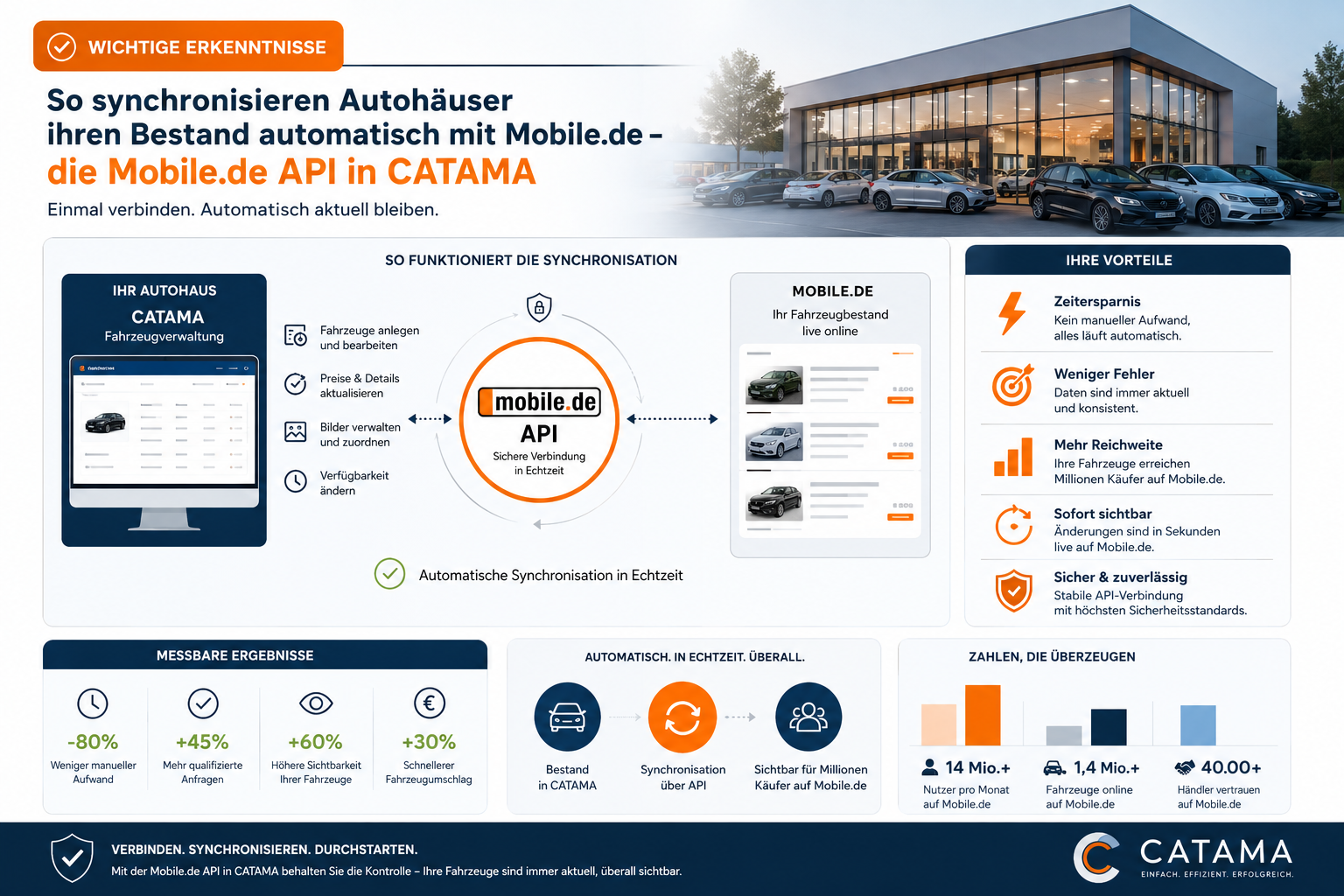
Key takeaways
- The Mobile.de API in CATAMA synchronises stock vehicles bidirectionally: listings are created and updated, and they can be imported back from Mobile.de.
- Two sync modes: bulk sync for many vehicles in the background, single sync for immediate updates to individual listings.
- Multi-branch capable: every branch can store its own Mobile.de credentials, with a fallback to global credentials.
- Photo sync (up to 15 images per vehicle), a Mobile.de editor with overrides and status transparency for every vehicle.
- The result: less duplicate data entry, consistent listings, faster time to market — a single source of data for the entire marketing process.
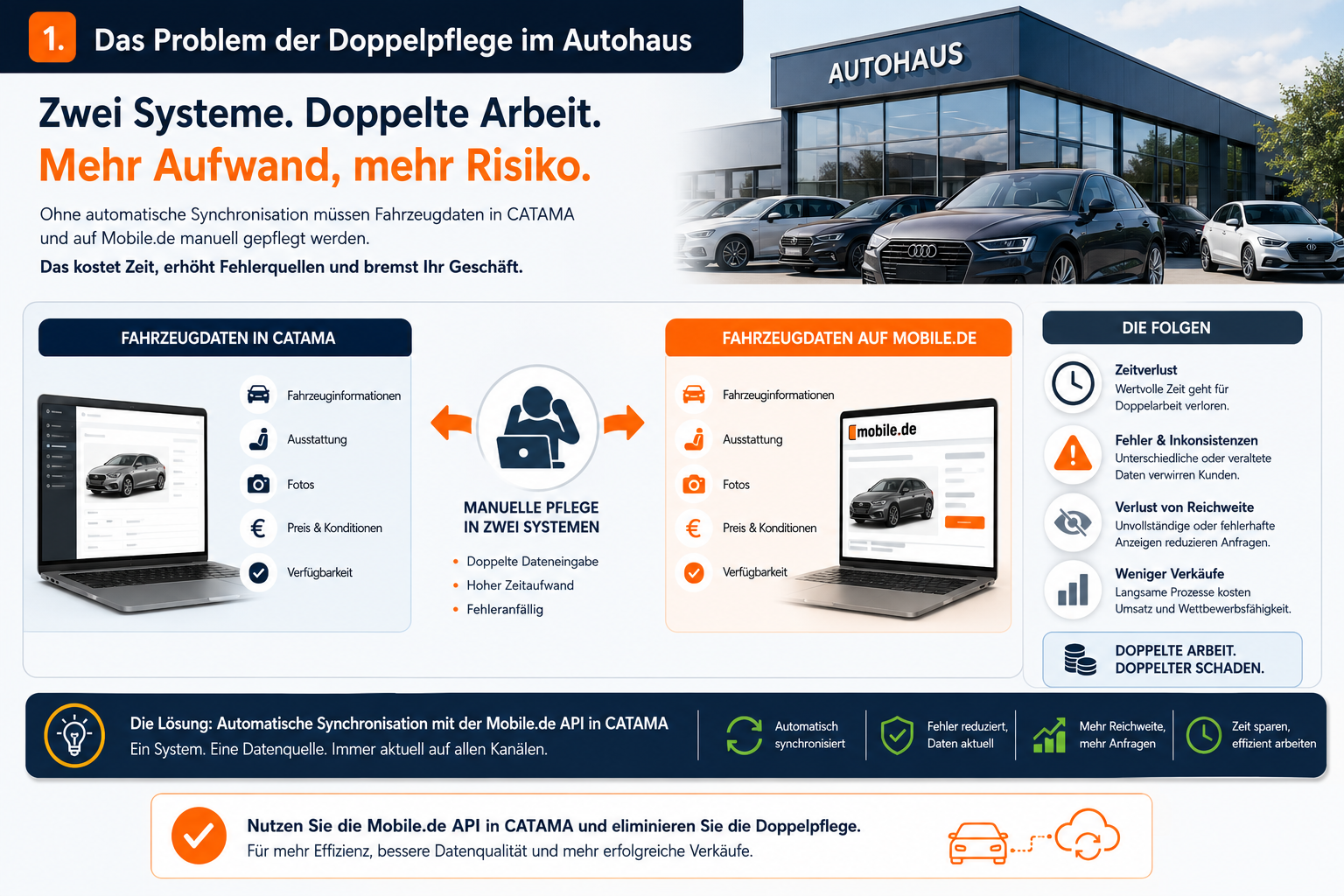
1. The problem of duplicate data entry in the dealership
In many car dealerships and repair shops with vehicles for sale, the same routine repeats itself every day: a vehicle is purchased, recorded in the internal system, furnished with photos, equipment, price and technical data — and then the same information is entered manually on Mobile.de all over again. With every price adjustment, every new description and every additional photo, the effort is repeated.
The consequences are familiar:
- The error rate rises: typos, forgotten fields, incorrect mileage.
- Outdated prices: reductions are entered in the DMS while the old price stays online for weeks.
- Missing photos: new images from vehicle preparation never make it into the listing.
- Lost time: staff spend hours on data entry instead of selling.
The core message of this article: CATAMA consolidates the vehicle record as the central source of data and handles the transfer to Mobile.de via API. The solution is therefore aimed at used car dealers, multi-brand sites and workshops with vehicles for sale that want to consolidate their marketing process. The article on the advantages of central vehicle and customer management offers a deeper perspective on the benefits of holding data centrally.
2. What the Mobile.de API in CATAMA does
The integration is more than a simple data export. It is a bidirectional connection to the Mobile.de Seller API.
Bidirectional data flow
- Outbound: vehicles from CATAMA are created or updated as listings on Mobile.de.
- Inbound: existing Mobile.de adverts can be imported into CATAMA — ideal for migrations or for taking over legacy stock.
Two synchronisation routes
| Sync mode | Purpose | Execution |
|---|---|---|
| Bulk sync | Transfer many vehicles at once | Background task, queue |
| Single sync | Create or update immediately | Directly in the vehicle editor |
Photo upload and status transparency
Vehicle images can be transferred straight from the CATAMA vehicle record into the Mobile.de listing. This function can be enabled per branch. In addition, the system shows for every vehicle whether it has already been synchronised, which listing ID has been assigned on Mobile.de and when the last sync took place.
“One vehicle record, one click, one consistent listing — that is the basic idea behind the Mobile.de API in CATAMA.”
3. Requirements and setup
3.1 What Mobile.de has to provide
Three components are required for the connection:
- An active Mobile.de dealer account with Seller API access enabled (to be requested separately from Mobile.de).
- The seller ID (the numeric identifier of the dealer account).
- An API user name and API password for technical authentication.
Mobile.de provides these credentials on request. They are not the same as the login details for the web portal.
3.2 Configuration in CATAMA
Setup takes place in the system settings under the „mobile.de credentials“ tab. This is where the seller ID, user name and password are stored. The interface also offers a „Test API data“ function that checks the connection before the first vehicle is synchronised.
The „Transfer vehicle photos to Mobile.de“ option can also be enabled or disabled per site. That is useful if individual branches work with their own image sources or want to manage bandwidth deliberately.
3.3 Branch-specific accounts for multi-site dealers
Dealer groups with several sites benefit particularly: each branch can use its own Mobile.de account. If no local credentials exist for a site, a fallback to the global credentials applies automatically. Central and decentralised marketing strategies can therefore be combined without difficulty — for instance when the main brand advertises centrally while individual sub-brands run their own listing accounts.
You will find more detailed information on multi-site administration in the overview of the CATAMA workshop software suite.
4. The typical workflow: from stock to online listing
4.1 Creating the vehicle in CATAMA
In the first step the vehicle is recorded in central vehicle management. This includes:
- Master data: VIN, HSN/TSN, date of first registration, mileage
- Technical data: power output, engine capacity, fuel type, transmission
- Equipment: optional extras, packages, colours
- Price: gross price, VAT treatment, price type
- Photos: exterior, interior, detail shots
The sync settings are then added: vehicle type, Mobile.de category as well as make and model are mapped to the Mobile.de classifications.
4.2 Enabling synchronisation per vehicle
Each vehicle has a „Synchronise with Mobile.de“ option. Only available vehicles with an active sync flag are transferred, so reserved, sold or internal vehicles reliably stay out of the listings.
4.3 Starting a bulk sync
A central sync button in the stock overview starts the mass transfer. A background task places all flagged vehicles in a queue. Progress can be viewed at any time via the task info (lorry icon) — including an error log if individual transfers fail.
4.4 Sending a single vehicle immediately
In the vehicle editor, the „Send data to Mobile.de“ tab opens the single sync function. Listings can be created here or updated selectively — for a price change, a new description or an additional item of equipment. There is no need to synchronise the entire stock again.
5. The Mobile.de editor: full control over listing data
The Mobile.de API in CATAMA provides more than a transfer function. An integrated Mobile.de editor gives you complete control over every listing-specific field.
5.1 Reading live data from Mobile.de
At the push of a button, the editor retrieves the current data of an existing advert. That creates a direct comparison: what is in CATAMA, and what is online? Discrepancies become visible before they lead to complaints or lost sales.
5.2 Fields you can edit directly in CATAMA
The following data areas can be maintained entirely in the Mobile.de editor:
- Key data: model description, condition, mileage, date of first registration, number of previous owners
- Price: gross price, VAT rate, price type (fixed price or open to offers)
- Technical data: power in kW and hp, engine capacity, fuel, transmission type, exterior and interior colour, air conditioning
- Consumption and emissions: CO₂ emissions, urban/extra-urban/combined consumption, efficiency class, emissions sticker
- Equipment: ABS, navigation system, heated seats, all-wheel drive, LED headlights, towbar and many other options
- Description text: free text for the listing description with formatting options
5.3 Overrides instead of duplicate data entry
One important concept is overrides. Mobile.de-specific adjustments are stored separately without changing the master data in the CATAMA vehicle record. The central vehicle record remains the basis; fine-tuning for the listing is possible at any time. That way no conflict arises between internal data (for accounting, for example) and the public presentation in the listing.
This separation is especially valuable when internal designations are more technical than the marketing-friendly listing description — see also our background article on HSN, TSN and KBA type approval numbers.
6. Photo sync: images online with one click
In online vehicle sales, images are the most important conversion driver after price. Photo synchronisation transfers the images from the CATAMA vehicle record directly to Mobile.de.
The key points:
- A re-sync replaces existing images: no duplicates, no outdated pictures
- A maximum of 15 images per vehicle (Mobile.de limit)
- Activation per branch: useful when not every site should sync images
- The order is preserved: the sequence from CATAMA is carried over to Mobile.de
Tip: check images for quality and order before the first sync. A consistent visual language (front view first, then side view, rear and interior, for example) noticeably increases the click rate.
7. Import: taking existing Mobile.de listings into CATAMA
Anyone switching from another system, or who has so far advertised only directly on Mobile.de, faces a typical question: how do you get the existing online stock into CATAMA? The import flow provides the answer.
CATAMA shows an overview of all Mobile.de adverts belonging to the dealer account. For each listing you can see whether it is already linked to a CATAMA stock vehicle. Listings that are not linked can be turned into new stock vehicles using the import function. Master data, technical details and existing images are taken over in the process.
This is particularly practical for:
- System migration from an old DMS to CATAMA
- Taking over stock when acquiring another dealer
- Switching systems later to central data management
8. Practical scenarios: how dealers use the Mobile.de API in CATAMA
Scenario A: day-to-day business in the dealership
A new vehicle is purchased, recorded in the CATAMA vehicle record, given photos and flagged for sync — and is visible online on Mobile.de within a few minutes. The whole process without a second round of data entry.
Scenario B: price adjustment
The price of a stock vehicle is reduced in CATAMA. One click on single sync and the Mobile.de listing is up to date. No more risk of a higher price online than the one quoted on the phone.
Scenario C: multi-site dealer
Branch A uses its own Mobile.de account for its main brand while branch B advertises under a different sub-brand. Both sites are managed centrally in CATAMA and synchronisation runs against the correct Mobile.de account in each case. Central workshop planning and administration remains unaffected.
Scenario D: changing systems
A dealer switches from a legacy system to CATAMA. Instead of re-entering every vehicle, the existing Mobile.de listings are imported. The stock is then maintained centrally from CATAMA — and the old system can be retired.
9. The advantages at a glance
| Advantage | Effect in day-to-day business |
|---|---|
| Time saved | No manual duplicate data entry |
| Fewer errors | One source of data, consistent listings |
| Fast time to market | Vehicles online within minutes |
| Status transparency | Sync status visible for every vehicle |
| Scalability | A single vehicle or the entire stock |
| Multi-branch capability | Several sites, several Mobile.de accounts |
| Overrides | Mobile.de fine-tuning without master data conflicts |
If you would like to explore the economic effects of automation of this kind in more depth, the article on how car repair shops save time and money with CATAMA software offers concrete calculation examples.
10. A technical outlook: how the Mobile.de API in CATAMA works
For technically minded readers, a brief look under the bonnet:
- REST interface: the Mobile.de Seller API is addressed via REST with a JSON payload.
- Bulk upload API: for large volumes of data the Mobile.de upload API is used as well, which accepts ZIP archives containing XML records and images.
- Background processing: a task runner controlled by cron works through the queue, so synchronisation never blocks the user interface.
- Robust error handling: if a listing no longer exists on Mobile.de (after manual deletion, for example), CATAMA automatically recreates it at the next synchronisation.
- Sandbox mode: configurations can be checked in a test environment before going live in order to avoid faulty listings.
This architecture ensures stability even with stock levels of several hundred vehicles — an important criterion for dealer groups and large traders. The article on the advantages of industry-specific software for car repair shops provides a general perspective on industry-specific software architectures.
11. Conclusion and next steps
The Mobile.de API in CATAMA turns the vehicle record into a central hub for all online marketing. Instead of maintaining data twice, a single consistent data flow runs from purchasing through preparation to the listing. Bidirectional sync, branch-specific credentials, a Mobile.de editor with overrides and a robust bulk sync cover every relevant workflow — from a single vehicle to the stock of a multi-site dealer.
Those who benefit most:
- Used car dealers with high stock turnover
- Multi-brand sites with separate listing accounts
- Workshops with vehicles for sale that still maintain two systems in parallel today
- Dealer groups that want to manage several branches centrally
Next steps
- Request a demo: have the Mobile.de connection shown to you live on real stock.
- Try CATAMA: start with the edition that suits you — you will find an overview of all packages on the CATAMA automotive software solutions and pricing page.
- Set up the branch manager: store your Mobile.de seller ID, user name and password, test the connection — and start with a first trial sync on a single vehicle.
- Import your stock: if you already advertise on Mobile.de, transfer your adverts into CATAMA using the import function.
Moving from manual duplicate data entry to automated marketing does not just save time. It gains you data quality, scalability and a competitive edge that pays off vehicle by vehicle.
Frequently asked questions about the Mobile.de API
What does the Mobile.de API in CATAMA cost?
The Mobile.de API is part of vehicle management in CATAMA and is included in the relevant editions. You additionally need a Mobile.de dealer contract with API access. You will find an overview of the packages on the Products page.
What do I need in order to use the Mobile.de API?
You need an active Mobile.de dealer account with a seller ID as well as a user name and password for API access. You store these credentials in the CATAMA branch manager.
Is synchronisation via the Mobile.de API bidirectional?
Yes. CATAMA transfers vehicles and photos to Mobile.de and can import existing listings. Changes to your stock are reconciled automatically.
How long does setup take?
Setup usually takes just a few minutes: store the credentials, test the connection and run a trial sync on a single vehicle.
Can I import existing Mobile.de listings?
Yes. If you already advertise on Mobile.de, you can transfer your existing listings straight into CATAMA using the import function.
