
Seven minutes. That is how long an average service advisor still needed back in 2019 to correctly identify a single spare part, price it and transfer it into the job. Today, with CATAMA with an interface (API) to the PartsFinder parts catalogue, it takes less than 30 seconds. This figure is not a marketing promise but the result of a simple technical truth: anyone who unites vehicle data, parts searches and job management in one system wins back hard cash every single day.
For automotive businesses and the car trade, the speed of parts identification has long since become the decisive competitive factor. Customers no longer wait. Margins are shrinking. And every manual typing step is a risk of incorrect orders. CATAMA with an interface (API) to the PartsFinder parts catalogue eliminates precisely these weak points – cleanly, quickly and fully integrated into the job workflow.
Key Takeaways
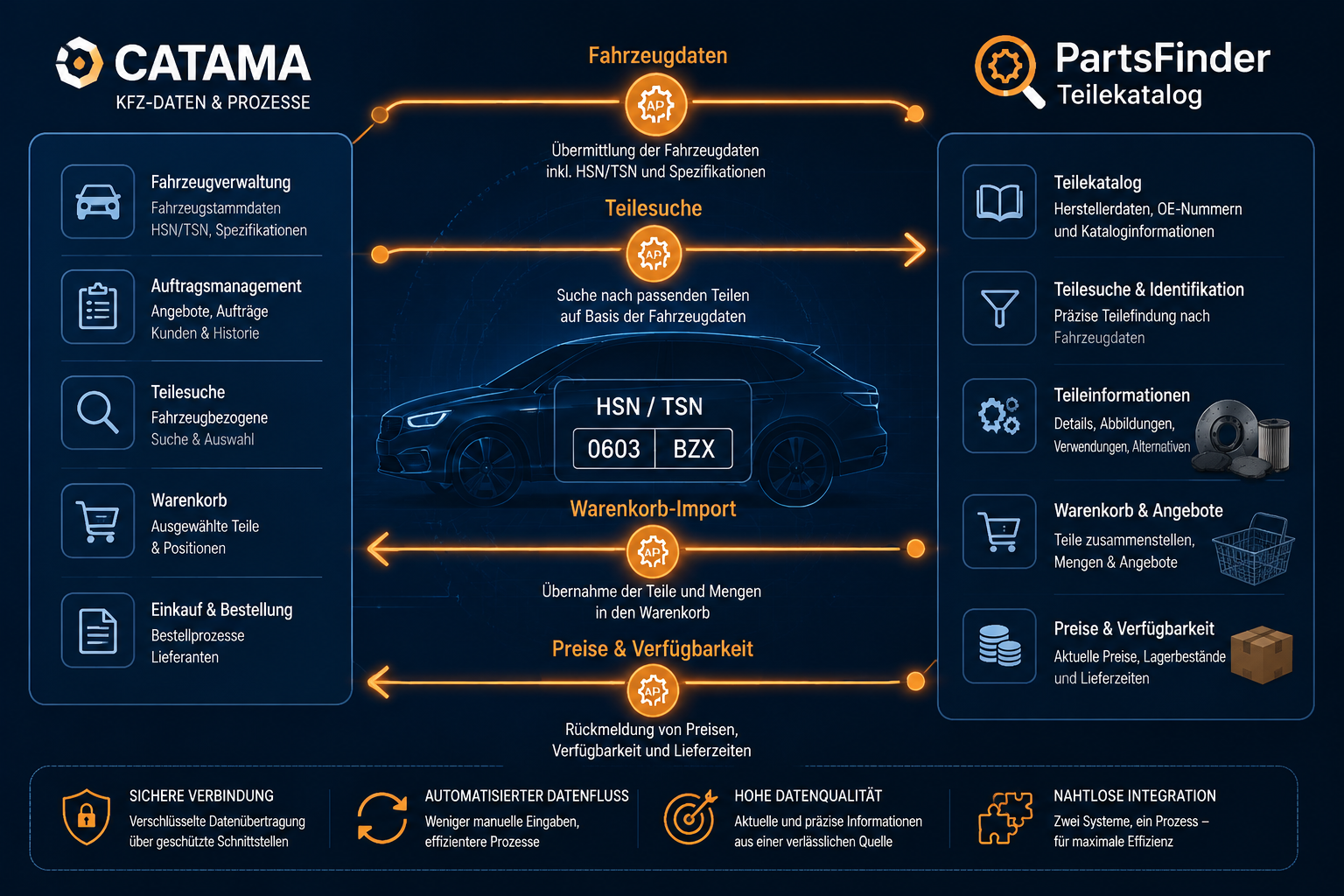
- Seamless integration: The API interface connects the workshop system directly with the PartsFinder parts catalogue – with no break in the media chain.
- Time savings of up to 90 % in parts identification and job creation thanks to direct data transfer.
- Fewer incorrect orders thanks to vehicle-specific parts searches via HSN/TSN and VIN.
- A higher margin through up-to-the-day prices, availability information and shopping basket import in a single step.
- Scalable for every business – from the single workshop to the multi-site dealership.
What does CATAMA with an interface (API) to the PartsFinder parts catalogue mean in concrete terms?
The connection between the CATAMA automotive software and the PartsFinder parts catalogue is a direct, database-supported programming interface. It transmits vehicle-specific information from the CATAMA job to PartsFinder in real time and returns the matching parts data – including prices, stock levels and original part numbers – back into the job.
In contrast to classic copy-and-paste workflows, there is no longer any need to transfer complete blocks of data by hand. The service advisor stays inside the CATAMA system, starts the parts search with a single click and adopts the result as a job item. To do so the system uses standard protocols such as REST or SOAP, depending on the provider configuration, and it forms part of the comprehensive range of interfaces offered by CATAMA Software.
Which data is exchanged?
The API transmits structured information in both directions. That is the very core of the efficiency gain.
| Direction | Type of data | Example |
|---|---|---|
| CATAMA → PartsFinder | Vehicle identification | HSN/TSN, VIN, date of first registration, engine code |
| CATAMA → PartsFinder | Search parameters | Assembly group, part description, manufacturer |
| PartsFinder → CATAMA | Parts data | Article number, EAN, description |
| PartsFinder → CATAMA | Commercial data | Purchase price, RRP, discount group, availability |
| PartsFinder → CATAMA | Logistics data | Delivery time, storage location, minimum order quantity |
“You can tell a good interface by the fact that the user no longer notices it – only the time gained stands out.”
Why the integration is so decisive precisely for automotive workshops
The workshop sector is under twofold pressure: the rising complexity of modern vehicles and growing expectations regarding response speed. Anyone who still switches manually back and forth between the parts catalogue, inventory management and the invoicing program loses several minutes per job – multiplied by the daily job volume, that quickly adds up to hours.
CATAMA with an interface (API) to the PartsFinder parts catalogue solves this problem structurally. Instead of operating four programs in parallel, the member of staff works in one single interface. That reduces not only the training time for new personnel but also the error rate – an effect that the guide on how automotive workshops save time and money with CATAMA examines in detail.
The three biggest efficiency levers
- Elimination of typing errors – article numbers are adopted directly instead of being typed out by hand.
- Avoidance of incorrect orders – the vehicle-specific search rules out incompatible parts.
- Accelerated invoicing – parts, prices and quantities flow straight into the invoice.
Practical example: a brake service in under three minutes
A concrete scenario illustrates the benefit. A customer arrives with a VW Golf VII for a brake service. The service advisor scans the vehicle registration document and CATAMA reads out the HSN/TSN key numbers automatically. One click opens PartsFinder, filtered to exactly this vehicle. Brake discs, brake pads and wear sensors are selected – the API transfers all the data directly into the CATAMA job. Invoice finished, order placed with the supplier. Total time: 2 minutes 40 seconds.
Technical architecture of the API connection
The interface is based on a modern, event-driven architecture. It communicates via encrypted HTTPS connections and uses token-based authentication. It therefore meets the requirements for data security and GDPR compliance that simply have to be taken for granted today.
Authentication and security
Every business receives unique access credentials, which are stored in the CATAMA configuration. All requests are transmitted in encrypted form. Sensitive customer data never leaves the system – only technical vehicle and parts data is transmitted.
Performance and scalability
The API is designed for high request rates. Even with several service advisors working in parallel, the response time typically remains below one second. In businesses with intensive peak periods in particular, that is a decisive factor.
| Key figure | Typical value |
|---|---|
| Average response time | < 800 ms |
| Availability (SLA) | 99.5 % |
| Parallel requests per business | unlimited |
| Data format | JSON / XML |
Integration into existing workflows
The connection is made without any intervention in the existing IT infrastructure of the workshop. CATAMA runs as a cloud solution, and so does PartsFinder. The API works in the background. Anyone already using other supplier interfaces such as Stakis/Stahlgruber, WMKAT or Partslink24 benefits from a consistent operating logic across all catalogues.
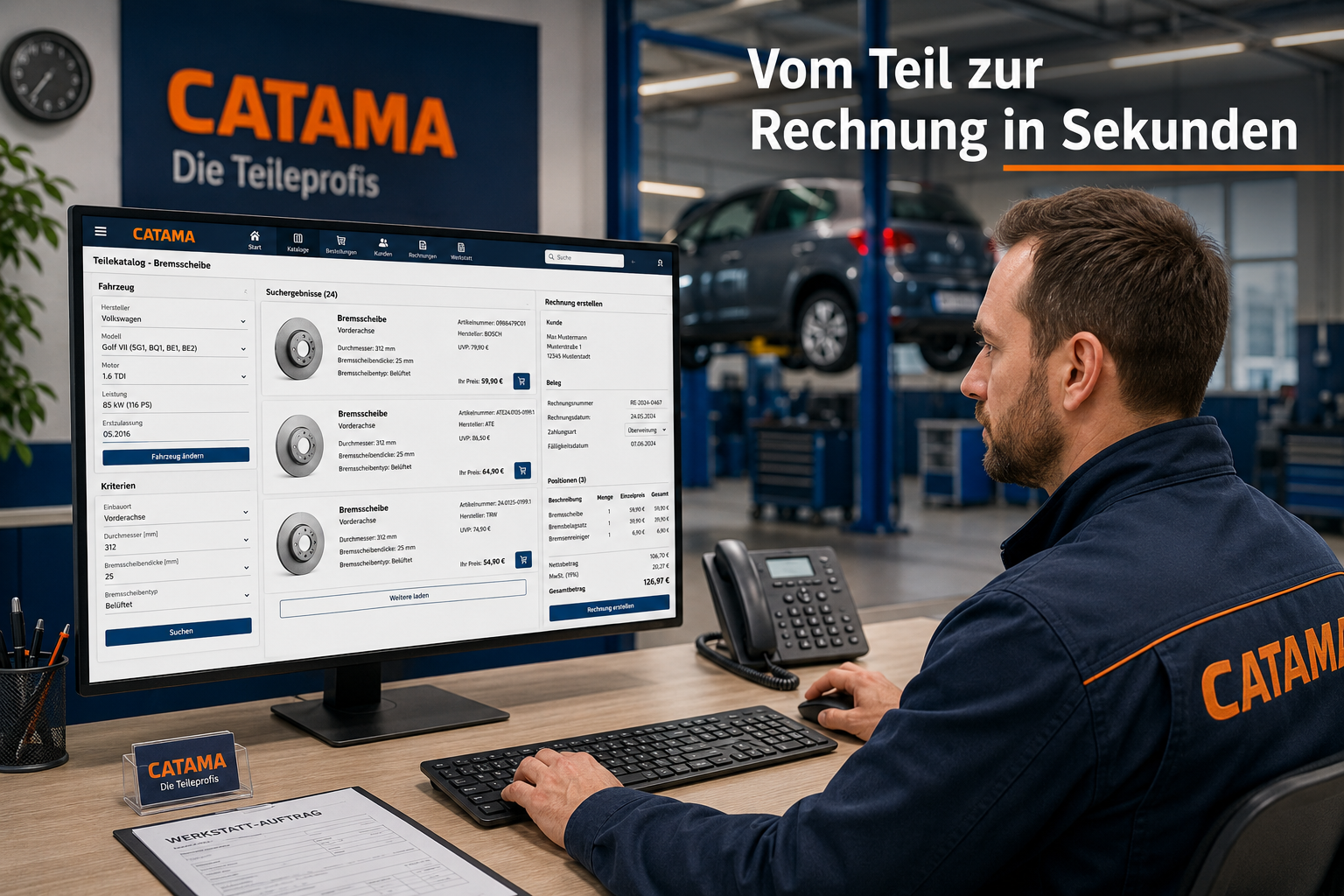
The advantages of CATAMA with an interface (API) to the PartsFinder parts catalogue in detail
The economic effects of a clean API connection are measurable. Workshops regularly report double-digit percentage figures for the time saved per job – and that has a direct impact on the hourly charge-out rate.
Time savings in parts identification
Searching manually in a classic parts catalogue often takes several minutes per item. With the API connection this time shrinks to a few seconds, because the vehicle has already been identified and only the matching assembly group still has to be selected.
Reduction of incorrect orders
Wrongly ordered parts are expensive. Returns cost time, sometimes money, and they delay the job. The vehicle-precise search via VIN or HSN/TSN makes incorrect orders practically impossible – provided that the vehicle data in the job is correct.
Up-to-the-day prices and availability
PartsFinder supplies current purchase prices and stock levels in real time. This enables workshops to calculate estimates precisely and to show their margin cleanly – with no risk that entirely different prices suddenly apply on the day of ordering.
Transparency for the end customer
Anyone who can tell the customer the exact parts costs as early as the direct service acceptance creates trust. Direct service acceptance as a service concept gains considerably in quality when the price information is available immediately.
Comparison: with and without an API connection
| Work step | Without an API | With the CATAMA PartsFinder API |
|---|---|---|
| Identify the vehicle | 2–3 min | 10 sec |
| Search for parts | 4–6 min | 30 sec |
| Check prices | 1–2 min | automatic |
| Transfer into the job | 2–3 min | 5 sec |
| Total time per job | 9–14 min | < 1 min |
Application scenarios for the workshop and the trade
CATAMA with an interface (API) to the PartsFinder parts catalogue unfolds its benefit in a wide range of constellations. Independent workshops, franchised businesses and the pure car trade all profit – although in different ways.
Independent workshops
For independent workshops, fast access to a cross-brand parts catalogue is worth its weight in gold. They look after vehicles from every manufacturer and need a system that maps this variety without staff constantly having to switch between providers.
Franchised workshops
Franchised businesses use the API as a supplement to manufacturer catalogues such as Mercedes-Benz WebParts. Here PartsFinder often serves as a source for aftermarket spare parts, wear materials and workshop supplies – areas in which the original manufacturer catalogue is not always the most economical choice.
The vehicle trade
In the car trade the integration helps with the preparation of used vehicles. Wear parts, filters, brakes – everything that has to be renewed before the sale can be calculated and ordered quickly. That shortens the standing time and improves the margin per vehicle sold.
Multi-site businesses
Branch operations benefit particularly, because the API allows central control. Purchasing conditions, supplier preferences and ordering processes can be defined uniformly – the CATAMA Enterprise Suite is designed for exactly such structures.
Implementation and commissioning
Setting up CATAMA with an interface (API) to the PartsFinder parts catalogue is deliberately kept lean. Most businesses are productive within a single working day.
Step by step to productive use
- Contractual activation – the business needs an active PartsFinder account and the corresponding API licence data.
- Configuration in CATAMA – the access credentials are stored in the configuration area; a test call checks the connection.
- Adjustment of the workflow interfaces – standard processes are activated; individual fields, for instance for internal article numbers, can be mapped.
- Training of the staff – as a rule one to two hours are enough, because operation takes place in the familiar CATAMA interface.
- Go-live – after a short period of parallel operation the interface runs in full.
Frequent questions during the roll-out
- What happens if the API fails? CATAMA remains fully operational. Only the automatic parts search is briefly unavailable; manual entry is still possible.
- Can I use several supplier interfaces in parallel? Yes. Many businesses combine PartsFinder with further providers and choose the most economical source for each job.
- How current are the prices? PartsFinder supplies up-to-the-day conditions directly from the supplier system.
Profitability: what does the interface deliver in euros?
The sober question stands at the end of every investment decision: does it pay off? A conservative example calculation shows the potential.
Assumptions:
- Workshop with 4 service advisors
- 25 jobs per day involving a parts search
- Average time saved per job: 8 minutes
- Charge-out rate: 110 € per hour
Calculation:
- 25 jobs × 8 min = 200 minutes = 3.33 hours per day
- 3.33 hours × 110 € = 366.67 € per day
- 220 working days × 366.67 € = 80,667 € per year
Even if only half of this time is actually converted into additional billable workshop work, the result is a clearly five-figure additional income per year. More background on clean calculation is provided by the free hourly rate calculator for automotive workshops.
“The interface does not pay for itself in months – it pays for itself in weeks.”
Data protection, compliance and data security
Data protection is not a marketing argument but a legal obligation. CATAMA with an interface (API) to the PartsFinder parts catalogue is designed in such a way that no personal customer data has to be transmitted to PartsFinder. Only technical vehicle data is passed on – HSN/TSN, VIN and year of construction.
All connections are encrypted and every access is logged. The CATAMA data protection guidelines document the measures transparently. For GoBD- and GDPR-compliant archiving, the entire job history remains stored in the CATAMA system in an audit-proof manner.
CATAMA with an interface (API) to the PartsFinder parts catalogue compared with other solutions
What distinguishes the CATAMA integration from comparable offerings? Three points are decisive:
- Native integration: the interface is not an add-on but part of the core system. No third-party providers, no additional login routes.
- Multi-catalogue strategy: PartsFinder is one source among many. For every job the user can decide where the part is obtained from – be it PartsFinder, Repdoc or an original manufacturer part.
- A complete process chain: from the parts search through the order to e-invoicing with a DATEV connection, everything stays in one system.
Overview of the CATAMA interface family
| Interface | Area of application |
|---|---|
| PartsFinder | Cross-brand parts catalogue |
| Stakis/Stahlgruber | Wholesale, workshop supplies |
| Repdoc | Repair data, labour values |
| Partslink24 | Multi-brand OE catalogue |
| WMKAT | Original parts |
| Mercedes-Benz WebParts | Brand-specific original parts catalogue |
Best practices for productive use
Even the best interface is of little use if the team does not apply it consistently. These practical tips have proven their worth:
- Record vehicle data completely and consistently. The cleaner the HSN/TSN data, the more precise the parts search. The OCR-supported vehicle data capture helps with this.
- Preset standard assembly groups. Anyone who regularly sells the same maintenance packages benefits from predefined search filters.
- Define a supplier strategy. Which catalogue is preferred for which type of part? Clear rules avoid discussions.
- Train staff regularly. Even experienced users discover new functions in short refresher sessions.
- Measure key figures. How many jobs run via the API? How high is the hit rate? Data reveals the potential for optimisation.
Frequently asked questions about CATAMA with an interface (API) to the PartsFinder parts catalogue
Do I need special hardware?
No. CATAMA is a cloud solution. A current browser and a stable internet connection are enough.
Can I test the interface?
Yes. CATAMA offers free trial access in which the way it works can be tried out with demo data.
How quickly does the setup pay for itself?
In most businesses within a few weeks, depending on the job volume.
What happens to my historical data?
Existing jobs remain unchanged. The API only affects new transactions.
Conclusion and next steps
CATAMA with an interface (API) to the PartsFinder parts catalogue is more than a technical function – it is a strategic lever for speed, margin and customer satisfaction. Workshops and dealers that digitalise their parts processes gain measurable time, avoid errors and create the basis for scalable growth.
Concrete next steps:
- Assess your own status quo: how much time do staff currently spend on parts searches and manual transfers?
- Request trial access: a non-binding test shows the difference in practice.
- Plan an interface strategy: which suppliers and catalogues should be connected in the longer term?
- Involve the staff: successful digitalisation projects succeed only with the team, never in spite of it.
- Make use of a consultation: the CATAMA team supports you with the individual configuration – getting in touch is well worth it.
Anyone still typing article numbers by hand in 2026 is leaving money on the table every single day. The API connection to PartsFinder is one building block with which modern automotive businesses make their processes fit for the future – cleanly documented, data protection compliant and economically measurable.
