
Trello in CATAMA: Boards, Cards, and Kanban Right in the Automotive Software
Connect your Trello account to the CATAMA automotive software and work with your boards, lists, and cards directly within the workshop software—as a Kanban board with drag-and-drop functionality, including the ability to create, move, and comment on cards, as well as preview media. No more constantly switching between programs.
Hybrid Sign-In · Tokens per User · Open API & MCP
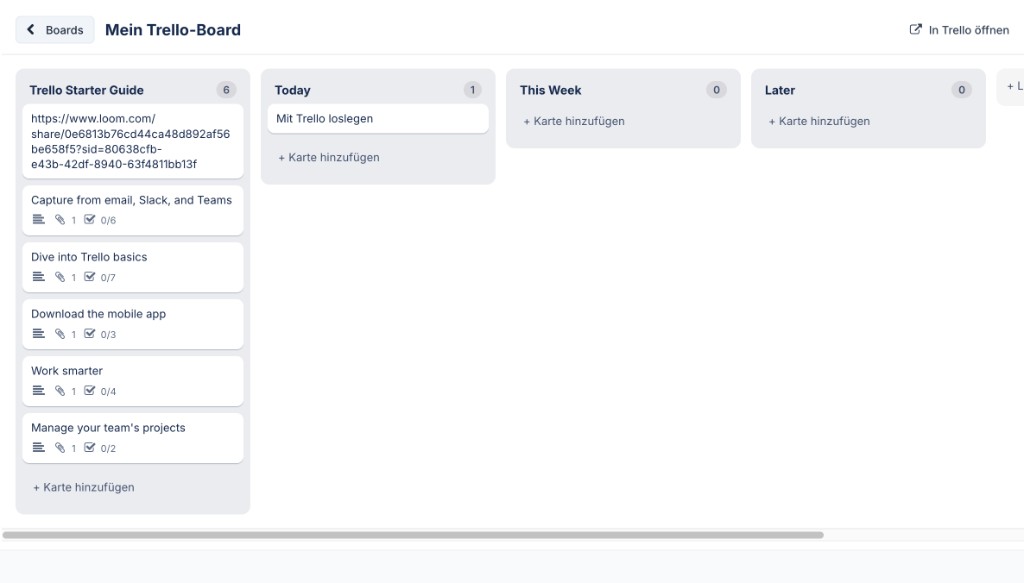
Use Trello boards directly in CATAMA
All the key Trello features—without leaving CATAMA. From the board overview to the interactive Kanban board.
Boards & Lists
View all open boards and their lists in a clear, organized way and open them with a single click.
Kanban with Drag & Drop
Simply drag and drop cards between lists—their status is updated directly in Trello.
Create & Edit Cards
Create new cards and update titles, descriptions, and due dates—all directly from CATAMA.
Comments
Comment on cards and view the history—for seamless coordination within the team.
Media & Covers
Cover images and link previews from Loom, YouTube, or uploaded images are displayed directly on the card.
Secure Hybrid Login
One global API key plus a personal token for each user—everyone can only see their own boards.
How to Use Trello in CATAMA
Kanban Board Directly in CATAMA
Open a board and view all lists and cards in Kanban view—including labels, due dates, comments, and covers. Move cards using drag-and-drop, create new ones, and keep track of your progress at all times.
- Lists and Cards as Kanban
- Drag and Drop Between Lists
- Labels, Due Dates & Covers
Secure Connection: One Token Per User
The Trello API key is stored once, centrally, in the system settings. Each employee then connects their own Trello account using a personal token—this ensures that access is clearly separated and that every change is attributed to the correct user.
- Global API Key in System Settings
- One personal token per user
- Proper attribution for every action
Why Use Trello with CATAMA
Tasks, projects, and everyday workshop life all in one place—fewer tool changes, a better overview.
Frequently Asked Questions About the Trello Integration
What do I need for the Trello integration?
A Trello account and a Trello API key. The administrator enters the key once in the system settings; each user then connects their own account using a personal token.
Where do I enable Trello in CATAMA?
In the System Settings, under the API tab, enter the Trello API key and enable the interface. After that, the "Trello Boards" menu item will appear, and each user can connect their Trello account in their own profile.
Do all employees see the same boards?
No. With personal token login, each user sees only the boards that their own Trello account has access to.
Can I create and move cards?
Yes. You can create cards, edit them, move them between lists using drag-and-drop, add comments, and set due dates—all directly in CATAMA.
Are there any additional costs?
The Trello integration is part of the CATAMA interfaces. For Trello itself, the terms and conditions of your specific Trello plan apply.
More from the CATAMA Universe
All Interfaces
Parts catalogs, vehicle marketplaces, online stores, and more—an overview of all integrations.
Open API & MCP
Standardized REST API and MCP interface for custom integrations and AI workflows.
The CATAMA Software
Workshop, inventory management, auto dealership, and office—all in one solution.
Connecting Trello and CATAMA
Try CATAMA for free for five days, or see the Trello integration in action during a personalized demo.