
Imagine this: It’s 7:30 in the morning, and instead of frantically switching back and forth between paper lists, phone notes, and cluttered calendars, you simply open your tablet. Within seconds, you see your entire workshop’s daily schedule—every job, every mechanic, every resource perfectly coordinated. Sound like a dream? With the right digitalization, this dream will become a reality in 2026. Optimizing automotive workshop workflows: Setting up the morning briefing correctly with CATAMA Software isn’t just a technical gimmick, but the key to a more productive, stress-free start to the workday.
The morning briefing is the heart of every successful auto shop. This is where the foundation for a smooth day’s work is laid—or not. Many auto repair shops still struggle with outdated processes: handwritten order slips, a lack of visibility into staff availability, and last-minute changes that throw the entire daily workflow into disarray. The solution lies in intelligent workshop software designed specifically for the needs of modern auto repair shops.
Key Takeaways
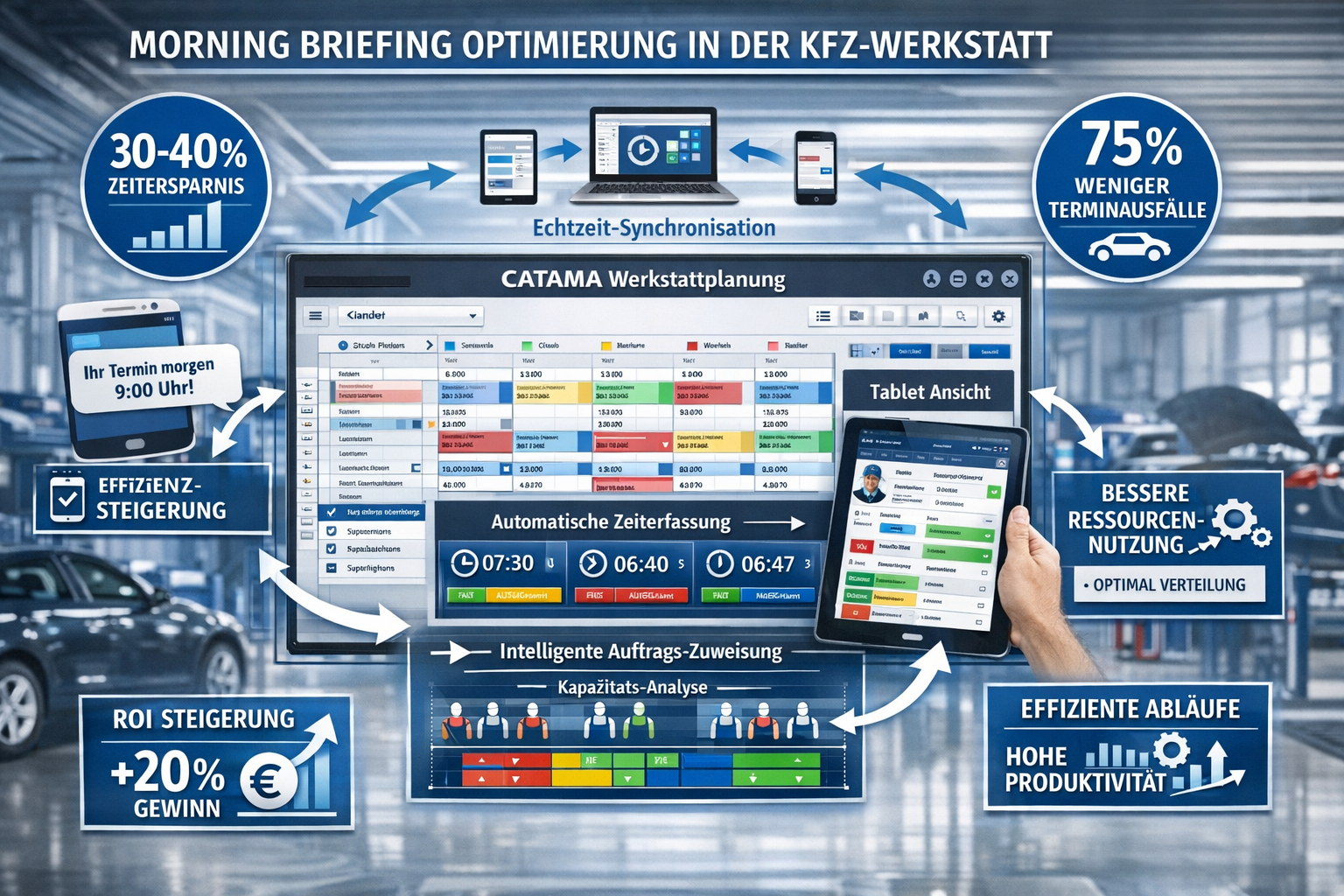
- Time savings of 30–40%: Automated scheduling and digital time tracking significantly reduce administrative tasks and free up more time for value-added activities[1]
- Cloud-based real-time synchronization: All employees work with the same up-to-date data, which eliminates duplicate bookings and makes the morning briefing more accurate[1]
- Intelligent job scheduling: Rule-based assignment automatically takes into account technicians' qualifications and availability to ensure optimal resource utilization[1]
- 75% fewer no-shows: Automatic reminders via text message or email dramatically improve scheduling accuracy[1]
- Mobile flexibility: Full tablet access enables real-time updates during briefings and in the workshop[1]
Why the morning briefing determines success or failure
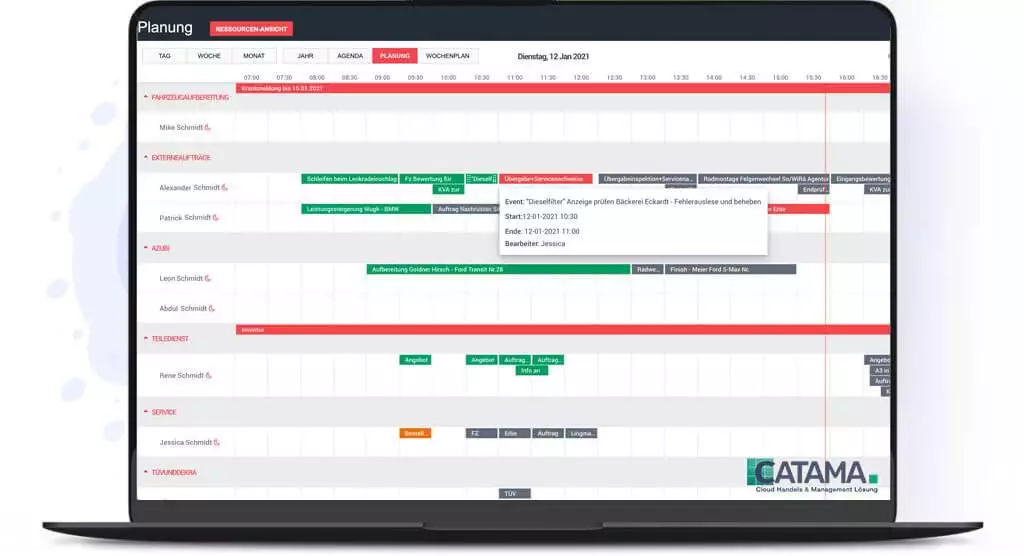
The morning briefing is much more than a quick team meeting—it serves as a strategic guide for the entire workday. In an average auto repair shop with 5–10 mechanics, just 15 minutes of chaos in the morning can lead to several hours of lost productivity throughout the day.
The typical challenges in a traditional briefing
Many workshop managers are familiar with this problem: You gather the team, assign the jobs, and hope that everything goes according to plan. But then a customer arrives late, a spare part is missing, or a mechanic unexpectedly calls in sick. Without digital support, a well-organized plan can quickly turn into a chaotic mess.
Common problems without digital workshop management:
- ❌ No real-time overview of available capacity
- ❌ Manual order distribution wastes valuable time
- ❌ Lack of transparency regarding order status and progress
- ❌ Communication gaps between the reception desk and the workshop
- ❌ Paper-based processes lead to information loss
A real-life example: Thomas, a workshop manager in Munich, used to spend 45 minutes every morning sorting jobs, assigning them to mechanics, and keeping track of everything. Since implementing professional automotive workshop ERP software, that time has been reduced to 10 minutes—and the quality of planning has improved significantly.
Optimizing Workflows in Automotive Service Shops: The Role of Digital Transformation
Digitizing workshop processes is no longer a luxury but a necessity in 2026. Workshops that still rely on manual processes are not only wasting time but also losing their competitive edge. Automating invoicing and digital order processing are just the tip of the iceberg.
From Paper Chaos to Streamlined Efficiency
The transition from analog to digital processes may seem like a major hurdle at first. But the benefits become apparent after just a few weeks. A automotive invoicing program with an integrated workshop scheduler creates a seamless database—from the initial customer inquiry to the final invoice.
Benefits of digital transformation:
| Area | Analog process | Digital Process with CATAMA |
|---|---|---|
| Scheduling | 30–45 minutes a day | 5–10 min. automatic[1] |
| Order allocation | Manual, prone to errors | Intelligent, rule-based[1] |
| Data availability | Only at work | Anywhere, anytime (Cloud)[1] |
| Communication | Phone, note | Real-time synchronization[1] |
| No-show rate | 15–20% | Below 5% due to memories[1] |
The CATAMA Software Suite offers exactly this kind of comprehensive solution. It integrates all business processes into a single platform and turns the morning briefing into an efficient, data-driven process[6].
Cloud Document Management as a Game-Changer
A key advantage of modern workshop management tools is their cloud-based architecture. All data is stored centrally and is available to authorized employees at any time. This means that the workshop manager can prepare the briefing while still sitting in the car. Mechanics can check the current status of their jobs on their tablets. And the reception desk can see in real time what capacity is still available.
The cloud-based auto repair shop software eliminates the need for expensive server infrastructure and makes data accessible from anywhere[3].
How to Run an Effective Morning Briefing: Best Practices for 2026
An effective morning briefing follows a clear structure and uses the right tools. With " Optimize Automotive Workshop Workflows: Designing Effective Morning Briefings with CATAMA Software," this process becomes a breeze.
The Perfect Briefing Structure in 5 Steps
1. Preparation (5 minutes before the briefing)
Open the workshop scheduler to get an overview of:
- All scheduled events for the day
- Available mechanics and their qualifications
- Special assignments or challenges
- Availability of parts for upcoming repairs
2. Team meeting (2 minutes)
Use a large monitor or projector to display the daily schedule. The color-coded display in CATAMA shows at a glance:
- 🟢 Green: Standard orders, everything is ready
- 🟡 Yellow: Orders with open questions
- 🔴 Red: Priority or time-sensitive jobs
3. Assignment of tasks (3 minutes)
CATAMA's intelligent job distribution automatically takes into account[1]:
- Mechanics' Specializations
- Current utilization
- Estimated processing times
- Availability of tools and lifting platforms
4. Clarification of outstanding issues (3 minutes)
Please briefly discuss:
- Special customer requirements
- Missing parts or delays
- Prioritization During Capacity Constraints
5. Start the day (1 minute)
A few words of encouragement—and let's get started!
“Since we started using CATAMA, our morning briefing has gone from 30 minutes to 10—and yet we’re more organized than ever. The automatic scheduling is simply brilliant.” – Workshop manager from Hamburg
Mobile-First: The Briefing in Your Pocket
CATAMA's mobile workshop management feature allows mechanics to do the following directly on their tablet or smartphone:
- View order details
- Track work hours
- Document material usage
- Upload photos of the damage
This flexibility means that the morning briefing is no longer static. Changes can be communicated and implemented in real time[1].
CATAMA Software: The all-in-one solution for optimized workflows
Optimizing automotive shop workflows: Getting your morning briefing right with CATAMA software is more than just a buzzword—it’s a reality that thousands of auto shops in Germany are already experiencing. CATAMA offers a comprehensive platform that covers every aspect of shop management.
Key features for the perfect morning briefing
Automated Scheduling & Time Tracking
The software automatically schedules appointments while taking all relevant factors into account. This not only saves time but also drastically reduces scheduling errors. The digital time-tracking system automatically records how long mechanics spend working on each job—perfect for post-project analysis and future planning[1].
Cloud-based workshop scheduling
All data is stored in the cloud and syncs automatically. This means that when the receptionist enters a new appointment, the shop manager sees it immediately in the scheduler. No more double bookings or misunderstandings[1].
Intelligent Job Distribution
Over time, the system learns which mechanic is best suited for which type of job. The following factors are automatically taken into account during assignment[1]:
- Qualifications and Specializations
- Current utilization
- Historical processing times
- Availability of resources
Automatic reminders
Customers automatically receive reminders via text message or email. This reduces no-shows by up to 75%[1]—a huge advantage for planning reliability during the morning briefing.
Integration with existing systems
CATAMA integrates seamlessly into existing infrastructures. Whether it’s the DATEV interface for accounting, Stakis 4.0 for spare parts orders, or Partslink24 for the parts trade —the software connects all relevant systems into a cohesive whole[6].
Latest Developments and Features in 2026
CATAMA is constantly evolving. The latest updates introduce features that make the morning briefing even more efficient[1]:
- Integrated vacation planning: See at a glance who is available and when
- Advanced billing fields: Greater flexibility in billing
- Streamlined Cancellation Management: Better Handling of Appointment Cancellations
- Enhanced calendar features: Even more intuitive to use
Planned features for 2026:
- 🤖 AI-powered scheduling optimization
- 🔧 Predictive Maintenance Integration
- 📱 Advanced mobile app features
Digital Order Processing: From Briefing to Invoicing
A perfect morning briefing is just the beginning. The true strength of a digital workshop management system is evident throughout the entire process—from order acceptance to final billing.
The complete workflow in CATAMA
Phase 1: Order Acceptance
The system captures all relevant data as soon as an appointment is scheduled:
- Customer data (automatically retrieved from the database)
- Vehicle data ( extracted from the vehicle registration certificate using OCR technology)
- Desired services
- Estimated duration and cost
This information is immediately available during the morning briefing.
Phase 2: Morning Briefing & Assignment
The workshop manager opens the scheduling system and sees all the appointments for the day. With just a few clicks, he assigns jobs—or lets the intelligent automated system handle it. The centralized vehicle and customer management system ensures that all historical data is available.
Phase 3: Implementation
Mechanics process the orders and document everything directly in the system:
- Hours worked
- Materials Used
- Additional defects identified
- Photos and notes
Phase 4: Billing
The automatic invoicing feature generates a legally compliant invoice at the click of a button—including all line items, the correct sales tax, and e-invoice compliance.
Time Savings in the Workshop: Concrete Figures
Digitization offers measurable benefits. Here are some realistic daily time savings in a workshop with five mechanics:
- Morning briefing: 20 minutes saved (from 30 to 10 minutes)
- Searching for orders: 45 minutes saved (everything can be found digitally)
- Invoicing: 60 minutes saved (automated instead of manual)
- Material documentation: 30 minutes saved (direct entry)
- Customer communication: 25 minutes saved (automatic updates)
Total: 3 hours per day = 15 hours per week = 780 hours per year
At an average hourly rate of €80, this translates to a potential value-added of €62,400 per year —simply through more efficient processes[3].
Legally Valid Invoices and Compliance
One aspect of automotive accounting that is often overlooked is legal compliance. Incorrect invoices can not only lead to follow-up inquiries but also have tax implications.
GoBD Compliance and Data Security
CATAMA meets all the requirements of the GoBD (Principles for the Proper Maintenance and Retention of Books, Records, and Documents in Electronic Form). This means:
- ✅ Immutability of documents
- ✅ Complete documentation of all changes
- ✅ Secure, auditable archiving
- ✅ Transparent processes
The cloud infrastructure provides automatic backups and the highest level of data security. Your data is better protected than on any local server.
E-invoicing: Ready for the future
Starting in 2027, e-invoicing will become mandatory for B2B transactions in Germany. CATAMA is already prepared and supports all common formats, such as XRechnung and ZUGFeRD. This gives repair shops the assurance that they will be able to meet future requirements without any problems.
ROI Calculation: Is the Investment Worth It?
The question every garage owner asks: Do the benefits justify the costs? Let's take a look at a realistic calculation.
Sample calculation for a medium-sized workshop
Initial situation:
- 5 mechanics
- 20 orders per day
- Average order value: €350
Cost of CATAMA software:
- Monthly license: approx. €150–300 (depending on the package)[5]
- One-time setup fee: approx. €500
- Training: approx. €300
Savings in the first year:
- Time saved (780 hours × €80): €62,400
- Fewer no-shows (5% increase in occupancy): approx. €18,000
- Fewer errors in invoices: approx. €3,000
- Faster receipt of payments: approx. €5,000
Total savings: €88,400
Investment in Year 1: approx. €4,400
ROI: 2,000% in the first year
This estimate is conservative. Many repair shops report even greater savings, particularly due to improved customer loyalty and an increase in the number of jobs resulting from a more professional image[3].
Real-world examples: Success stories from the workshop
Case Study 1: Family-run workshop in Bavaria
The Müller workshop in Regensburg was struggling with chaotic morning briefings and dissatisfied customers. After implementing CATAMA:
- Morning briefing: Reduced from 40 to 8 minutes
- Customer satisfaction: From 3.2 to 4.7 stars (Google)
- Revenue: +23% in the first year
- Employee satisfaction: Significantly increased
“CATAMA has transformed our business. We no longer work harder, but smarter—and our customers can tell.” – Johann Müller, Owner
Case Study 2: A Growing Chain of Auto Repair Shops in Northern Germany
AutoService Nord operates 4 locations with a total of 22 mechanics. The challenge: ensuring consistent processes across all locations.
Solution with CATAMA:
- Centralized planning for all locations
- Cross-site resource utilization
- Consistent pricing and processes
- Consolidated reports
Result:
- 35% increase in efficiency
- Option to open a fifth location
- A stronger negotiating position with suppliers thanks to a centralized database
Implementation: How to Make the Transition a Success
The transition from analog to digital processes doesn't have to be complicated. With the right strategy, the implementation will go smoothly.
Step-by-step instructions
Weeks 1–2: Preparation
- Free trial of CATAMA software
- Analysis of Current Processes
- Definition of Objectives
- Selecting the right plan (Smart, Professional, or Enterprise)
Weeks 3–4: Data Migration
- Importing Customer Data
- Transfer of Vehicle Data
- Setting up product master data
- Configuring Workstations and Resources
Weeks 5–6: Training
- Team training (approx. 4 hours)
- Practical exercises
- Creating custom workflows
- Test morning briefing using the system
Weeks 7–8: Parallel Operation
- Using CATAMA alongside existing processes
- Fine-tuning the settings
- Collection of feedback
- Adjusting workflows
Starting in week 9: Full operation
- Complete transition to CATAMA
- Regular team reviews
- Continuous optimization
- Using advanced features
Common Challenges and Solutions
“My employees aren’t tech-savvy”
→ CATAMA is deliberately designed to be intuitive. Most users are up and running within 2–3 days. CATAMA also offers comprehensive support.
“We already have a different system”
→ CATAMA offers interfaces to most common systems. Parallel operation or a phased transition is possible.
“What happens if the internet goes down?”
→ The cloud solution offers high availability (99.9% uptime). In the event of temporary outages, data can be entered offline and synchronized later.
“Is our data secure?”
→ CATAMA uses German data centers that meet the highest security standards. All data is encrypted and backed up daily.
The Future of Workshop Planning: Trends for 2026 and Beyond
Optimizing automotive shop workflows: Using CATAMA software to effectively conduct morning briefings is just the beginning of a comprehensive digital transformation.
AI and Predictive Analytics
The next generation of workshop software will use artificial intelligence to:
- Predicting maintenance needs
- Recommend optimal time slots
- Forecasting spare parts demand
- Adjust prices dynamically
CATAMA is already working on AI-powered features that will be rolled out in 2026 and 2027[1].
Connectivity with vehicles
Modern vehicles already transmit diagnostic data today. In the future, workshop software will be able to communicate directly with vehicles:
- Automatic error detection
- Appointment scheduling by the vehicle itself
- Preparing for repairs before arrival
- Digital Service Log
Augmented Reality in the Workshop
In the future, AR glasses could help mechanics:
- Display repair instructions directly in your field of view
- Visualizing complex assemblies
- Get expert help via video call
- Document the steps
Comparison: CATAMA vs. Traditional Processes
To illustrate the benefits even more clearly, here is a direct comparison:
Morning briefing
Traditional:
- 30–45 minutes a day
- Paper-based, prone to errors
- No real-time updates
- Difficult prioritization
With CATAMA:
- 5–10 minutes a day[1]
- Digital, precise
- Live Synchronization
- Intelligent Job Distribution
Customer Communication
Traditional:
- Manual calls
- High no-show rate
- Time-consuming
- Inconsistent
With CATAMA:
- Automatic reminders
- 75% fewer no-shows[1]
- Time-saving
- Professional and reliable
Billing
Traditional:
- 15–20 minutes per invoice
- Prone to errors
- Manual archiving
- Late payments
With CATAMA:
- 2–3 minutes per invoice
- Automatically correct
- Digital Archive
- Faster receipt of payments
Additional features for maximum efficiency
In addition to its core feature, the morning briefing, CATAMA offers numerous other functions that make day-to-day workshop operations easier:
Tire Management
The integrated tire management system manages tire sets, storage, and replacement schedules—including automatic reminders for customers.
Form Builder
With the Form Builder Tool, you can create custom checklists, handover reports, and inspection reports—perfect for standardized processes.
Merchandise Management
The full integration of ordering and goods receipt ensures that materials are available on time.
Cash Book
The digital cash book meets all tax requirements and simplifies daily accounting.
Support and Training
Support is an important factor to consider when choosing workshop software. CATAMA offers:
- 📞 Phone support during business hours
- 💬 Live chat for quick questions
- 📧 Email support with a response within 24 hours
- 📚 Extensive knowledge base with tutorials
- 🎓 Regular webinars on new features
- 🛠️ Ticket system for complex inquiries
CATAMA Support is German-speaking and understands the specific needs of automotive businesses.
Pricing Plans and Packages
CATAMA offers various packages tailored to businesses of different sizes:
CATAMA Professional
For medium-sized businesses (4–10 employees)
- All Smart Features
- Advanced Planning
- Multiple job openings
- Interfaces with suppliers
CATAMA Enterprise
For large businesses and chains (10+ employees)
- All Professional Features
- Multi-client capability
- Advanced Analyses
- Customization
CATAMA Unlimited
Customized solution featuring:
- Dedicated Support
- Customization
- Priority Updates
- Personal Account Manager
You can find detailed pricing on the CATAMA product page.
Conclusion: The future starts with the morning briefing
Optimizing automotive shop workflows: Designing effective morning briefings with CATAMA software is more than just a technical improvement—it is
