
Imagine this: A customer calls your shop and urgently needs a replacement part for their Kawasaki. In the past, that meant opening a catalog, looking up the part number, manually checking the price, entering it into the software—and hoping no mistakes were made. In 2026, the reality at modern auto shops looks completely different. The CATAMA Software – Kawasaki Parts List Import feature revolutionizes this very process, turning a time-consuming task into a matter of seconds.
Integrating manufacturer parts lists directly into workshop software is no longer a luxury, but a business necessity. Especially for specialty brands like Kawasaki, where precision and quick availability are crucial, CATAMA Software’s Kawasaki parts list import feature makes the difference between satisfied regular customers and lost orders.
Key Takeaways
✅ Time savings through automation: The Kawasaki Parts List Import eliminates manual data entry and reduces error rates by up to 95%
✅ Automatic price updates: Prices are automatically updated every time you reimport data—your calculations are always up to date
✅ Seamless integration: Imported Kawasaki parts are immediately available in quotes, orders, workshop scheduling, and accounting
✅ Data validation: Automatic quality checks prevent incorrect entries and ensure data consistency
Why the CATAMA Software – Kawasaki Parts List Import Will Transform Your Workshop
The Challenges of Traditional Spare Parts Processes
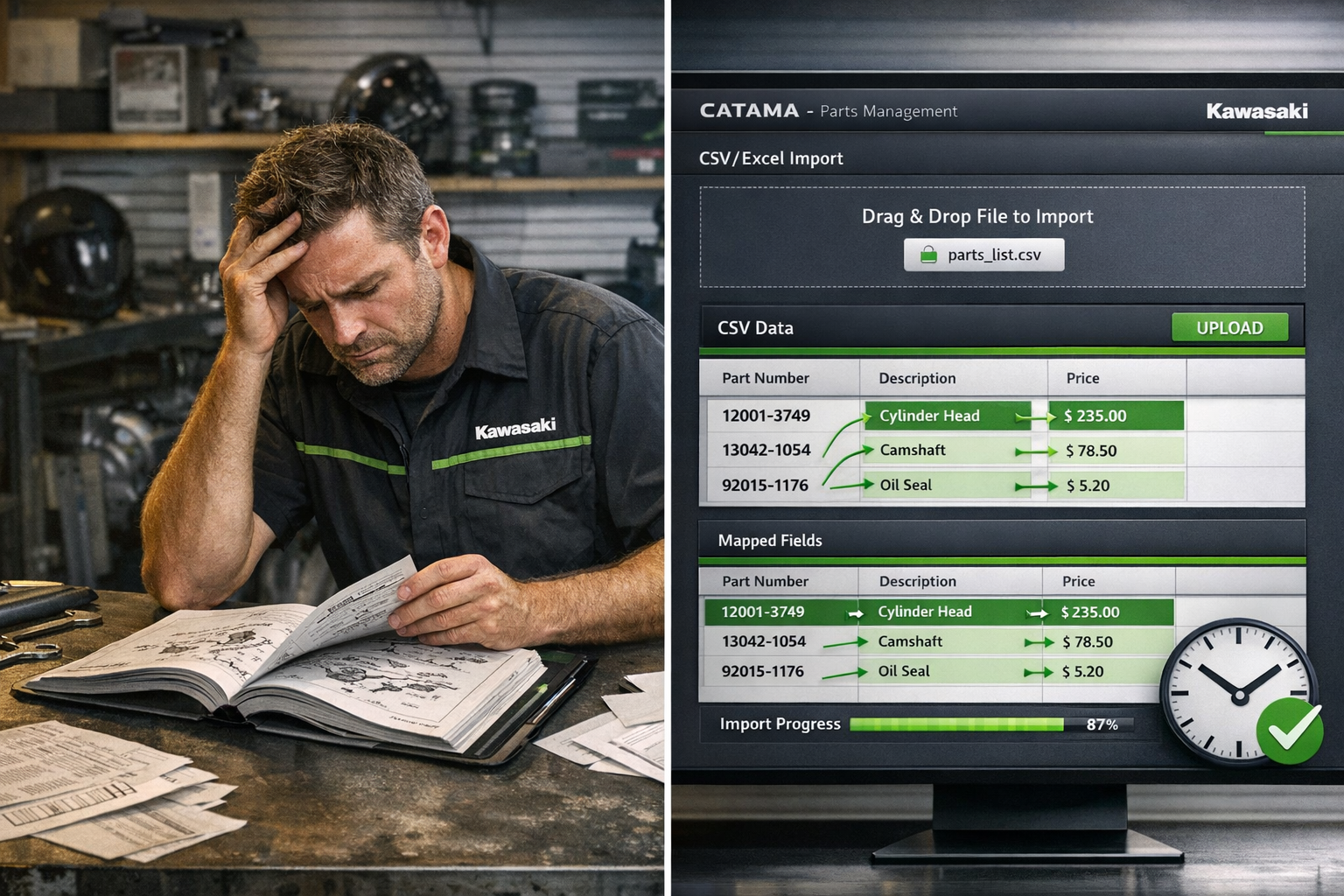
Shop owners are familiar with the problem: Kawasaki regularly publishes updated parts lists with new prices, additional items, and changes in availability. Without an automated import feature, every update means hours of manual work. A mechanic recently said, “We used to spend half a day every month just updating price lists. That was a complete waste of skilled labor time.”
The CATAMA Software – Kawasaki Parts List Import Solution fundamentally eliminates this inefficiency. The system supports Kawasaki’s standard formats, enabling the direct integration of manufacturer parts lists into the workshop software[1]. This flexibility means that regardless of the format in which Kawasaki provides its lists, CATAMA can process them.
Automated field mapping: Intelligence instead of manual labor
The real added value lies in automatic data field mapping. The system automatically recognizes part numbers, descriptions, prices, EAN/GTIN codes, weights, and dimensions, and assigns them to the correct database fields[1]. This intelligent mapping not only eliminates manual data entry but also drastically reduces errors.
One particularly clever feature is the automatic price update upon reimport. When you import an updated Kawasaki price list, the system identifies existing items by their part numbers and automatically updates the prices[1]. This ensures your calculations are always up to date—without you having to lift a finger.
Data Validation and Quality Assurance
Before a single Kawasaki part is added to your central product database, it undergoes automated validation. The system checks the data for completeness and consistency[1]. Missing required fields? The system alerts you. Inconsistent price formats? They are automatically detected and corrected.
This quality assurance is particularly valuable when you consider that inaccurate product data can lead to miscalculations, incorrect orders, and ultimately dissatisfied customers. Professional automotive software ensures that your database remains reliable.
Direct integration with quote and order creation
Immediate availability when preparing a quote
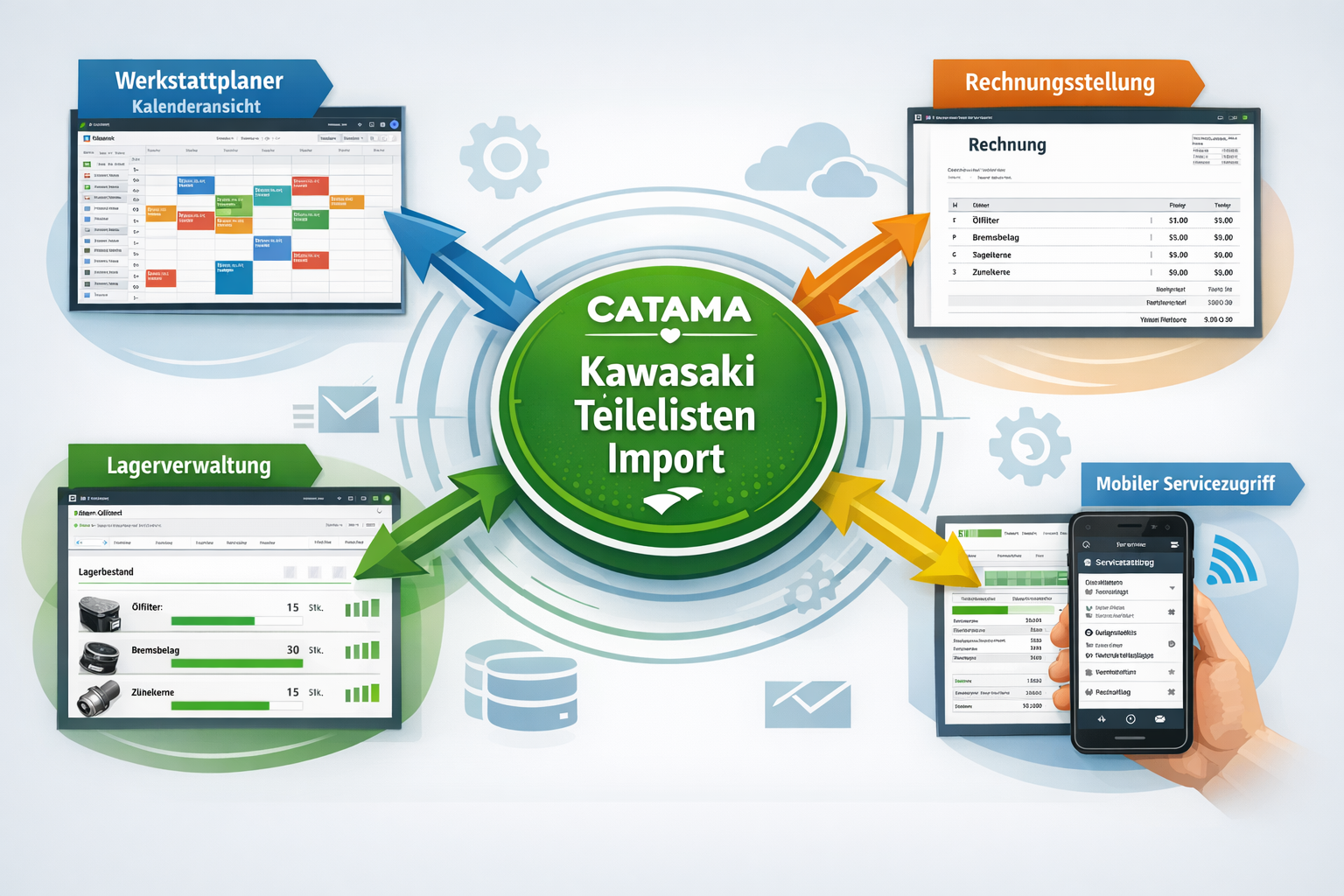
The greatest practical benefit of the CATAMA software’s Kawasaki parts list import feature becomes apparent in day-to-day operations: imported Kawasaki parts are immediately available for use in creating quotes and orders[1]. When a mechanic prepares a quote for a customer, they can directly access the complete parts database with up-to-date prices.
Imagine the following scenario: A customer walks into your shop and wants a quote for a comprehensive inspection of their Kawasaki Ninja. Your mechanic opens the CATAMA automotive software and, within seconds, has access to all the necessary genuine parts—complete with correct part numbers, current prices, and availability information. The quote is created in minutes, professionally formatted, and can be printed directly or sent via email.
Workshop planning with integrated parts information
But the integration goes even further: Kawasaki parts imported into CATAMA are integrated into the workshop scheduler, enabling task planning that includes availability checks[1]. In practical terms, this means that when you schedule a repair appointment, the system automatically checks whether the required Kawasaki parts are in stock or need to be ordered.
This feature eliminates one of the most common sources of frustration in workshops: vehicles that are jacked up for repair but cannot be completed because parts are missing. With efficient workshop planning, you can set realistic deadlines and make optimal use of your capacity.
Accounting integration for automated processes
An often-overlooked but extremely valuable feature: Imported Kawasaki items are automatically assigned to the correct accounting accounts and can be exported via the DATEV interface for automated accounting[1]. This means that the entire process, from the parts list to accounting, is fully automated.
For garage owners who take their bookkeeping and administration seriously, this integration is worth its weight in gold. No more manual data entry, no errors in account assignments, and no duplicate data entry. The DATEV interface ensures that your tax advisor receives exactly the data they need—in the right format and at the right time.
Practical application scenarios from everyday workshop life
Scenario 1: Monthly price list update
Every month, Kawasaki publishes updated price lists. With the CATAMA software’s Kawasaki parts list import feature , updating takes just a few minutes:
- Download the current Kawasaki price list
- Import into CATAMA in just a few clicks
- Automatic identification of existing items based on the part number
- Automatic price updates for all affected items
What used to take half a workday can now be done in 10 minutes. The time saved can be used for value-added activities—such as customer service or workshop optimization.
Scenario 2: Major Order for the Kawasaki Fleet
A business customer operates a fleet of Kawasaki motorcycles and has contracted your shop to perform annual maintenance on all the vehicles. Thanks to the integrated parts lists, you can:
- Quick calculation: All required maintenance parts are listed with current prices
- Account for volume discounts: CATAMA Enterprise Software enables customer-specific pricing
- Check availability: Direct integration with inventory levels shows what needs to be ordered
- Professional Presentations: Detailed Quotes with Part Numbers and Descriptions
The cloud-based solution even allows multiple employees to work on different vehicles in the fleet at the same time without getting in each other's way.
Scenario 3: Emergency spare parts procurement
A customer is standing outside with a broken-down motorcycle. Thanks to the CATAMA software’s Kawasaki parts list import feature, you can:
- Identify immediately: Which part is needed?
- Provide price: Current prices are listed
- Check availability: Is the item in stock or does it need to be ordered?
- Order quickly: Place orders directly with the supplier via integrated interfaces
- Schedule an appointment: As soon as the part arrives, the repair can be scheduled in the workshop scheduler
This speed and professionalism impress customers and lead to positive reviews and referrals.
Economic Benefits and ROI Analysis
Quantified time savings
Let’s say an average repair shop works with about 200 different Kawasaki parts. Without automated import, the monthly update would take about:
- 4 hours for manual price maintenance
- 2 hours for troubleshooting and corrections
- 1 hour for coordination with the accounting department
That amounts to 7 hours per month or 84 hours per year. At an average hourly rate of 60 euros, that translates to an annual cost of 5,040 euros for data maintenance alone.
With the CATAMA software’s Kawasaki parts list import feature, this task is reduced to about 30 minutes per month—a time savings of over 90%. The efficiency gains pay for the software investment in no time.
Error reduction and customer satisfaction
Manual data entry inevitably leads to errors. Studies show that an error rate of 3–5% is common with manual entry. For 200 parts, that means:
- 6–10 incorrect entries per month
- Potential miscalculations in quotes
- Rework and customer dissatisfaction
- Potential loss of profits due to prices that are too low
The CATAMA software's automated validation reduces the error rate to less than 0.5%. This not only means less stress for your employees, but also happier customers and better margins.
Scalability for growing businesses
One particular advantage becomes apparent as your business grows: as your company expands and you add new brands, the solution scales effortlessly to meet your needs. The various CATAMA editions —from the Smart Edition to the Unlimited version —grow alongside your requirements.
Implementation and Getting Started
Requirements for a successful launch
Implementing the CATAMA software’s Kawasaki parts list import feature is easier than many people think. All you need is:
✓ Access to CATAMA: One of the CATAMA software versions with an import function
✓ Kawasaki parts lists: In CSV or Excel format from the manufacturer or supplier
✓ Basic training: CATAMA offers comprehensive training
✓ Internet connection: For the cloud-based solution
Most businesses are up and running within a day. The intuitive user interface eliminates the need for lengthy training.
The First Import: Step by Step
- Prepare the parts list: Provide the Kawasaki list in a supported format
- Start import: Open the Import Wizard in CATAMA
- Select file: Upload a CSV or Excel file
- Check field mappings: The system automatically suggests mappings
- Perform validation: The system checks the data for completeness
- Confirm import: Data will be added to the database
- Check the results: The import report shows new and updated items
For a typical parts list with 200–500 items, the entire process takes about 5–10 minutes. It might take a little longer the first time, but after two or three runs, it becomes routine.
Best Practices for Optimal Results
🎯 Frequency: Import updates monthly to ensure you always have the latest prices
🎯 Back up before importing: Create a backup of your database before performing large imports
🎯 Take validation seriously: Check import reports for anomalies
🎯 Use categorization: Assign imported parts to appropriate categories
🎯 Invest in training: Make sure all relevant employees are familiar with the feature
The comprehensive CATAMA documentation provides additional guidance on all questions.
Integration into the overall workflow
From Import to Invoice: The Complete Process
The true strength of the CATAMA software’s Kawasaki parts list import feature lies in its seamless process integration:
1. Import → Kawasaki parts list is imported and validated
2. Inventory → Parts are recorded and managed in inventory
3. Quote → Mechanic creates a quote using the imported parts
4. Order → Customer places order, order is created
5. Scheduling → Appointment is scheduled in the workshop planner
6. Execution → Repair is performed, parts are removed
7. Billing → Invoice is created and sent
8. Accounting → Export to DATEV interface
Every step is seamlessly integrated, with no media breaks or manual transfers. This end-to-end digitization is the key to improving efficiency.
Combination with other CATAMA features
The Kawasaki import function really comes into its own when combined with other CATAMA features:
📋 Form Builder: Create custom forms for Kawasaki-specific inspections
📊 Analytics: Analyze which Kawasaki parts sell the most
🔄 Order Management: Automate reorders when inventory levels are low
📱 Mobile access: Access parts information from anywhere
💰 Pricing: Set custom prices and discounts
These synergies make CATAMA more than just software—it becomes the central nervous system of your workshop.
Comparison with alternative solutions
Why specialized import features are important
While many general-purpose workshop software solutions offer generic import functions, the CATAMA software’s Kawasaki parts list import function goes significantly further:
| Feature | Generic solution | CATAMA Kawasaki Imports |
|---|---|---|
| Format support | Limited | CSV, Excel, others |
| Automatic field mapping | Manual | Fully automatic |
| Price Update | Manual | Automatically upon reimport |
| Validation | Basic | Comprehensive with report |
| Integration of the Workshop Scheduler | None | Complete |
| Accounting Export | Manual | Automatic (DATEV) |
The difference lies in the details: While generic solutions force you to adapt to the software, CATAMA adapts to the specific requirements of Kawasaki parts lists.
Industry-specific benefits
Industry-specific software for auto repair shops offers key advantages over general business solutions:
- Vehicle-specific data fields: part numbers, vehicle assignments, manufacturer codes
- Industry-standard processes: Quotation and order workflows as are common in workshops
- Regulatory requirements: Automatic accounting for taxes, deposits, etc.
- Supplier integration: Direct interfaces with automotive suppliers
This specialization means you don't have to start by making complex adjustments; instead, you can get right to work.
Support and ongoing development
Professional support for smooth operation
An often-overlooked fact: Even the best software is only as good as the support behind it. CATAMA offers:
✅ German-language support: No language barriers when it comes to technical questions
✅ Fast response times: Professional ticket system for efficient handling
✅ Comprehensive documentation: Detailed instructions and FAQs
✅ Regular updates: Continuous improvements and new features
✅ Training opportunities: Onboarding of new employees
Support and customer service are not just reactive, but proactive: Regular updates provide information about new features and best practices.
Future-proofing through continuous innovation
The developments planned for 2026 demonstrate that CATAMA is continuously investing in innovation. AI-driven process optimization and automatic format recognition[1] are just the beginning. In a rapidly evolving industry, this forward-looking approach is crucial.
Particularly exciting: The planned mobile import features[1] will further increase flexibility. Field technicians will then be able to import parts lists and place orders directly from the customer’s location—a real game-changer for mobile service teams.
Conclusion: Efficiency starts with smart automation
The CATAMA Software – Kawasaki Parts List Import Feature is much more than just a technical feature—it is a strategic tool for improving efficiency in modern automotive repair shops. At a time when labor shortages and cost pressures are on the rise, automating time-consuming routine tasks is not optional—it is essential.
Key benefits at a glance:
💡 Time savings: Over 90% less effort required for parts list maintenance
💡 Error reduction: Automated validation minimizes error rates
💡 Up-to-date: Automatic price updates keep calculations current
💡 Integration: Seamless integration into all business processes
💡 Scalability: Grows with your needs
For shop owners who want to remain competitive in 2026, there is no way around intelligent automation solutions. The CATAMA Software – Kawasaki Parts List Import feature is a prime example of what modern shop management software should look like: powerful, intuitive, and perfectly tailored to the industry’s needs.
Your next steps
Ready to take your workshop to the next level of efficiency? Here are some concrete recommendations:
1. Try the free trial: Try out the CATAMA software for free and test the Kawasaki import feature with your own data
2. Conduct a needs assessment: Determine how much time your team currently spends on manual parts list maintenance
3. Calculate ROI: Estimate the potential time savings and compare them to the software costs
4. Plan training: Invest in training your team to ensure maximum buy-in
5. Implement gradually: Start with Kawasaki, then expand to other brands
Digitalization in the automotive industry is advancing inexorably. Repair shops that invest in modern software today are securing a decisive competitive advantage for the future. The CATAMA Software – Kawasaki Parts List Import feature is the perfect starting point for this digital transformation—practical, measurable, and delivering immediate benefits.
Contact the CATAMA team today to learn how the Kawasaki parts list import feature can transform your workshop. The future of workshop management is automated—and it starts now.
References
[1] Parts Lists: Importing Parts for Kawasaki to Improve Efficiency Through Automated Parts Management Processes – https://www.catama-software.de/ratgeber/teilelisten-import-fuer-kawasaki-effizienz-durch-automatisierte-ersatzteilprozesse/
[2] Release Update V26.6 – https://www.catama-software.de/en/features/release-update-v26-6/
[3] Products – https://www.catama-software.de/en/products/
[4] Interfaces – https://www.catama-software.de/en/interfaces/
[5] The Workshop Planner for Automotive Workshops: Efficient Workshop Planning in 2026 – https://www.catama-software.de/features/der-werkstattplaner-fuer-kfz-werkstaetten-effiziente-werkstattplanung-im-jahr-2026/
