
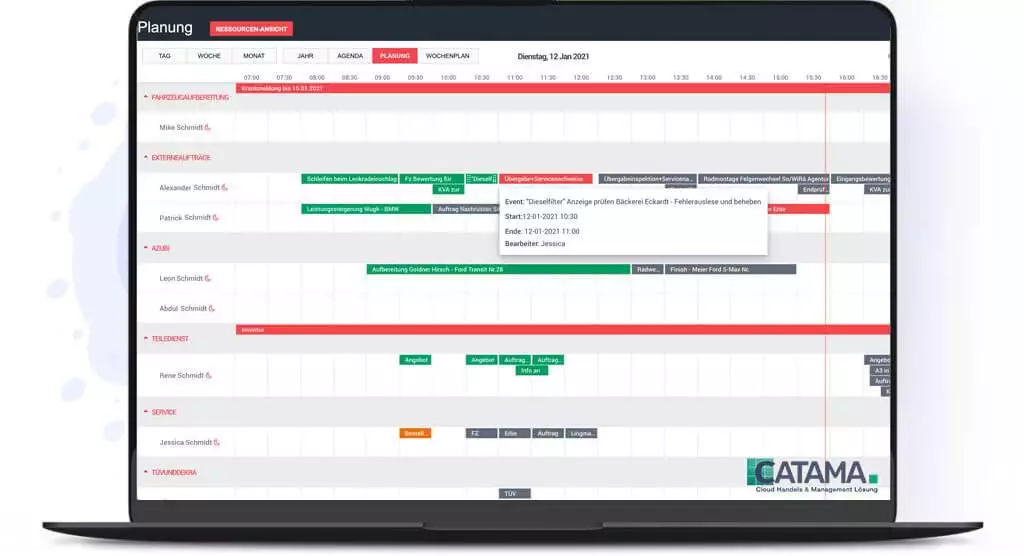
Imagine this: It’s Monday morning, 8:00 a.m. Your phone has already rung five times, three customers are waiting at the front desk, and your best mechanic has called in sick. At the same time, you need to figure out which lift is available, who is working on which vehicle, and whether Mr. Müller’s vehicle inspection appointment was today or tomorrow. Does this chaos sound familiar? This is exactly where modern workshop planning comes in—and this is exactly where CATAMA Software makes the decisive difference for auto repair shops in Germany, Austria, and Switzerland.
By 2026, digitizing workshop planning will no longer be a luxury, but a business necessity. While traditional planning methods using whiteboards, Excel spreadsheets, or paper lists are reaching their limits, CATAMA offers a comprehensive cloud-based solution that intelligently integrates all aspects of workshop planning.
Key Takeaways
- ✅ Real-time scheduling: CATAMA enables cloud-based workshop scheduling with instant synchronization for all employees—no more double bookings
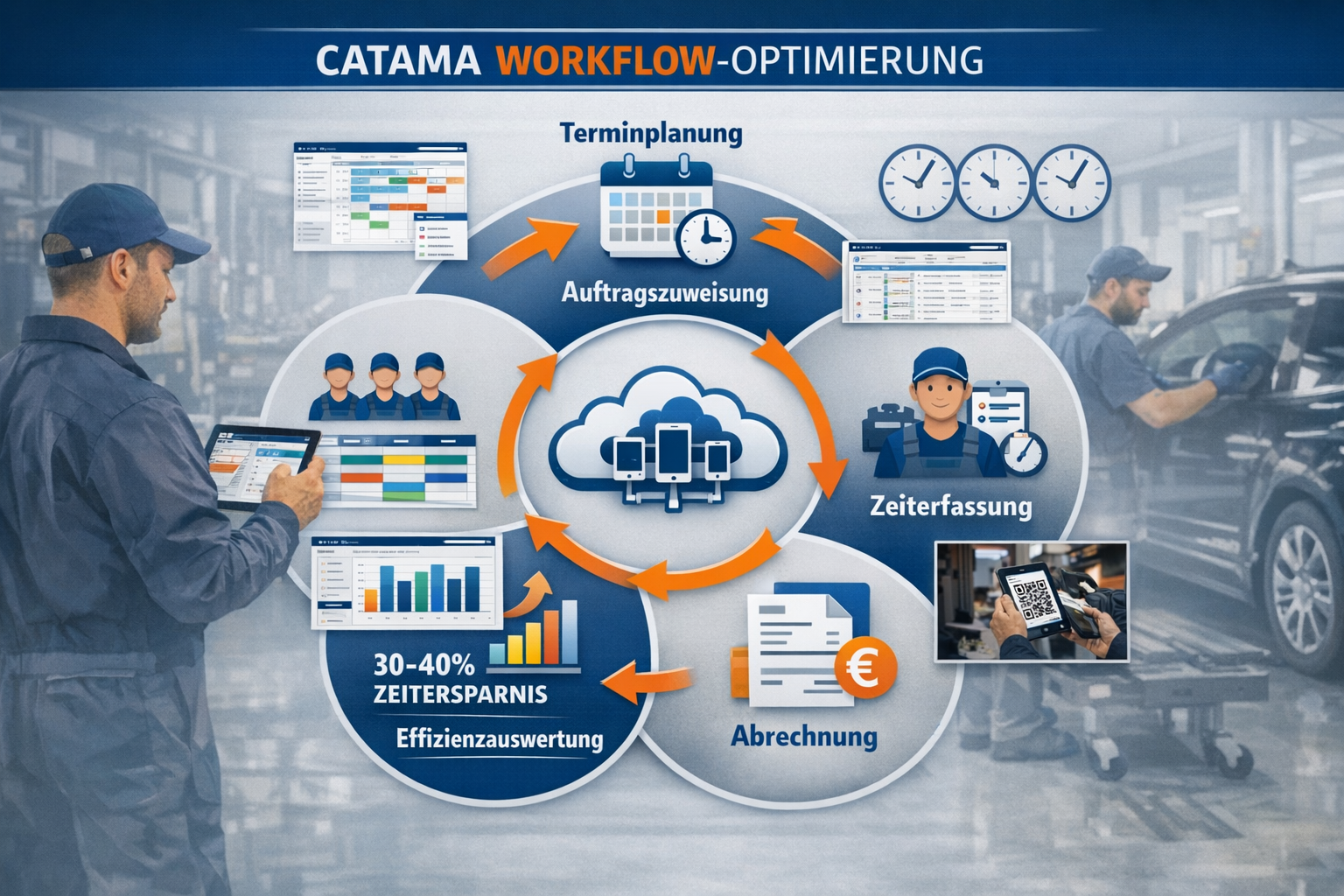
- ⏱️ 30–40% time savings: Automatic time slot scheduling, digital time tracking, and efficiency reports drastically reduce administrative workload
- 📊 Resource optimization: Intelligent allocation of mechanics, lifts, test benches, and loaner vehicles maximizes utilization
- 💰 Increased ROI: Direct time tracking against jobs, automatic billing, and employee performance reports improve profitability
- 🔄 Seamless integration: Full integration with invoicing, inventory management, Stakis 4.0, and other industry interfaces
Why Modern Workshop Planning Is Essential in 2026
The Challenges of Traditional Planning Methods
Today, auto repair shops face more complex challenges than ever before. The average shop juggles 15–25 jobs, 4–8 mechanics, multiple lifts, specialized tools, and increasingly demanding customer expectations on a daily basis. Traditional scheduling methods quickly reach their limits:
Common problems without digital workshop planning:
- 🔴 Double bookings of resources (lifts, special tools)
- 🔴 Inefficient utilization due to a lack of visibility
- 🔴 Time lost due to manual scheduling
- 🔴 Lack of transparency regarding employee workload
- 🔴 No traceability of time spent
- 🔴 Delayed billing due to missing time entries
A 2025 study shows that repair shops without digital planning software waste an average of 8–12 hours per week on administrative planning tasks alone—time that could be spent directly on productive repair work[7].
The Business Case for Digital Workshop Planning
Investing in professional workshop software like CATAMA pays for itself in just a few months. Let’s consider an average workshop with 5 mechanics:
| Key figure | Without CATAMA | With CATAMA | Savings |
|---|---|---|---|
| Planning time per week | 10 hours | 3 hours | 7 hours |
| Average utilization | 68% | 87% | +19% |
| Erroneous entries per month | 12–15 | 0–2 | ~13 |
| Delay in billing | 3–5 days | Immediately | 100% |
| Employee satisfaction | Medium | High | ↑ |
With an average hourly rate of €95, a 19% increase in utilization among 5 mechanics translates to over €3,500 in additional revenue per week—that’s over €180,000 in additional annual revenue.
The way automotive repair shops save time and money with CATAMA software is proven time and again in practice: Digitizing shop scheduling is not a cost center, but an investment with a measurable return on investment.
CATAMA Workshop Planner: Core Features for Maximum Efficiency
Smart assignment of tasks to employees and departments
The CATAMA Workshop Planner and Scheduler revolutionizes daily work organization through intelligent, rule-based job assignment. The system automatically takes the following into account:
Employee-specific factors:
- ✓ Qualifications and certifications (e.g., high-voltage certification)
- ✓ Specializations (engine technology, bodywork, electrical systems)
- ✓ Current utilization and available capacity
- ✓ Vacation planning and absences
- ✓ Break times and statutory working hours
Department-specific planning:
- ✓ Separate scheduling for the service shop, body shop, and tire service
- ✓ Resource allocation based on departmental capacity
- ✓ Overall coordination of complex projects
- ✓ Cross-departmental analyses
The new vacation planning feature for 2026 has been integrated directly into user settings, allowing for even more precise management of employee availability[1]. This automatically prevents tasks from being assigned to employees who are away.
Case Study: Müller GmbH, a repair shop in Nuremberg, reduced its turnaround times by 23% through intelligent job assignment. “I used to have to spend 30 minutes every morning figuring out who would get which job,” says shop manager Thomas Müller. “Now CATAMA suggests the optimal assignment—based on qualifications and current workload.”
Digital Time Tracking: Two Flexible Methods
CATAMA offers two proven time-tracking methods that integrate seamlessly into various workshop workflows[3]:
Method 1: Click-based time tracking
- Direct data entry for orders via tablet or desktop
- One-click start/stop function
- Automatic pause detection
- Ideal for workshops with fixed workstations
Method 2: QR Code Scanner Integration
- Scanning job-specific QR codes
- Mobile data collection directly at the vehicle
- Particularly suitable for large workshops
- Minimal time commitment for employees
The recorded times are posted to the jobs in real time and are immediately available for billing. This eliminates the problem of “forgotten work hours,” which costs many repair shops an average of 5–8% of their revenue[8].
Time Tracking Workflow in CATAMA:
- Employee starts time tracking (click or scan QR code)
- The system automatically posts time to the order
- In case of interruptions: Automatic pause detection
- Conclusion: Time is billed directly
- Analysis: Real-time comparison of actual vs. target values
Efficiency Assessment and Employee Analysis
A key competitive advantage of CATAMA workshop planning lies in its comprehensive reporting capabilities. The system provides detailed insights into:
Project vs. Time Tracking – The Target vs. Actual Comparison:
- Comparison of estimated time vs. actual time required
- Real-time detection of anomalies
- Basis for post-calculation and price adjustments
- Identifying training needs
Employee evaluations:
- Productivity per employee (billable vs. non-billable hours)
- Average processing times by order type
- Skills Gaps Identified Through Historical Comparisons
- Basics of Performance-Based Incentives
Efficiency Dashboards:
- Overall workshop utilization
- Resource utilization (lifts, test benches)
- Turnaround times by vehicle type
- Bottleneck analyses
These reports enable workshop managers to make data-driven decisions. CATAMA’s efficient automotive workshop ERP software provides all the key metrics needed for professional financial management.
Automatic time slot scheduling and appointment reminders
Automatic time slot scheduling is one of the most intelligent features of the CATAMA workshop scheduler. The system calculates the optimal time slots based on various parameters:
Factors considered in time slot planning:
- Estimated project duration (based on preliminary cost estimate)
- Available employees with the appropriate qualifications
- Portable lifts and specialty tools
- Appointments already booked
- Buffer time for unforeseen delays
- Company holidays and public holidays[3]
The improved appointment slot search feature in Update V26-2 makes it possible to identify available time slots even faster[6]. This allows workshop managers to find the next available appointment for a customer order in seconds.
Automatic appointment reminders:
- SMS or email notifications to customers
- Configurable lead times (e.g., 24 hours before the appointment)
- Reduction in no-shows by up to 75%
- Automatic reminders for service appointments
The new "Next Service" feature can now be entered and saved directly when creating an invoice[1], enabling seamless integration between billing and future scheduling.
Resource Planning: More Than Just Employees
Modern workshop planning involves not only coordinating staff, but also the comprehensive management of all operational resources. CATAMA offers comprehensive features for:
Lift Management:
- Real-time overview of available/occupied lifting platforms
- Automatic assignment based on vehicle type
- Maintenance intervals and inspection deadlines
- Utilization statistics
Test bench coordination:
- Scheduling vehicle inspection appointments
- Integration with testing organizations
- Capacity Planning for Vehicle Inspections
- Documentation and Archiving
Replacement Vehicle Management:
- Availability and booking status
- Automatic assignment for long-term orders
- Handover and Return Reports
- Documentation of damage
Break scheduling and compliance with working hours:
- Automatic accounting for statutory break times
- Scheduling in Compliance with the Working Hours Act
- Shift scheduling for multi-shift operations
- Overtime tracking
Comprehensive resource management with detailed real-time utilization displays[3] gives workshop managers a complete overview of all available capacity at all times.
Cloud-based real-time synchronization
A key advantage of CATAMA over on-premises solutions is its cloud-based architecture. All schedule changes are visible to all employees in real time[3]:
Advantages of the cloud solution:
- 🌐 Access from anywhere (office, workshop, home office)
- 🔄 Automatic synchronization without manual intervention
- 💾 Automatic backups – no data loss
- 🔐 Highest security standards (GDPR-compliant)
- 📱 Mobile use on tablets and smartphones
- ⚡ No IT infrastructure required
This cloud-based auto repair shop software enables teams to work in perfect coordination—even when the shop manager is visiting a customer on-site or a mechanic is out on a service call.
Integration into the entire workshop workflow
From scheduling a consultation to billing
The true strength of CATAMA workshop planning lies in its seamless integration with all other business processes. The entire workflow is mapped digitally:
1. Appointment Request and Booking
- The customer calls or uses the online appointment scheduling system
- The system displays available time slots based on the order description
- Automatic confirmation email with appointment reminder
- The appointment will appear immediately in the workshop scheduler
2. Order Creation and Preliminary Cost Estimation
- Digital order entry with vehicle data (OCR license plate scanner)
- Automatic cost estimation based on repair manuals
- Integration with Stakis 4.0, REPDOC, and WMKAT for spare part prices
- Quotation Preparation and Customer Approval
3. Workshop Planning and Assignment
- Automatic or manual assignment to qualified mechanics
- Reservation of resources (lift, tools)
- Drag-and-drop feature for flexible rescheduling
- Consideration of priorities and rush orders
4. Implementation and Time Tracking
- Mechanic starts time tracking for the job
- Real-time tracking of work progress
- Documentation of Additional Work
- Photographic documentation, if needed
5. Billing and Post-Audit
- Automatic transfer of recorded times to the invoice
- Target-Actual Comparison for Post-Calculation
- One-click invoicing
- DATEV Export for Accounting
The two new optional fields, “Time in the Workshop” and “Header Text,” in the Invoice and Quote Editor[1] enable even more detailed documentation and customer communication.
Interfaces to industry-specific systems
CATAMA is not a standalone solution, but integrates seamlessly into the existing IT infrastructure of automotive businesses:
Spare parts catalogs and suppliers:
- Stakis 4.0 integration for direct access to the Stahlgruber product range
- Partslink24 Interface for Spare Parts Procurement
- REPDOC and WMKAT for repair information
- Mercedes-Benz WebParts Shopping Cart Import
Accounting and Finance:
- DATEV Interface for Seamless Data Export
- E-invoicing functionality (XRechnung-compliant)
- Automatic account assignment and posting suggestions
- Open Item Management
Vehicle specifications and manufacturer:
- Manufacturers' Online Service Book Integration
- OCR technology for vehicle registration data capture
- KBA Vehicle Identification Database
- Mileage history in the CRM[6]
These comprehensive interfaces make CATAMA a true all-in-one solution that covers every aspect of workshop operations.
Mobile Access and Flexibility
Mobile usage will become increasingly important in 2026. CATAMA offers full functionality on all devices:
Tablet use in the workshop:
- Optimized interface for touchscreen operation
- Time tracking directly at the vehicle
- Photo documentation with built-in camera
- Access to repair manuals and schematics
Smartphone app for on the go:
- Schedule Overview for Workshop Managers
- Quick status checks
- Customer communication from überwegs
- Push notifications for important events
Full desktop version:
- Comprehensive administrative functions
- Detailed analyses and reports
- Configuration and System Settings
- Multi-monitor support for maximum visibility
Cancellation Management and Calendar Optimization
One often-overlooked but important feature is intelligent cancellation management. With the V26-4 update, a new automatic "Cancelled" status was introduced[1]:
Automatic cancellation logic:
- Appointments for canceled orders are automatically marked
- Appointments remain visible in the calendar (for tracking purposes)
- Automatic removal from active shop floor scheduling
- Release of reserved resources
- Historical traceability
In addition, a bug related to the recalculation of appointment durations during drag-and-drop operations in the calendar has been fixed[1], further improving planning accuracy.
The improved integration of customer and vehicle information in the calendar[1] makes it possible to see all relevant information at a glance—without having to switch between different views.
Pricing Models and Return on Investment
CATAMA Editions at a Glance 2026
CATAMA offers various editions tailored to businesses of different sizes. According to the current 2026 pricing information, all editions include automatic updates at no additional cost[5]:
CATAMA Professional Suite
- For established repair shops (8–15 employees)
- Comprehensive workshop planning
- Departmental Planning
- Advanced Interfaces
- Starting at €99/month
CATAMA Enterprise Suite
- For auto repair chains and large businesses
- Unlimited employees
- Multi-location management
- Customizations
- Customized pricing
- Starting at €139/month
CATAMA Unlimited
- Customized turnkey solution
- Dedicated Support
- Customized solutions
- Premium Service Level
- Upon request
Detailed information on all CATAMA editions and prices can be found on the official product page.
ROI Calculation: When Does CATAMA Pay Off?
Investing in professional workshop software typically pays for itself within 3–6 months. Let’s look at a specific example:
Sample Workshop:
- 6 mechanics
- Average hourly rate: €95
- Current capacity utilization: 70%
- CATAMA Professional Suite: €149/month
Cost savings and additional revenue:
| Area | Improvement | Monthly value |
|---|---|---|
| Increase in capacity utilization (+12%) | 96 additional billable hours | +9.120€ |
| Reduced planning time | 28 hours saved per month | +2.660€ |
| Avoided posting errors | 8 appointments per month | +1.520€ |
| Faster billing | 2 days earlier | +800€ |
| Total added value | +14.100€ | |
| Excluding CATAMA costs | -149€ | |
| Net profit | +€13,951/month |
Even using a conservative estimate of just 50% of these figures, the result is a monthly increase in value of nearly €7,000—which corresponds to an ROI of over 4,600%.
Free trial and onboarding
CATAMA offers a free trial so you can evaluate the software risk-free:
Benefits of the trial period:
- ✅ 14 days of full functionality
- ✅ No credit card required
- ✅ Personalized introduction by the support team
- ✅ Inventory data can be imported
- ✅ Customized training for employees
The onboarding process is structured and practical:
- Days 1–2: System Configuration and Basic Settings
- Days 3–5: Staffing and Resource Allocation
- Days 6–8: Employee training
- Days 9–12: Parallel operation with the old system
- Days 13–14: Complete migration
Compliance and Data Security
GDPR Compliance and Data Protection
As a German software solution, CATAMA complies with the requirements of the General Data Protection Regulation:
Privacy features:
- 🔒 Server location in Germany
- 🔒 End-to-end encryption
- 🔒 Role-based access rights
- 🔒 Audit logs for traceability
- 🔒 Data Protection Impact Assessment conducted
All details can be found in CATAMA's Privacy Policy.
Industry-Specific Compliance
Automotive repair shops are subject to specific legal requirements, which CATAMA takes into account:
Record-keeping requirements:
- Documentation of salvaged parts
- Archiving of workshop orders (6 years)
- Invoice Archiving (10 years)
- Warranty and Liability Documentation
Working Hours Act:
- Automatic pause control
- Monitoring of maximum working hours
- Compliance with Rest Periods
- Documentary on Sunday Work
Environmental regulations:
- Used Oil Documentation
- Hazardous Materials Management
- Archiving of Waste Disposal Records
This industry-specific software for auto repair shops ensures that all legal requirements are met automatically.
Real-world examples: Success stories from the industry
Case Study 1: Mid-sized Workshop Increases Capacity Utilization by 28%
Initial Situation:
Auto-Service Schmidt in Hamburg operates a repair shop with 8 mechanics and was struggling with inefficient scheduling. Appointments were managed in an Excel spreadsheet, and time tracking was done on paper slips.
Challenges:
- Average occupancy rate of only 65%
- 15–20 duplicate bookings per month
- Invoicing was delayed by 5–7 days
- Lack of transparency regarding employee productivity
CATAMA Implementation:
Following a two-week rollout, the CATAMA Professional Suite has been fully implemented.
Results after 6 months:
- ✅ Capacity utilization rose to 93%
- ✅ Duplicate bookings are virtually eliminated
- ✅ Invoices are issued the same day
- ✅ Lead time per order reduced by 18%
- ✅ Customer satisfaction (NPS) rose from 42 to 68
Managing Director Thomas Schmidt: “The investment paid for itself in just four months. The time savings are particularly impressive—I now spend 90% less time on planning tasks and can focus on strategic issues.”
Case Study 2: Auto Repair Chain Optimizes Multi-Location Operations
Initial Situation:
The AutoPro Group operates 5 repair shops in southern Germany with a total of 35 employees. Each location used different systems, making centralized management impossible.
Challenges:
- No cross-site resource planning
- Different processes at each location
- No consolidated reports
- Challenges in Staffing Planning During Sick Leave
CATAMA Implementation:
Phased rollout of the CATAMA Enterprise Suite across all 5 locations over a 3-month period.
Results after 12 months:
- ✅ Centralized planning and management of all locations
- ✅ Flexible workforce scheduling across locations
- ✅ Consolidated key figures and benchmarking
- ✅ 22% reduction in administrative costs
- ✅ Consistent processes and quality standards
Future-proof technology for 2026 and beyond
Continuous improvement
CATAMA is constantly evolving. Its regular updates demonstrate its commitment to innovation:
Recent Developments (V26-4):
- Integration of Vacation Planning 2026
- Advanced invoice and quote fields
- Improved Cancellation Management
- Improved calendar functionality
Planned features for 2026:
- AI-powered scheduling optimization
- Predictive Maintenance Integration
- Advanced mobile app features
- Automatic Capacity Planning
The fact that updates are included by default[5] means that repair shops automatically benefit from all new features—without any additional costs or manual upgrade processes.
Future Trends in Workshop Planning
Works hop planning is evolving rapidly. CATAMA is helping workshops prepare for future demands:
Electric mobility:
- Special time slots for high-voltage work
- Qualification Tracking for Electric Vehicle Certifications
- Charging Infrastructure Management
- Battery Diagnostics Integration
Artificial Intelligence:
- Automatic order duration forecasts based on historical data
- Predictive Analytics for Capacity Planning
- Smart appointment suggestions
- Anomaly Detection for Time Deviations
Customer self-service:
- Online appointment scheduling with real-time availability
- Transparent status updates during the repair
- Digital Vehicle Handover
- Automatic service reminders
Sustainability:
- CO2 tracking per order
- Optimization for minimal empty runs
- Resource efficiency indicators
- Sustainability Reporting
Frequently Asked Questions About CATAMA Workshop Planning
How long does it take to implement CATAMA?
The basic implementation typically takes 1–2 weeks. For more complex scenarios involving customizations, you should plan for 3–4 weeks. Parallel operation with existing systems is possible.
Can data be imported from other systems?
Yes, CATAMA offers import functions for common file formats (CSV, Excel). The support team can assist with data migration from legacy systems.
Is employee training required?
Basic training (2–4 hours) is recommended. However, the intuitive user interface makes it easy to get up to speed quickly. Video tutorials and documentation are available.
How secure is my data?
CATAMA uses German servers that meet the highest security standards. Daily backups, encryption, and GDPR compliance are guaranteed.
Can I customize CATAMA to fit my specific processes?
Yes, CATAMA offers extensive customization options, such as those available in the Unlimited version. In addition, the Form Builder Tool allows you to create custom forms and workflows.
What are the hardware requirements?
As cloud-based software, CATAMA runs on any modern browser (Chrome, Firefox, Safari, Edge). We recommend tablets for workshop use and desktop PCs for administrative tasks.
Are there any contract commitments?
CATAMA offers flexible terms. Most plans allow for monthly cancellation. Details can be found on the product page.
Comparison: CATAMA vs. Traditional Planning Methods
| Criterion | Paper/Whiteboard | Excel/Spreadsheets | CATAMA |
|---|---|---|---|
| Real-time updates | ❌ No | ⚠️ Manual | ✅ Automatic |
| Resource Planning | ❌ Very limited | ⚠️ Time-consuming | ✅ Automatic |
| Time tracking | ❌ Piece of paper | ⚠️ Late submission | ✅ Digital & direct |
| Reports | ❌ Not possible | ⚠️ Create manually | ✅ Automatic |
| Mobility | ❌ In-store only | ⚠️ Limited | ✅ Available everywhere |
| Error rate | 🔴 High | 🟡 Medium | 🟢 Very low |
| Scalability | ❌ Limited | ⚠️ Time-consuming | ✅ Unlimited |
| Costs | € Low | € Low | €€ Funds |
| ROI | – | – | 🚀 Very high |
Conclusion: Workshop Planning as a Competitive Advantage
By 2026, digital workshop planning with CATAMA will no longer be a luxury, but a business necessity for successful auto repair shops. The benefits are measurable and significant:
Summary of key benefits:
✅ Increased efficiency: 30–40% time savings on planning tasks
✅ Increased revenue: Up to 28% higher capacity utilization through optimized planning
✅ Cost reduction: Reduction in administrative workload by up to 60%
✅ Quality improvement: Error rate drops drastically thanks to digital processes
✅ Employee satisfaction: Clear structures and fair work distribution
✅ Customer satisfaction: On-time appointments and transparent communication
✅ Future-proof: Continuous updates and further development
The CATAMA Software Suite offers not only workshop scheduling, but also an integrated, comprehensive solution for all aspects of automotive operations—from inventory management and invoicing to comprehensive management.
Next Steps: How to Get Started with CATAMA
Step 1: Schedule a free demo
Take advantage of the free trial to get to know CATAMA with no obligation. The support team will walk you through all the features.
Step 2: Conduct a needs analysis
Analyze your current planning processes and identify the biggest pain points. CATAMA experts will help you optimize them.
Step 3: Select the Right Edition
Based on the size of your business and your requirements, select the optimal CATAMA edition. Upgrades are available at any time.
Step 4: Plan the implementation
Establish a timeline for the rollout. A structured onboarding process minimizes disruption to ongoing operations.
Step 5: Train your team
Invest in training your employees. The software’s full potential can only be realized if your team uses it effectively.
Step 6: Measure Success
Define KPIs (capacity utilization, turnaround time, customer satisfaction) and regularly track improvements.
Final Thoughts
In an increasingly digital world, professional workshop planning is the key to success. Workshops that invest in modern software today will secure a decisive competitive advantage for years to come.
CATAMA offers not just a software tool, but a platform for continuous process optimization. With regular updates, comprehensive support, and a clear vision for the future of the automotive industry, CATAMA is the ideal partner for forward-thinking auto repair shops.
The question is no longer whether you should go digital—but when you should start. Every day spent dealing with inefficient planning processes costs money, time, and patience. Take this opportunity to take your business to the next level.
Contact the CATAMA team today via the official contact page and get started on your digital transformation. Your shop, your employees, and your customers will thank you for it.
