
Does this sound familiar? A customer is waiting for their vehicle to be repaired, and just when you need it most, the required replacement part is missing—even though you were sure you still had it in stock. Or worse yet: During inventory, you discover that thousands of euros’ worth of unused parts are gathering dust on the shelves. Situations like these aren’t just frustrating—they cost you money. A professional workshop inventory management system will no longer be a luxury option in 2026, but an absolute necessity for any automotive business that wants to remain competitive. The good news: With the right systems and processes, you can put an end to inventory chaos once and for all—while simultaneously increasing profitability.
Key Takeaways
- ✅ Transparency leads to better control: A digital inventory management system gives you a real-time overview of stock levels, minimum quantities, and storage costs
- 💰 Save money through optimization: Reduce excess inventory by up to 30% and avoid costly rush orders
- 🔄 Automation saves time: Automatic order suggestions and supplier integration reduce administrative workload by up to 60%[4]
- 📊 Data-driven decisions: Analyses of margins, inventory turnover, and profitability reveal which parts are truly profitable
- 🔗 Seamless integration: Linking parts to orders and invoices eliminates sources of error and speeds up processes
Why Inventory Management Is So Important in the Workshop

The days of ordering spare parts “on a hunch” are long gone. In a modern auto repair shop, inventory often accounts for 20–30% of tied-up capital. Without systematic monitoring, several problems can arise:
Dead stock ties up capital that could be used elsewhere. Parts that are never installed gather dust on the shelves and lose value. At the same time, stockouts lead to delays, dissatisfied customers, and expensive express deliveries. The result: declining customer satisfaction and shrinking margins.
On top of that, there’s the administrative burden: without digital support, employees spend hours checking inventory, placing orders, and reconciling delivery notes. That’s time that’s not spent in the workshop—and it costs you money.
The Hidden Costs of Warehouse Chaos
Many garage owners underestimate how much money is lost due to inefficient inventory management:
- Excess inventory: Too many parts tie up capital and incur storage costs
- Waste and Deterioration: Oils and lubricants have an expiration date; seals become brittle
- Time spent searching: Employees spend up to 30 minutes a day looking for parts
- Incorrect orders: Without a system in place, parts are ordered twice or the wrong variants are ordered
- Missed discounts: Unplanned individual orders cost more than strategic bulk orders
A professional automotive inventory management system systematically solves all these problems and usually pays for itself within the first year.
The Basics of Effective Inventory Management Workshop
An effective inventory management system is based on three pillars: transparency, automation, and integration. Let’s take a look at what that means in practice.
Inventory Management: The Foundation of Everything
Without knowing what’s actually in stock, you can’t make informed decisions. A modern inventory management system tracks:
- Product master data: Part number, Manufacturer, Supplier, Purchase price, Selling price
- Storage locations: Where exactly is each part located? (Shelf, compartment, level)
- Quantities: Current stock, reserved quantities, available quantity
- Transfers: When were items added or removed?
- Batch numbers and expiration dates: Especially important for oils and chemicals
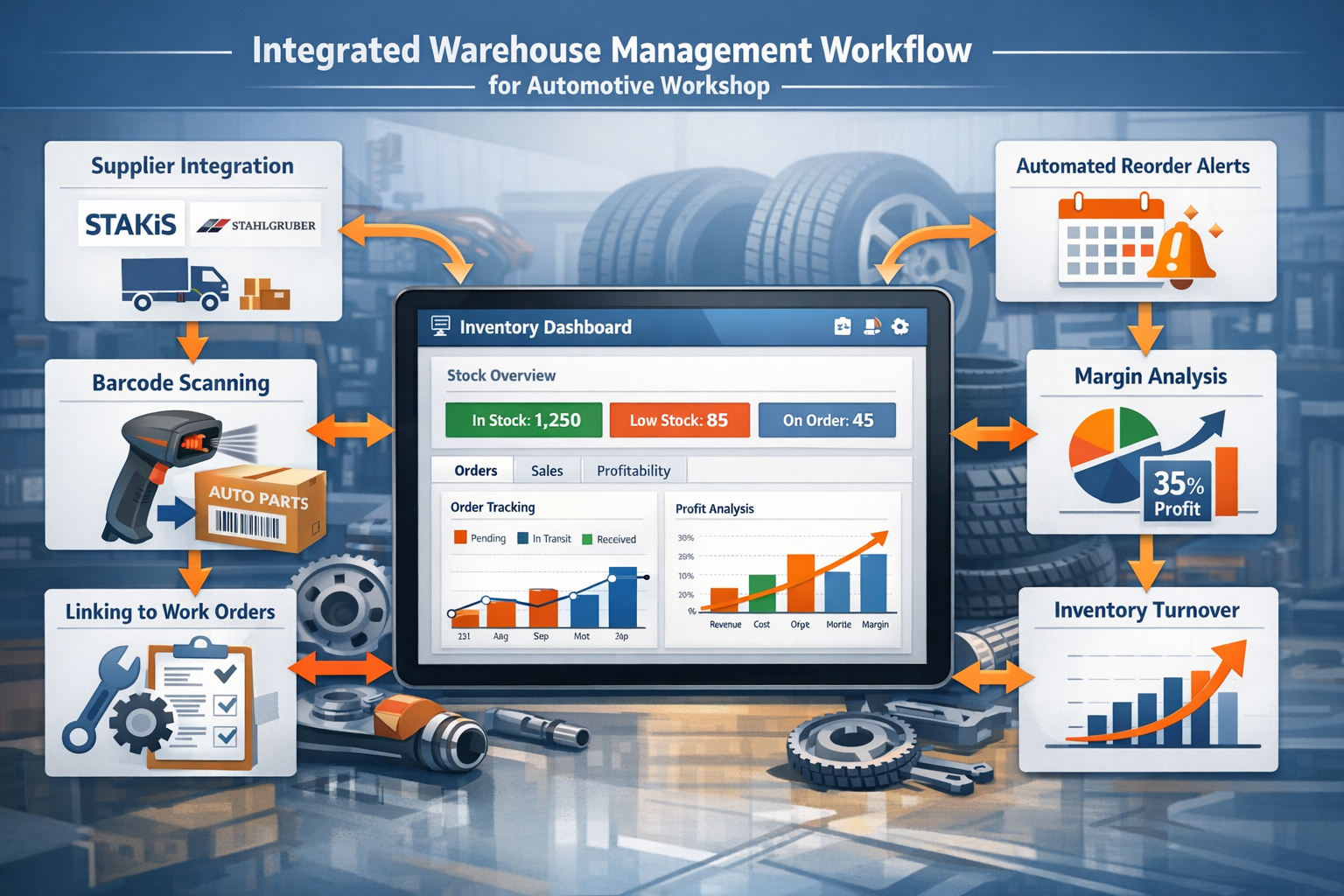
Modern systems utilize barcode scanners[5], which significantly speed up the receipt and removal of goods and minimize errors. One scan—and the item is recorded in the system, assigned to the correct order, and removed from inventory.
Set minimum and reorder levels intelligently
This is where the wheat is separated from the chaff: Setting minimum inventory levels too high ties up capital unnecessarily. Setting them too low risks supply shortages. The solution lies in data-driven analysis:
| Part Type | Recommended minimum balance | Reasoning |
|---|---|---|
| High-turnover items (oil filters, brake pads) | Enough for 2–3 weeks | Frequent use, predictable demand |
| Seasonal parts (air conditioning components) | Stock up before the season starts | Avoiding delivery bottlenecks during peak periods |
| Low-speed rotors (special parts) | Available by special order only | Avoid tying up capital |
| Oils and operating fluids | 1 month's supply | Please note the expiration date |
Modern inventory management systems analyze your usage history and automatically suggest optimal minimum stock levels [5]. The system continuously learns: If an item is needed more frequently, the minimum stock level adjusts automatically.
Inventory: From Nightmare to Routine
For many workshops, the annual inventory is a dreaded event. Hours or even days are spent counting every item and reconciling it with the system. With digital support , this becomes a quick and accurate routine:
Continuous inventory: Instead of counting everything once a year, areas are inventoried on a rotating basis. A different shelf is inventoried each month—this spreads the workload throughout the year.
Mobile data entry: Using tablets and scanners, employees walk through the aisles, scan barcodes, and enter quantities. The system immediately reconciles the data and highlights any discrepancies.
Inventory sampling: High-value A-parts are checked more frequently than low-cost C-parts—in accordance with the Pareto principle.
The software for recording incoming goods and inventory not only speeds up the process but also makes it more accurate. Discrepancies are immediately visible and can be resolved right away.
Supplier Integration: The Boost for Your Workshop Inventory Management
The true strength of a modern inventory management system lies in its seamless integration with suppliers. Instead of manually placing orders, checking availability by phone, or comparing prices, the system handles these tasks automatically.
Automatic order suggestions
If the stock level of an item falls below the minimum threshold, the system generates a purchase order proposal[5]. You review the list, adjust quantities as needed, and place the order with a single click. The order is sent directly to the supplier electronically—no more phone calls, faxes, or emails are needed.
Particularly convenient: The system takes the following into account:
- Delivery times: Parts with longer lead times will be reordered sooner
- Minimum order quantities: Automatic adjustment to supplier requirements
- Volume pricing: The system recommends the most cost-effective order quantity
- Open orders: Parts that have already been reserved are included in the calculation
Integration with Stakis, Stahlgruber & Co.
Major parts wholesalers offer electronic interfaces that can be integrated directly into your inventory management system. CATAMA software, with interfaces for Stakis & Stahlgruber, enables:
- Real-time availability check: See immediately whether a part is in stock
- Current prices: No more outdated catalog prices
- Electronic ordering: One click—and the order is sent to the supplier
- Automatic delivery note reconciliation: Delivered parts are automatically posted
- Invoice matching: The system checks whether the delivery note and invoice match
This automation not only saves time but also drastically reduces the likelihood of errors. No more transposed digits in part numbers, no forgotten orders, and no price discrepancies between the order and the invoice.
Supplier Evaluation and Optimization
Over time, your system collects valuable data about your suppliers:
- On-time delivery: How often do parts arrive on time?
- Completeness: How often are ordered items missing?
- Price trends: Which supplier offers the best prices?
- Return rate: How often do you have to send parts back?
These analyses will help you identify the best suppliers and continuously optimize your procurement strategy. You may find that a supplier who seems cheaper at first glance ends up being more expensive than a more reliable competitor due to frequent delivery errors.
From Order to Invoice: Integration Is Key
You can save the most time and minimize errors by seamlessly integrating all processes. A typical process typically goes through the following stages:
1. Identifying needs and placing orders
A mechanic creates a quote or work order and adds the necessary parts. The system:
- Automatically checks inventory levels
- Reserve available parts for this order
- Creates purchase order proposals for missing parts
- Displays alternative parts or suppliers
2. Goods Receipt and Putaway
The ordered parts arrive. The delivery slip is scanned:
- Parts are automatically assigned to the order
- The inventory is being updated
- The purchase price is recorded
- The storage location is documented
3. Extraction and Installation
The mechanic removes the part from the storage area:
- Scanning the barcode removes the item from inventory
- Automatic assignment to the order
- The sales price is taken from the master record
- The margin is calculated automatically
4. Billing
All items are already included in the invoice:
- No more manual entry required
- Accurate prices guaranteed
- Complete documentation for warranty claims
- Automatic transfer to accounting
This seamless integration eliminates data silos and the associated sources of error. Each item is entered only once—all subsequent steps are automated. This not only saves time but also ensures data consistency across all departments.
This industry-specific software for auto repair shops takes into account all the unique aspects of the industry—from linking to vehicle data to automatically applying manufacturer specifications.
Insights: Numbers That Can Transform Your Business 📊
An inventory management system is only as good as the insights you gain from it. Modern systems offer comprehensive analytics and reporting features[5] that go far beyond simple inventory lists.
Profit Margin Analysis: What Are Your Actual Earnings?
Many repair shops know their average profit margin—but do you know which specific parts are particularly profitable? A detailed profit margin analysis shows:
- High-margin items: Which products should you actively promote?
- Low-margin items: Where can you adjust prices or find cheaper suppliers?
- Margin trends: Are margins declining in certain areas? Why?
- Comparison of Purchase Price vs. Selling Price: Are all price changes from suppliers passed on?
Practical tip: Many repair shops find that they make very little profit on standard parts like oil filters, while specialty parts are significantly more profitable. This insight allows for targeted price adjustments.
Inventory Turnover: How quickly is your capital turning over?
Inventory turnover shows how many times your inventory is replaced each year. A high turnover rate means that capital is not tied up for long. Low figures indicate dead stock.
Formula: Inventory turnover = Annual cost of goods sold ÷ Average inventory
For auto repair shops, a healthy inventory turnover rate is 4–6 times per year. This means that, on average, each part remains in stock for 2–3 months before it is sold.
Your inventory management system can calculate the inventory turnover for each item individually and shows you:
- Fast-moving items: You should always keep these parts in stock
- Slow-moving inventory: Here's how you can reduce your inventory
- Slow-moving inventory: You should sell these items and stop stocking them in the future
ABC Analysis: Focusing on the Essentials
The ABC analysis categorizes your items by value:
- A-grade items (approx. 20% of the items, 80% of the value): High-quality items that deserve special attention
- B-parts (approx. 30% of items, 15% of value): Medium priority
- C-parts (approx. 50% of items, 5% of value): Low-cost small parts that tie up little capital
This categorization helps with prioritization:
- A-items: Close inventory monitoring, accurate inventory counts, optimal suppliers
- Class B parts: Standard processes, regular inspections
- C-parts: Simplified ordering processes, higher minimum stock levels (to reduce the effort involved in ordering)
Seasonal Analyses
Your system detects seasonal patterns:
- Demand for air conditioning components rises in the spring
- More lighting fixtures are needed in the fall
- As winter approaches, demand for batteries and antifreeze rises
These insights enable proactive planning: You can build up inventory in advance, before demand rises and suppliers become overwhelmed.
Special Case: Tire Management and Other Storage Areas
In addition to spare parts, many workshops have other storage areas with specific requirements.
Tire Storage: More Than Just Stacking
The tire management and inventory software must offer specific features:
- Inventory Management: Where is each set of tires located? (Shelf, Level, Position)
- Customer assignment: Stored customer tires must be clearly assigned
- Tread Depth Measurement: Documentation Upon Receipt and Shipment
- Seasonal Reminders: Automatic Notifications to Customers About Tire Changes
- Storage Fees: Automatic Calculation and Billing
A well-organized tire warehouse not only saves time when searching for tires, but also generates additional revenue through storage fees and helps build customer loyalty.
Oils and operating fluids
When dealing with oils, coolants, and other fluids, there are specific considerations to keep in mind:
- Batch Management: Which batch was delivered and when?
- Expiration dates: Timely warning before expiration
- Container sizes: Management of drums, pails, and small containers
- Environmental regulations: Documentation for government agencies
Small parts and consumables
Screws, clips, gaskets—these small parts may not seem like much on their own, but they add up:
- Simplified inventory management: Often, specifying quantities in units (pieces, meters, kilograms) is sufficient
- Bulk orders: Small items are ordered in bulk to meet minimum order quantities
- Flat-rate pricing: Instead of charging for each screw individually, many repair shops use flat rates
Practical Implementation: How to Get Started with Digital Inventory Management
The idea of implementing an inventory management system can seem overwhelming. But with the right approach, the transition is easier than you might think.
Step 1: Assessment
Before you get started, you should know where you stand:
- How many items do you have in stock? (An estimate will do for now.)
- How is your warehouse organized? (Are there already designated areas, shelves, or compartments?)
- Which suppliers do you mainly use?
- How do the processes currently work? (Who places the order? Who checks in? Who checks out?)
Step 2: Set up master data
The quality of your inventory management system depends entirely on your master data. For each item, you should record:
- Item number (in-house and/or manufacturer's number)
- Name
- Main supplier
- Purchase price
- Selling price
- Minimum stock
- Storage location
Tip: Don’t start with all your items at once. Begin with your fast-moving items —the 20% of your inventory that accounts for 80% of your sales. These will provide the quickest return on investment.
Step 3: Define processes
Set clear rules:
- Who is allowed to remove parts? (All mechanics, or only certain people?)
- How are withdrawals documented? (Scanner, manual entry, withdrawal slip?)
- Who is responsible for orders?
- How often is inventory taken?
Clear processes prevent chaos and ensure that the system remains up to date.
Step 4: Train employees
Even the best software is useless if employees don't use it or use it incorrectly. Invest time in thorough training:
- Why is inventory management important? (Motivating employees)
- How does the system work? (Practical exercises)
- What do I need to keep in mind in my daily routine? (Standard procedures)
- Who should I contact if I have any problems? (Support)
Appoint an inventory management administrator to serve as the point of contact and maintain the system.
Step 5: Continuous Optimization
Once you’ve launched, it’s time to optimize. Use your system’s analytics to continuously improve:
- Adjust minimum stock levels to match actual demand
- Optimize supplier relationships based on data
- Identify slow-moving items and clear them out
- Check again if errors occur repeatedly
This efficient auto repair shop ERP software scales with your needs and can be expanded in stages.
Common pitfalls and how to avoid them
When implementing an inventory management system, there are a few common mistakes you should avoid:
❌ Error 1: Incomplete master data
Problem: Items are created, but important fields remain empty (e.g., minimum stock, storage location).
Solution: Define required fields and regularly check data quality. Use import functions to import master data from suppliers.
❌ Mistake 2: Lack of discipline when booking
Problem: Parts are being removed but not written off. The system shows inventory levels that do not reflect reality.
Solution: Make the booking process as simple as possible (use a scanner!) and establish clear procedures. Regular spot checks will show whether the system matches reality.
❌ Mistake 3: Structures that are too complex
Problem: Too many storage locations and overly detailed categorizations—the system is becoming confusing.
Solution: Start small and expand gradually. It’s better to have a simple system that’s used consistently than a perfect system that nobody understands.
❌ Mistake 4: No integration with other systems
Problem: The inventory management system operates in isolation, and data must be manually transferred to other systems.
Solution: Choose an integrated solution that combines inventory management, order processing, and invoicing.
❌ Mistake 5: Unrealistic expectations
Problem: People expect the system to run perfectly from day one.
Solution: Plan for an implementation phase of 3–6 months during which processes will be optimized and data will be cleaned up. Perfection comes with time.
The Future: Trends in Merchandise Management Workshop
Digitalization is advancing, and modern inventory management systems are constantly evolving. Here are some trends that will already be a reality by 2026[4][5]:
🤖 Artificial Intelligence and Predictive Analytics
AI-powered systems analyze your historical data and make predictions:
- What parts will be needed in the coming weeks?
- When can we expect delivery delays?
- What price changes can we expect?
These forecasts enable even more precise ordering and reduce both overstocking and understocking.
☁️ Cloud-based systems
Cloud solutions offer significant advantages[8]:
- Access from anywhere: Check inventory even when you're on the go
- Automatic updates: Always the latest version, without manual installation
- Scalability: Grows with your business
- Data Security: Professional Data Centers with Backup Strategies
📱 Mobile Solutions
Tablets and smartphones are becoming full-fledged work tools:
- Mechanics order parts right at the vehicle
- Warehouse staff use mobile devices to record incoming goods
- Inventories are conducted using a smartphone
🔗 IoT and automatic inventory tracking
Smart shelves and scales automatically track inventory:
- Sensors trigger an alert when stock falls below a minimum level
- Automatic reordering without manual intervention
- Real-time visibility into all inventory levels
These technologies are still a long way off for smaller businesses, but they are becoming increasingly affordable.
Conclusion: Workshop Inventory Management as a Key to Success
By 2026, a professional workshop inventory management system will no longer be a nice-to-have, but a fundamental prerequisite for business success. The benefits are clear:
✅ Transparency: You always know what’s in stock, what’s missing, and what’s in excess
✅ Cost reduction: Fewer dead stock items, fewer rush orders, less time spent searching
✅ Time savings: Automation reduces administrative workload by up to 60%[4]
✅ Better decisions: Data-driven analyses identify areas for improvement
✅ Happier customers: Faster repairs thanks to readily available parts
In most cases, the investment in a modern inventory management system pays for itself within the first year—as our ROI calculator shows. The ongoing savings from optimized processes and reduced inventory costs far exceed the cost of the software.
Next Steps: What to Do Next
If you are now convinced that your workshop would benefit from a digital inventory management system, we recommend the following steps:
- Analyze your current situation: Use the ROI calculator above to determine your potential savings
- Define your requirements: What is particularly important to you? Supplier integration? Mobile data entry? Comprehensive reports?
- Compare solutions: Take a look at different systems. Pay attention to industry-specific features and integration with other workshop processes
- Try it for free: Most providers offer trial periods—take advantage of them to test the system in everyday use
- Start small: Begin with the most important parts and expand gradually
- Train your team: Invest time in thorough onboarding—it pays off
Digitizing your inventory management is a crucial step toward creating a modern, efficient workshop. Investing in this today ensures a clear competitive advantage for the future. This puts an end to inventory chaos once and for all—and allows you to focus on what really matters: providing excellent service to your customers.
References
[1] Market for Automotive Workshop Equipment 115116 – https://www.fortunebusinessinsights.com/de/markt-f-r-kfz-werkstattausr-stung-115116
[2] Workshop Optimization 2026: How to Save Up to 30% of Your Time with the Right Equipment – https://www.opti.de/de/c/werkstattoptimierung-2026-wie-sie-mit-der-richtigen-ausstattung-bis-zu-30-zeit-sparen.75688
[3] Process Optimization 2026 – https://www.digitalesautohaus.de/blog/aktuelles/prozessoptimierung-2026/
[4] The Workshop Planner for Auto Repair Shops: Efficient Workshop Planning in 2026 – https://www.catama-software.de/features/der-werkstattplaner-fuer-kfz-werkstaetten-effiziente-werkstattplanung-im-jahr-2026/
[5] The #1 Enterprise Software for Automotive Repair Shops and Dealerships: Digitalization for Maximum Efficiency – https://www.catama-software.de/ratgeber/die-1-enterprise-software-f
